

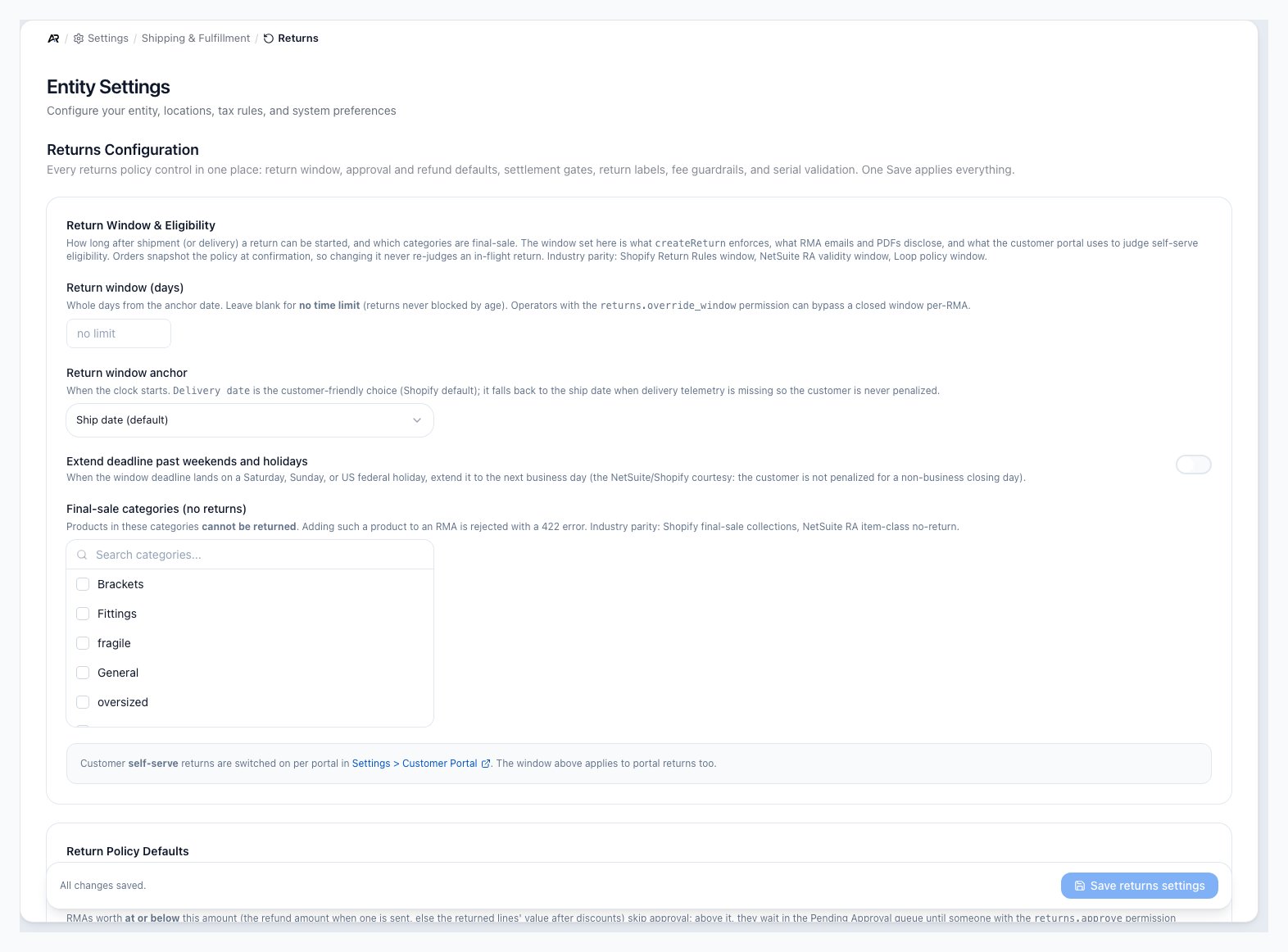
The Returns screen in Settings.
Before You Start
- You need the settings.view permission to open the page.
- You need settings.edit (Edit Settings) to save. The controls show for everyone who can open the page, but without settings.edit the save is refused with “Failed to save: Permission denied: settings.edit”.
- Product categories should already exist if you plan to mark final-sale categories or route categories to vendor returns.
- Return fee rates themselves are rules on Settings > Products & Pricing > Adjustments & Coupons. This page only holds the company-wide limits on them.
Open Returns Settings
- In the deck, open Settings.
- Under Shipping & Fulfillment, choose Returns.
Save Your Changes
Change any fields on the page, then click Save returns settings in the bar at the bottom. The bar stays in view as you scroll and tells you where you are:- “You have unsaved changes.” when something changed.
- “Fix the highlighted fields to save.” when a field is out of range. The button is disabled with “Fix the highlighted fields first”.
- “All changes saved.” when nothing is waiting. The button is disabled with “No changes to save”.
Return Window And Eligibility
- Return window (days): how many whole days after the anchor date a return can be started. Leave it blank for no time limit. Someone with the returns.override_window (Override Return Window) permission can still open a return past a closed window, one RMA at a time.
- Return window anchor: when the clock starts. Ship date (default), or Delivery date (falls back to ship date when delivery is unknown), so a customer is never penalized for missing delivery tracking.
- Extend deadline past weekends and holidays: off by default. When a deadline lands on a Saturday, Sunday or US federal holiday, it moves to the next business day.
- Final-sale categories (no returns): products in these categories cannot be returned. Adding one to an RMA is refused. Pick categories with the search picker.
Return Policy Defaults
- Auto-approve under $: a return worth this amount or less (the refund amount when one is set, otherwise the returned lines’ value after discounts) skips approval. A return worth more waits in the Pending Approval queue until someone with the returns.approve (Approve Returns) permission approves it. Leave it blank, or enter 0, and no return waits for approval. A warranty replacement that refunds nothing never waits.
- Auto-void stale authorized RMAs after (days): off when blank, which is the default. When set to 1 to 3650 days, a nightly sweep voids any authorized or expected return with nothing received once it is older than that, because the customer never sent the goods back. Voiding reverses everything the return did and releases the authorization; a voided return can be un-voided if the goods arrive later. Migrated historical returns are never auto-voided.
- Default refund method: Auto (decide later), Cash Refund, Credit Memo or Store Credit. It is used only when a return arrives without a refund method: a customer portal return request, an eBay return import, or an API call that leaves it out. The method is fixed on the return when it is created. The Create RMA screen does not use this default, because staff choose the outcome there. Auto lets the settlement choose from the order’s payment state when the return closes.
- Default disposition after inspection: pre-fills each line in the Disposition Items dialog: No default (require operator pick), Restock to original location, Write off (damaged / defective) or Quarantine for inspection. Staff can change any line. With No default, every line starts empty and Apply Disposition stays off until each line has a choice.
- Auto-route to vendor return (categories): when a returned item in one of these categories is dispositioned without an explicit choice, Arcus sets it to a vendor return and creates the vendor return for you. Staff can still change it per item.
Refunds And Settlement
-
Credit-card surcharge on refunds: what happens to a card processing-fee surcharge when you refund.
- Refund proportionally (recommended), the default: refunds the surcharge in proportion to the amount refunded, which is what the card brands require on a partial refund.
- Refund only on a full refund: refunds the whole surcharge only when the entire order is refunded.
- Never refund the surcharge: keeps it on every refund. The page warns: “Mastercard requires a proportional surcharge refund on a partial refund.”
-
Refund auto-settle timing: when a refund-eligible return pays out.
- Manual (operator issues the refund), the default: a received return waits in the RMAs Ready for Refund worklist in Accounts Receivable until someone issues the refund.
- Auto-settle on receive: the net refund goes back to the original payment method as soon as the return is received.
- Auto-settle on delivery: the net refund goes out when the carrier marks the return label delivered. This needs a return label bought through Arcus, so delivery can be tracked.
- Keep-item refund threshold: when a return’s refund is at or below this amount, the Create Return panel suggests refunding without asking for the item back, which saves return freight and handling. Leave it blank to never suggest it.
- Allow settlement total override: on by default. A refund total typed on a return is honored at settlement, and the line refunds are scaled to add up to it. Turn it off to allow line-level amounts only.
- Re-settle pending returns when the invoice posts: on by default. A return closed before its invoice was posted is settled again when the invoice posts, so the credit lands on the posted invoice. Turn it off to settle those returns by hand.
- Require disposition before refund: on by default. A refund cannot be issued while a return is still received or inspecting; someone must decide first whether the goods are restocked, written off or sent to the vendor. Issue Refund is disabled with a tooltip until then. Someone with the returns.override_condition (Override Return Condition) permission can override it with a reason, which is audited. Refund-only returns, where no goods come back, are exempt.
Return Labels
Choose the Return label policy:- On request (default): staff decide per return; a generate-label button appears on the return.
- Prepaid on authorize: a prepaid return label can be bought automatically when a return is authorized.
- Customer self-pays: Arcus never buys return labels; the customer pays their own postage.
Return Processing And Label Defaults
- Require an inspection step before disposition: off by default. When on, a received return starts in inspecting, and the dock must finish inspection before it can be restocked, written off or sent to the vendor.
- Default return carrier and Default return service: filled in on a prepaid return label that is bought automatically on authorize. Enter the carrier and service names your shipping account uses, for example usps and usps_priority. Leave them blank for none.
Vendor Returns
These print on the vendor return document when you send goods back to a vendor. An address on the vendor’s own account wins over them.- RMA “ATTN / care-of” line (optional): printed as an ATTN line above the address.
- Fallback vendor RMA address: where returned goods ship when the vendor has no return address of its own. When it is blank, the document prints “(Contact vendor for return address)”.
- Vendor-return terms blurb: replaces the built-in terms paragraph about packing, the vendor’s RMA number and the credit window. Leave it blank to use the built-in text.
Return Fees And Guardrails
Restocking, handling, processing and return-shipping fee rates are rules. The banner “Restocking, handling & processing fees are RULES” explains that you create them on Settings > Products & Pricing > Adjustments & Coupons with Applies to: Returns; Open Coupons & Adjustments builder takes you there. This section keeps only the company-wide limits:- Restocking fee bounds (per RMA): Min . Whatever restocking rate a rule works out, the fee on one return is kept inside this range, behind any tighter caps on the rule itself. It is checked when the return is created and again at disposition. Leave both blank for no bound.
- Let AvaTax determine restocking-fee tax: on by default. The restocking fee is sent to AvaTax, which charges tax only where the customer’s state taxes it. Turn it off to never tax restocking fees. A fee rule’s own taxable setting wins over this.
- Let AvaTax determine handling-fee tax: the same choice for handling fees, on by default.
- Waive fees on merchant-fault returns: on by default. Older tier-based restocking and handling fees drop to zero when the return reason is defective, damaged in transit, wrong item shipped, or not as described. Fee rules carry their own waiver checkbox.
Serial Number Validation Mode
When a serialized product is received on a return, Arcus can check that the returned serial number was really shipped on the original order:- Off, the default: any serial number is accepted.
- Warn: a warning shows when the serial does not match, and staff can carry on.
- Hard (Block): a serial that does not match is refused until it is corrected.
Messages You May See
What Changes Elsewhere
- Customer returns: new returns are checked against the window, the final-sale categories and the approval threshold; existing returns keep the policy their order was confirmed under.
- Refunds and the general ledger: auto-settle timing issues real refunds to the customer’s original payment method and records them, and the surcharge policy decides how much of a card surcharge goes back.
- Inventory: the default disposition, the inspection step and the auto-route categories decide how returned stock is restocked, written off or sent back to the vendor.
- Carrier labels and customer email: with Prepaid on authorize and the automatic toggle on, each authorized return buys a carrier label and emails it to the customer.
- Sales tax: restocking and handling fees are taxed through AvaTax unless you turn that off.
- Nightly sweep: with a stale-RMA limit set, old returns with nothing received are voided each night.
- Vendor return documents: the ATTN line, fallback address and terms print on vendor return documents.
- Customer portal: portal return requests use the window and the default refund method.
- Audit trail: each save is recorded in the Audit Log with the old and new values, and other people with Settings open see the change without reloading.
Common Blocks
- A customer cannot start a return: check the return window, the anchor date and whether the product is in a final-sale category.
- A return is stuck in Pending Approval: its value is above Auto-approve under $. Someone with Approve Returns must approve it.
- Issue Refund is disabled on a received return: Require disposition before refund is on. Disposition the return first, or have someone with returns.override_condition override it.
- A refund went out without anyone clicking: Refund auto-settle timing is set to receive or delivery.
- No return label was bought on authorize: the policy must be Prepaid on authorize and Auto-generate return label on authorize must be on.
- The Save button stays grey: nothing changed, or a field is highlighted in red.
Related Articles
Customer Returns
Work the returns list, approvals, receiving, inspection, disposition and refunds.
Create a Return From an Order
Start a return for an order’s lines and choose what the customer gets.
Vendor Returns
Send goods back to a vendor with the document and label this page configures.
Customer Portal Settings
Turn on customer self-serve return requests in the portal.
Adjustments and Coupons
Create the restocking, handling and processing fee rules this page limits.
Purchasing Defaults and Payment Terms
Set vendor return defaults on Vendor Return Policy.