

Use Walk-in Pack when a customer is at your counter and takes the order with them. Open it at Operations > Warehouse > Walk-in Pack. One confirmation fulfills every remaining item on the order: stock is taken out, the sale posts to the general ledger, and the invoice is created when your invoicing settings call for one. No carrier or label is involved.
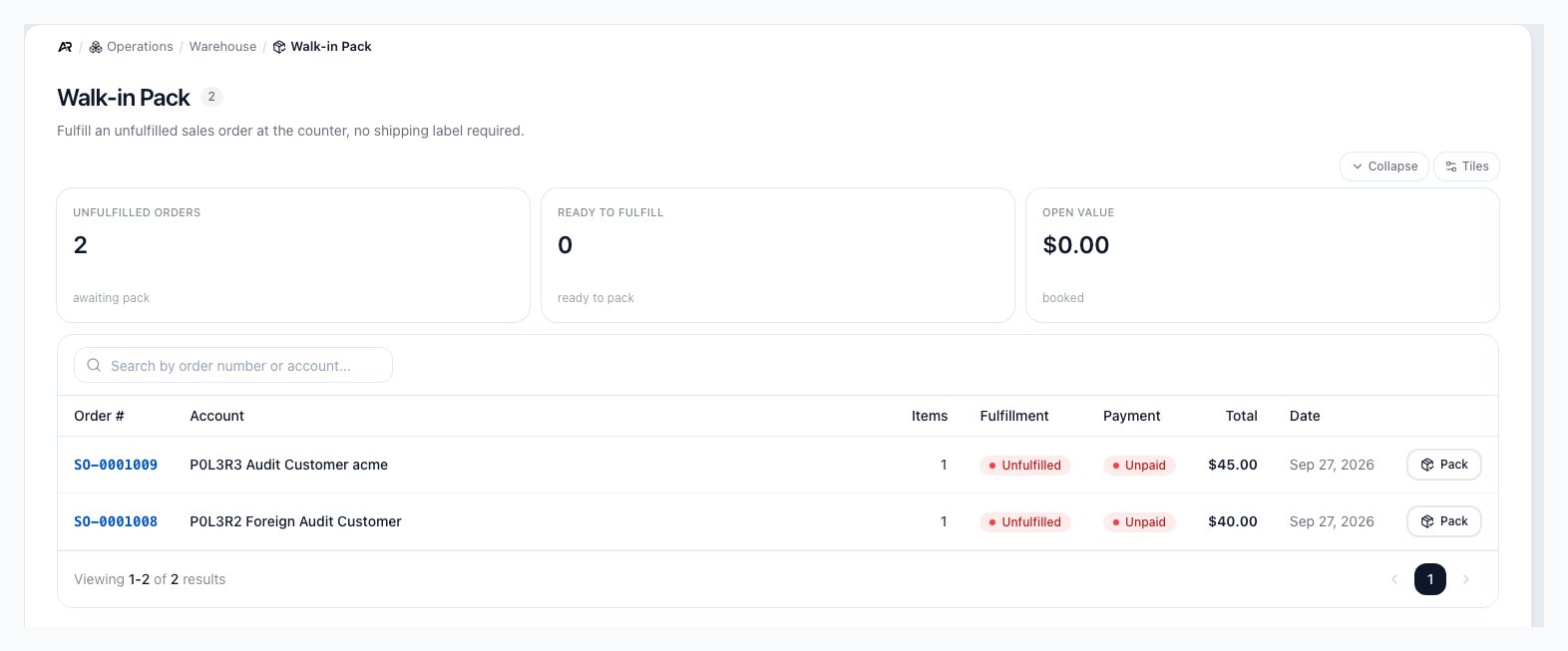
Walk-in Pack lists the sales orders still waiting to be fulfilled, with a Pack button on each row.
Before You Start
- Permissions: the screen and the Complete walk-in button need Pack Orders. Listing orders also needs View Orders; without it the list does not load even though the menu entry shows.
- The order: it must be a confirmed sales order with items still to fulfill. Draft, cancelled, archived, and expired orders are refused.
- Holds: the same checks that protect a normal shipment apply. An order on credit hold, on a manual hold, blocked by a tag, frozen by an open dispute, waiting on an ACH payment to clear, or unpaid with no payment terms cannot be walked out until the hold is cleared.
- Payment: a walk-in takes no payment. If the customer pays at the counter, open the order and select Collect Payment first, or assign payment terms, then complete the walk-in.
- Serial numbers: every serialized item needs one serial per unit before you can complete.
- Search the command palette for Walk-in Pack, counter sale, or will call.
- A link to a single order’s walk-in page opens it directly.
- If that link is for an order that belongs to another company you are a member of, Arcus finds it, switches you to that company, and shows “Switched to” the company name, “to open this order.” If you do not belong to the company that holds the order, the page says Order not found.
Find the Order
- Open Operations > Warehouse > Walk-in Pack. The count next to the title is the number of unfulfilled sales orders.
- Read the tiles: Unfulfilled orders (awaiting pack), Ready to fulfill (payment and holds clear and the order has physical items to pack), and Open value (the total of the unfulfilled orders, not counting drafts or cancelled, archived, or expired orders).
- Search by order number or account.
- Select the order’s row, or select Pack at the end of the row. The order number opens the order itself instead.
Complete the Walk-in
- Review Items to fulfill. Each line shows the product, SKU, price, and the quantity still to fulfill. An order with nothing left says No unfulfilled items.
- For each serialized line, select Capture serials. The Add or edit serial numbers dialog opens. Scan each unit, or choose Manual (or Switch to manual entry while scanning) to type a serial, or paste several separated by commas, then select Add. While some units still need a serial, Save partial closes the dialog and shows “Progress staged. Complete walk-in to fulfill.”; once every unit has one, Confirm all closes it and shows “Serials staged. Complete walk-in to fulfill.” Selecting Save partial before any serial is added shows the warning “No serials captured yet” and keeps the dialog open. To take back a serial you staged by mistake, remove it from the list in the dialog; nothing is saved on the order until you complete the walk-in. The line then shows how many serials are captured, for example 2/2 serials, and the button changes to Review serials.
- Check the Order summary: subtotal, discount, tax, shipping, and total.
- Select Complete walk-in. The Complete walk-in fulfillment? dialog explains that inventory will be consumed, entries will post, and an invoice will be created if auto-invoicing is on, and that this cannot be undone without a return.
- Select Fulfill.
When Complete walk-in is disabled
On a phone-width screen, a short reason shows under the button: Order is cancelled for a cancelled order, or Capture all required serials first when a serialized line is short of serials. On a wider screen no reason is shown, so check each serialized line’s serial count. An order that is already fulfilled shows the Already fulfilled banner instead of the button.What a Walk-in Changes
- Order and package: Arcus creates a pickup package holding every remaining item from your own stock (service lines and drop-ship lines are not packed) and moves the order to Fulfilled. Serial numbers you captured move to Sold and are tied to the order.
- Inventory: on-hand stock drops for each stocked item, using the oldest cost layers first. Services and non-stocked items do not change stock.
- Accounting: revenue and cost of goods sold for the packed goods post to the general ledger, along with any sales tax, shipping, discounts, and fees on the order. Lines that are entirely zero-value post nothing.
- Invoice: an invoice is created when your invoice timing calls for one (set at Settings > Payments & Checks > AR & Invoicing). When your invoice email settings are on, the customer receives it by email.
- Customer email: the customer receives the pickup-ready email for a pickup or will-call order, or the order-shipped email otherwise, when those notifications are turned on at Settings > Documents & Email > Email Configuration.
- Card payments: a card payment that was authorized to be captured at shipping is captured now.
- Marketplaces: new stock levels are sent to your connected marketplaces.
- Audit trail: the walk-in is recorded in the activity log.
Zero-Value Service Lines
Service lines priced at zero (a warranty replacement or a promotional freebie) post nothing to the ledger. Your company can require a reason for them: turn on Require operator reason for zero-value service lines under Zero-Value Walk-In Audit Trail at Settings > System > Approval Workflows. It is off by default. When it is on and the order has such a line, the first Fulfill is refused with a request for a reason, and a Reason for zero-value service lines box appears with the note “This entity requires an explanation when fulfilling zero-value service lines”. Type the reason (for example, warranty replacement) and complete the walk-in again.Messages You May See
- Already fulfilled: “Order SO-1001 has already been fully fulfilled. No further action needed.”
- Order not found: “This order could not be loaded. It may not exist or you may not have access.” Select Back to Walk-in Pack.
- Cannot complete walk-in: a red banner with the reason the server refused. Common reasons:
- “Confirm SO-1001 before packing. A draft sales order reserves no inventory, so packing it risks another order consuming the stock. Confirm the order, then pack.”
- An archived or expired order: the message says Arcus will not pack it, and asks you to reinstate the order if it is live again or create a new order for this shipment. A cancelled order cannot be submitted; its button stays disabled.
- A hold: the message names the credit hold, manual hold, dispute, tag, or payment that blocks fulfillment.
- Serial numbers required: followed by each product and how many serials it has out of how many it needs. The pop-up message starts Serials required for:.
- A product has more units than the order still owes. The message opens “Nothing was packed or shipped, and no stock was drawn.” and then names each product, for example “Only 2 more units of SKU-1 can ship on this order (5 ordered across 1 line, 3 shipped, 0 packed), and 5 were about to be packed and shipped.” When every unit has already shipped it says “Every unit of SKU-1 ordered on this order has already shipped”. Nothing is changed. A walk-in packs and ships every remaining unit in one step, so it cannot run in two cases. If a package already holds some of the units and has not shipped, the message names that package: ship it first (Mark as Fulfilled), or remove its units or delete it, then run the walk-in again. If the order’s lines show more units than it still owes (for example after a package came back from the carrier), create a package for only what is still owed and ship that package instead.
- Invoice not created: if automatic invoicing fails, the walk-in still completes, but no invoice or invoice email is made. Open the order: a banner says Automatic invoicing failed when this order was fulfilled. Select Invoice Shipped Items there to bill the goods.
- The server took too long to respond: Arcus cannot tell yet whether the walk-in went through. The page checks the order again; if the walk-in did go through it updates in a moment, and if not, try again.
Returning a Walk-in
To reverse a walk-in the customer did not take, open the order and select Undo Fulfillment within the undo window set at Settings > Shipping & Fulfillment > Shipping (Undo Fulfillment window (days)). It needs the Undo Fulfillment permission. For goods the customer brings back, or after the window, open the order and start a return for those items, then receive and disposition them on the return.Related Articles
Serial Capture During Pack
Scan, type, or paste serial numbers for serialized items.
Pickup Customer No-Show
Handle pickup orders the customer never collects.
Fulfillment Station
Operations > Fulfillment > Fulfillment Station: pack and ship orders that leave by carrier.
Bins
Operations > Warehouse > Bins: the other Warehouse screens start here.
Order Lifecycle
Sales > Orders > All Orders: how an order moves from confirmed to fulfilled and invoiced.
Customer Returns
Operations > Returns > Customer Returns: return items from a walk-in.
Approval Workflows
Settings > System > Approval Workflows: the zero-value walk-in reason.