

Product setup is not just catalog cleanup. Small choices on this page
can affect whether an item can be sold, stocked, picked, packed,
purchased, taxed, serialized, or shown on a sales channel.
Start From The Products List
Go to Sales > Products > All Products to search the catalog, filter by product type, review active and inactive counts, import or export product data, and create a new product. The list is also the fastest place to confirm whether a product exists, what type it is, and whether it has available inventory. You can also open a product from the command palette or from any product link on an order, purchase order, or report. Everyone with View Products can open it. If you belong to more than one company and a product link belongs to another one of yours, Arcus switches you to that company and opens the product, with the message Switched to the company name to open this product. If the switch fails you see Could not switch to the company name to open this product. Try again.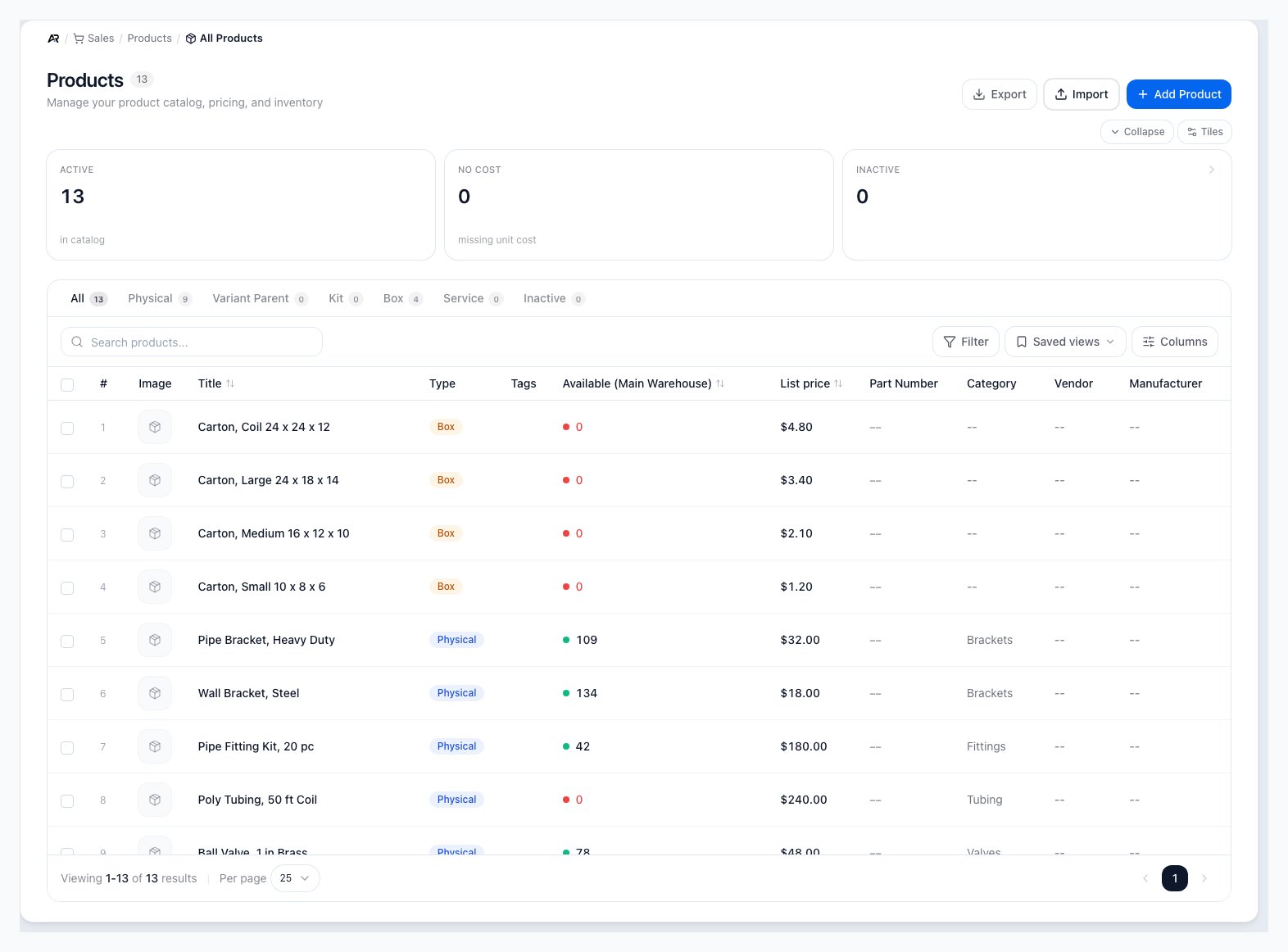
The All Products screen in Sales, with the summary cards, the type tabs, search and filters, and the product table.
What the list shows
- Summary cards: Active products in the catalog, No cost (active stocked products with no unit cost recorded, so margin and cost of goods cannot be computed), and Inactive. Click Inactive to open that tab.
- Tabs: All, Physical, Variant Parent, Kit, Box, Service, and Inactive, each with a count.
- Filters: Category, Vendor, Manufacturer, Stock level (In stock, Out of stock, or Low (at/below reorder point)), and Available quantity range. Filters, tabs, and search work together.
- Columns: Row #, Image, Title, Type, Tags, Available, List price, Part Number, Category, Vendor, and Manufacturer. A product nobody has priced shows Not set in List price, never $0.00. Use the Columns menu to hide or restore them and to save a view.
- Export: downloads the rows you see. Needs Export Reports.
- Import: loads products from a file. Needs Create Products and Import Data; without Import Data the import window does not open. Each imported product keeps the unit of measure the file supplies instead of falling back to each.
Marketplace products that need review
When a marketplace order arrives with a SKU that Arcus does not know, Arcus creates a placeholder product so the order can import. The list then shows a banner with the count, for example 2 products imported from marketplace orders need review. These are placeholder products created when a SKU was not found in Arcus. Search for the product name or SKU to open one, then finish its setup or map it to the right product. The banner disappears when nothing needs review.Bulk actions
Select products in the table to act on several at once:- Set Tax: apply one tax code. Needs Edit Products.
- Set Category: move the products into one category. Needs Edit Products.
- Set Packaging Class: apply one packaging classification: Over-Box (default), SIOC (ships in own container), SIPP (ships in product packaging), or Prep-Free Packaging. Needs Edit Products.
- Archive: make the products inactive. Needs Delete Products.
Create A Product
- Click Add Product. The button is disabled with a tooltip when your role does not have Create Products.
- Enter the product title customers and operators should recognize.
- Enter the part number or SKU used by your team.
- Choose the correct product type.
- Select a category when the product should group with related catalog items.
- Enter the list price used as the starting sell price before pricing rules apply.
- Add weight and dimensions when the item will be packed, rated, shipped, or palletized.
- Confirm whether the item should charge tax and track inventory.
- Click Create Product. You see Product created, or Failed to create product with the reason.

The create modal captures the minimum record Arcus needs before sending you to the product detail page for deeper setup.
Choose The Right Product Type
Product type controls which tabs, fields, and workflows are relevant for the item. Pick the type that matches how the item is used physically and financially.- Physical: a normal stocked item that can be sold, purchased, counted, packed, shipped, and replenished.
- Kit: a sellable bundle whose component products satisfy the order line. Use this for assemblies, bundles, and packages sold as one item.
- Box: a shipping container or package product used by packing and label workflows. Boxes are setup infrastructure, not normal sellable inventory.
- Service: labor, fees, installation, subscriptions, or other non-stock lines. Services do not need inventory or shipping setup.
- Variant Parent: a grouping product for variations such as size, color, model, or configuration. The child variants carry the real stock, shipping, and order behavior.
Finish The Product Detail Page
After creation, Arcus opens the product detail page. Use the header to edit, duplicate, archive, reactivate, delete when allowed, or move through the filtered product list. Use the tabs to finish the parts of setup that apply to that product type.
The Overview tab keeps the operator-facing catalog fields, media, active state, tax, serialized inventory, inventory tracking, and freight insurance flags together.
- Overview: title, description, media, active state, serialized inventory, charge tax, track inventory, product tax code, warranty, and inventory location summary.
- Pricing: list price, channel or customer pricing, quantity breaks, the product’s cost, and margin. See Read and Set a Product’s Cost below. When the product has no usable cost, margin stays blank with the note Margin is blank until a cost is set. Arcus never treats a missing cost as zero, so it never shows a false 100 percent margin. The same rule applies to kit and component margins.
- Components: kit composition for kit products.
- Variants: child product variations for variant parents.
- Purchasing: vendor, replenishment, cost, purchasing, and lead-time behavior for purchasable items.
- Inventory: on-hand, allocated, available, supply, demand, and inventory movements for stocked items.
- Bin Locations: warehouse placement and picking context for stocked items.
- Serials: individual serial records for serialized stocked items.
- Shipping: dimensions, weights, box rules, package presets, and pallet data for shippable items and boxes.
- Listings: sales channel publishing and customer-facing catalog behavior for sellable items.
- Analytics: performance, usage, and related product signals for sellable items.
Read and Set a Product’s Cost
The Pricing tab shows two different costs, because Arcus keeps two.- Stock cost: the average cost of the stock you have on hand, across all warehouses. It is the cost your books carry that stock at. Under it the tab says Average of what is on hand, all warehouses; each warehouse’s own average is on the Inventory tab. With nothing on hand it reads No stock on hand. If every open batch of the product is carried at $0.00 it adds carried at zero. While the stock is loading it reads Loading, and if it cannot be read it reads Unavailable; reload the page to try again.
- Card cost (used when no stock is on hand): the cost stored on the product record. Arcus uses it when an order’s warehouse has no stock, for a recovered part that goes back on the shelf, for a build’s estimate, and as the reorder fallback. It appears under Stock cost only when it differs from it, or when there is no stock. Receipts, builds, Set cost, and cost corrections refresh it; sales, transfers, adjustments, and landed freight do not, so it can differ from the stock.
Cost and margin are hidden from people who do not have View Order Margin. Instead of the cost and margin tiles they see an access panel, while the list price and the last purchase price stay visible. The Purchasing and Inventory tabs hold their own cost columns, which follow your role as well.
Set a product’s cost
Use Set cost when a product has no usable cost, for example a recovered part with no purchase price, or when you want to fix a cost yourself. It is the one supported way for a person to set a cost.- Open the product and go to the Pricing tab. Above the tiles, a line reads Cost follows the stock on hand and updates with each receipt or build. Set it yourself to keep it fixed. Select Set cost. You can also type a new amount in Card cost while editing the product and select Save; Arcus then opens the same Set cost window with your amount filled in.
- Enter New cost for one unit.
- Wait a moment while the window reads Working out what this changes It then shows Units on hand, Value now, and Value after, followed by the journal entry it will post, or the sentence The stock on hand is already at this cost, so no journal entry posts. when nothing moves, or No stock on hand, so no journal entry posts. Only the product’s cost changes. when there is no stock.
- Add a Reason if you like (up to 200 characters, shown in the activity log).
- Select Set cost to the amount. You see Cost of the product set to the amount, how many units were revalued and the amount posted, and Receipts and builds will keep this cost until you unpin it.
- Stock value: every open batch of the product is re-priced to the new cost, so the stock on hand is carried at that cost.
- Accounting: when the stock value changes, Arcus posts one journal entry between your finished goods inventory account and your inventory revaluation account, for exactly the amount shown in the preview. If your company has no such account set up, you see Arcus cannot post this change with the name of the missing account (Inventory Revaluation or Finished Goods Inventory) and a request to ask an admin to set it up in your chart of accounts. Nothing changes until that account exists.
- The cost is kept: after Set cost, purchase receipts and builds no longer change the cost. Each receipt still records what you actually paid on its own stock, and sales still cost from that stock. A blue line on the Pricing tab reads Cost set by you with the amount and Purchase receipts and builds do not change it. When the last receipt cost differs, it shows beside it as Last receipt.
- Unpin: select Unpin on that line to let the cost follow the stock again. It needs Edit Products. You see Cost unpinned. It now follows the stock on hand, or, with no stock, Cost unpinned. There is no stock on hand, so it updates on the next receipt or build. Unpin only changes the stored cost: it posts no journal entry, and it is recorded in the activity history.
- Already set: if the cost is already kept at the amount you typed and nothing would move, the window says This is already the cost, and it is already kept. Nothing would change.
Know Which Tabs Appear By Product Type
Arcus hides tabs that do not apply to the selected product type. If a tab is missing, first confirm the product type before assuming a permission or data problem.- Physical products: can show Pricing, Purchasing, Inventory, Bin Locations, Serials when serialized, Shipping, Manufacturing, Listings, and Analytics.
- Variant parents: show the Variants workspace. The parent does not carry top-level inventory, bins, shipping, or manufacturing. Child variants carry the sellable SKU, stock, baseline price and cost, shipping overrides, serial behavior, and component behavior.
- Kits: show Components, Pricing, Inventory, Bin Locations, Shipping, Listings, and Analytics. Kits are not purchased or manufactured from this tab set; buy or build the component products.
- Services: skip inventory, serial, bin, manufacturing, and shipping work. They can still be priced and listed when the service is sold as an order line.
- Boxes: focus on package setup and shipping rules instead of normal sellable inventory.
Set The Operational Flags
The settings on the Overview tab tell Arcus how to treat the item in daily work. Review them before the product is used on real orders.- Is Active: active products can appear in product search and normal workflows. Archive products that should no longer be selected.
- Serialized Inventory: requires one serial number per unit before a serialized product can be completed through fulfillment or manufacturing.
- Charge Tax: tells order entry and AvaTax review that the product is intended to be taxable unless the customer, address, or tax setup changes the result.
- Track Inventory: keeps stock balances and availability. Turn it off only for non-stock products or special items where Arcus should not enforce quantity availability.
- Apply Freight Insurance: includes the product in insurance calculations when supported by the shipping workflow.
Finish Manufacturing And Purchasing Setup
Physical products can be purchased, manufactured, or both. The Purchasing tab controls vendor, lead time, cost, and reorder behavior. The Manufacturing tab shows build recipes, default BOM status, recent work orders, where-used component references, and a build action when an active BOM exists.- Approved vendors: add the vendor account, vendor part number, minimum order quantity, lead time, and default-vendor status so buyers know which supplier record to use.
- Purchase policies: maintain active quantity breaks, fixed purchase prices, or multiplier rules. Duplicate active policies for the same vendor and quantity break are blocked, so edit the existing policy when the scope already exists.
- Policy validation: the policy modal requires an approved vendor, blocks quantity breaks below that vendor’s minimum order quantity, warns on duplicate active scopes, and checks that the end date is after the effective date.
- Vendor performance: compare manual lead time to observed receipt history. When enough receipts exist, observed lead time can explain why replenishment timing changed.
- Reorder intelligence: review demand, safety stock, lead-time demand, suggested reorder point, and suggested reorder quantity before changing purchasing setup.
- Purchased: complete vendor and purchasing setup so reorder reports, purchase orders, and MRP purchase suggestions can create useful buying work.
- Products with variants: maintain approved vendors and purchase policies on the parent. When a buyer adds the item to a purchase order, Arcus asks for the exact variant and can use the variant cost on the line after the parent vendor setup is chosen.
- Multiple vendor parts: when the same vendor has more than one vendor-product row, buyers select the right vendor part on the purchase order line.
- Last purchase price: the unit price on the most recent purchase order receipt for the product, from any vendor. It reads Not set until a receipt sets it, and receipts loaded from an older system do not set it.
- Last price from this vendor: in the approved vendor table, the unit price on the last receipt from that vendor for this product. Every receipt updates it. It reads Not set until the first receipt from that vendor, with the tooltip No price recorded from this vendor yet. The first receipt from this vendor sets it. On a vendor row loaded from an older system that no receipt has touched, it is the price that system held.
- Purchase order pricing: PO line entry can use the best active vendor policy for the selected vendor and quantity. Buyers should review the auto-priced badge, active quantity break, vendor minimum, and lead time before saving the line.
- Manufactured: create and activate a default BOM so MRP and Build This Product know which recipe to use.
- Purchased or manufactured: keep both purchasing and manufacturing data current so planners can choose whether to buy or build based on demand, component availability, and lead time.
- Used as a component: check where-used rows before changing a product that appears inside BOMs or kits.
Enter Shipping And Packing Data
Use the Shipping tab for products that are packed, rated, shipped, or palletized. This is where the physical data used by Pack with Mighty, carrier rates, label purchases, box selection, and freight handling is maintained.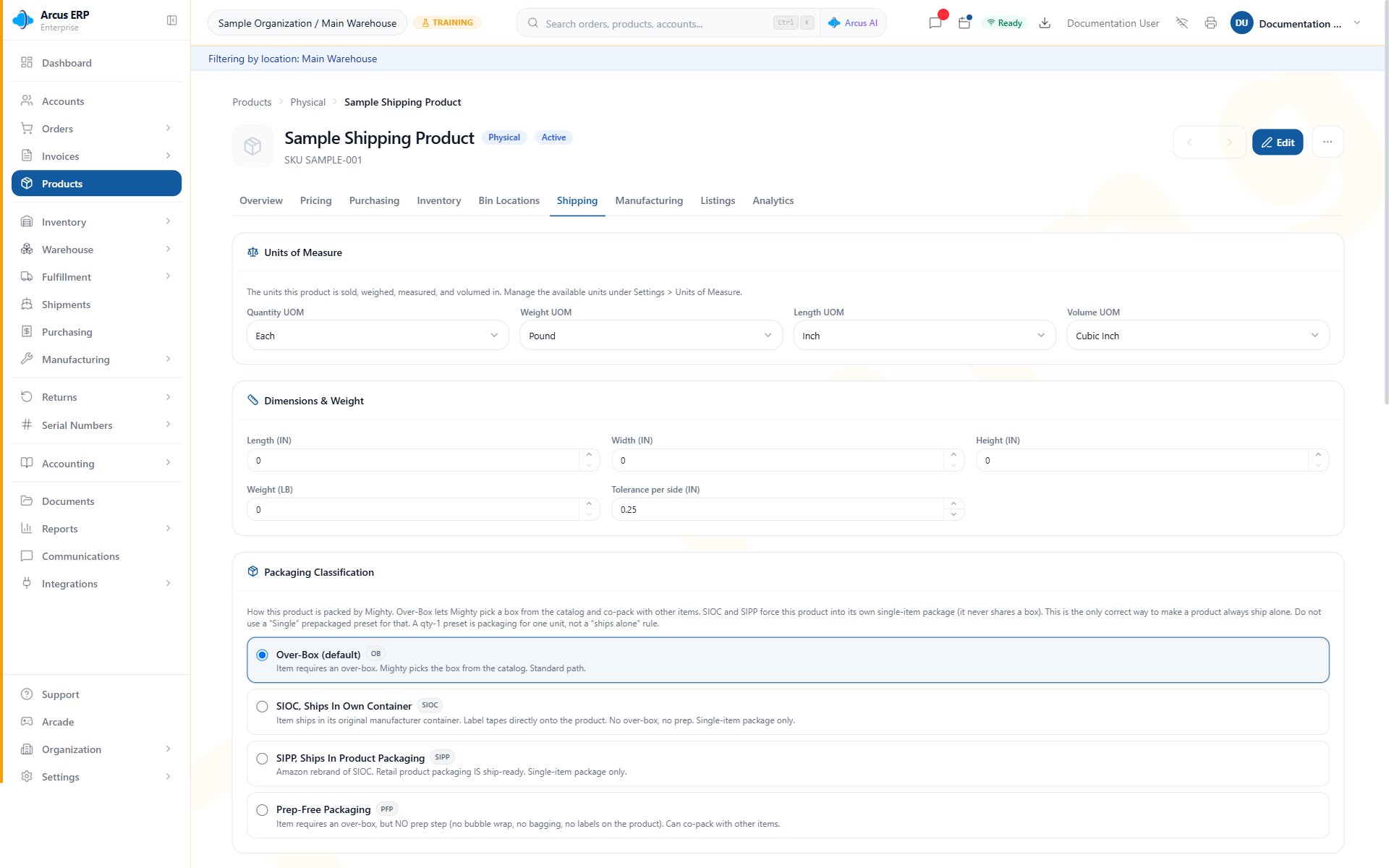
The Shipping tab shows units of measure, dimensions and weight, and packaging classification.
- Dimensions and weight: required for useful Mighty suggestions, carrier rating, label purchase, and freight planning. Enter the packed size and shipping weight operators can verify.
- Length and weight units: confirm the units match the numbers entered so rates and packing math stay correct. Unit conversions use one consistent definition per unit, so ounces convert to pounds and feet to inches at the correct rates.
- Tolerance per side: gives packing suggestions a small physical buffer when appropriate.
- Packaging classification: choose whether the item needs an over-box, ships as SIOC or SIPP, or is prep-free but still needs an over-box. This tells packers whether the product needs another container.
- Packing category: groups products that may or may not share a box during Pack with Mighty.
- Prepackaged presets: use when the product ships in a known manufacturer box or fixed package. A preset can link to a Box product so Pack with Mighty uses the box dimensions.
- Pallet configuration: supports carton and pallet math for bulk, freight, and warehouse planning.
- Serial tracking: enable serialized inventory on the Overview tab when each shipped unit must be identified. Packing cannot complete the unit until the required serial is captured.
- Freight, hazmat, and customs: maintain freight class, NMFC, freight flags, hazardous material fields, HS code, country of origin, customs description, and customs value when the product needs those shipping controls.
- Product list cleanup: use the bulk Set Packaging Class action from the product list when a group of products needs the same packaging classification.
How Product Setup Affects Other Workflows
- Order entry: active products, variants, kits, list price, charge tax, and pricing rules determine what can be added and how it prices.
- Fulfillment: track inventory, serialized inventory, kit components, bins, package data, packaging classification, and shipping dimensions determine what can be picked, packed, labeled, and completed.
- Inventory: stocked product setup drives balances, allocations, receiving, bin locations, supply, demand, and transaction history.
- Purchasing: approved vendors, vendor parts, purchase policies, minimum order quantities, and lead times drive purchase orders, replenishment, bills, and receiving context.
- Manufacturing: supply method, active default BOM, and where-used context determine whether MRP and work orders can plan a build.
- Accounting: product type, cost, tax code, revenue, freight, and inventory handling affect downstream posting and reporting.
- Inventory movements: the Inventory tab’s movement history shows Unit cost and Total cost, the cost of the units that moved. A movement with no cost recorded, such as a reservation, shows a dash and is not the same as $0.00. A sale carried over from an older system can hold its sell price there instead, and those rows carry a sell price badge.
- Analytics: the Analytics tab shows revenue, Estimated cost, margin, velocity, and top customers. Estimated cost is the cost recorded on each sales line when the order was entered, not what the shipped goods cost, so a cost set later applies to new orders only. When no sold line carries a cost the tiles read No sold line has a cost yet. Open Total Margin by Product for what the shipped goods actually cost.
- Purchasing cost history: receiving updates the product’s last purchase price. A receipt line with an unusable unit cost leaves the existing last purchase price in place.
- Audit trail: product edits are recorded in the activity history, and other users see the changes without refreshing.
- Shopify listings: a list price change is sent to the product’s Shopify listings only when price sync is turned on for your Shopify connection and for the listing; it is off by default.
- Sales channels: listing data, media, title, description, active state, and variants affect what customers can see or buy.
Common Blocks
- Product is missing from order search: confirm it is active, belongs to the current entity, has the correct product type, and is searchable by title or part number.
- Inventory will not track: confirm the item is not a service or variant parent, and that Track Inventory is enabled.
- Serialized fulfillment is blocked: add the required serial numbers before completing the unit.
- Kit cannot be fulfilled: review kit components, component stock, and whether the ordered quantity can be built.
- Purchase policy will not save: check for a duplicate active vendor quantity break, missing approved vendor, date overlap, or quantity below the vendor minimum.
- Manufacturing tab is missing: confirm the product is a physical product, not a kit, service, box, or variant parent.
- Build action is unavailable: confirm the product has an active BOM and the BOM is safe to use for the selected quantity and location.
- Shipping label or rate looks wrong: review weight, dimensions, units, ship-from address, destination address, packaging, and shipping rules.
- Set cost is missing: you need Adjust Inventory. A variant parent never offers it; set the cost on each variant.
- Cost and margin are not shown: you need View Order Margin. Ask an administrator.
- Margin is blank: the product has no usable cost, or its stock is carried at zero. Use Set cost, or receive the stock at a real cost.
- Cost keeps its value after a receipt: the cost was set by a person and is kept. Select Unpin on the Pricing tab to let it follow the stock again.
- Tax looks wrong: review Charge Tax, product tax code, customer exemption, shipping address, and AvaTax setup.
- Product type conversion is unavailable: check whether the product already has historical references that block conversion.
Related Articles
Product Types and Costing
Understand product type conversion rules, FIFO layers, product value, and Recost repair behavior.
Kits and Assemblies
Create kits, add components, understand kit cost, and sell bundles safely.
Pricing Rules
Configure quantity breaks, customer pricing, and multiplier rules.
Product Variants
Generate variants, manage child SKUs, use the variant editor, and set variant kit behavior.
Marketplace Listings and Mapping
Map Arcus products and variants to marketplace listings, resolve drift, and use Shopify Bulk Map.
Inventory Management
Track stock, locations, reorder points, and inventory movement history.
Pack with Mighty
See how product dimensions, packaging, categories, and serial requirements affect packing.
Mighty Leftovers
Resolve unpacked quantities and correct the product or package data that caused them.