

Check Access And Product Setup
You need manufacturing.view to open and rerun Production Planning. You need manufacturing.create to create a suggested work order or purchase order. The create buttons show for everyone who can open the page; without manufacturing.create, Arcus refuses the request and the message names the reason. A product is eligible for manufacturing analysis when it:- Is active and inventory tracked.
- Uses the Manufactured or Both supply method.
- Has an Active default BOM.
Run Production Planning
Open Purchasing, then Manufacturing, then Production Planning. The breadcrumb reads Purchasing > Manufacturing > Production Planning, and the page title is Production Planning (MRP). You can also search for Production Planning in the command palette. The Manufacturing link above the title opens Purchasing > Manufacturing > Work Orders.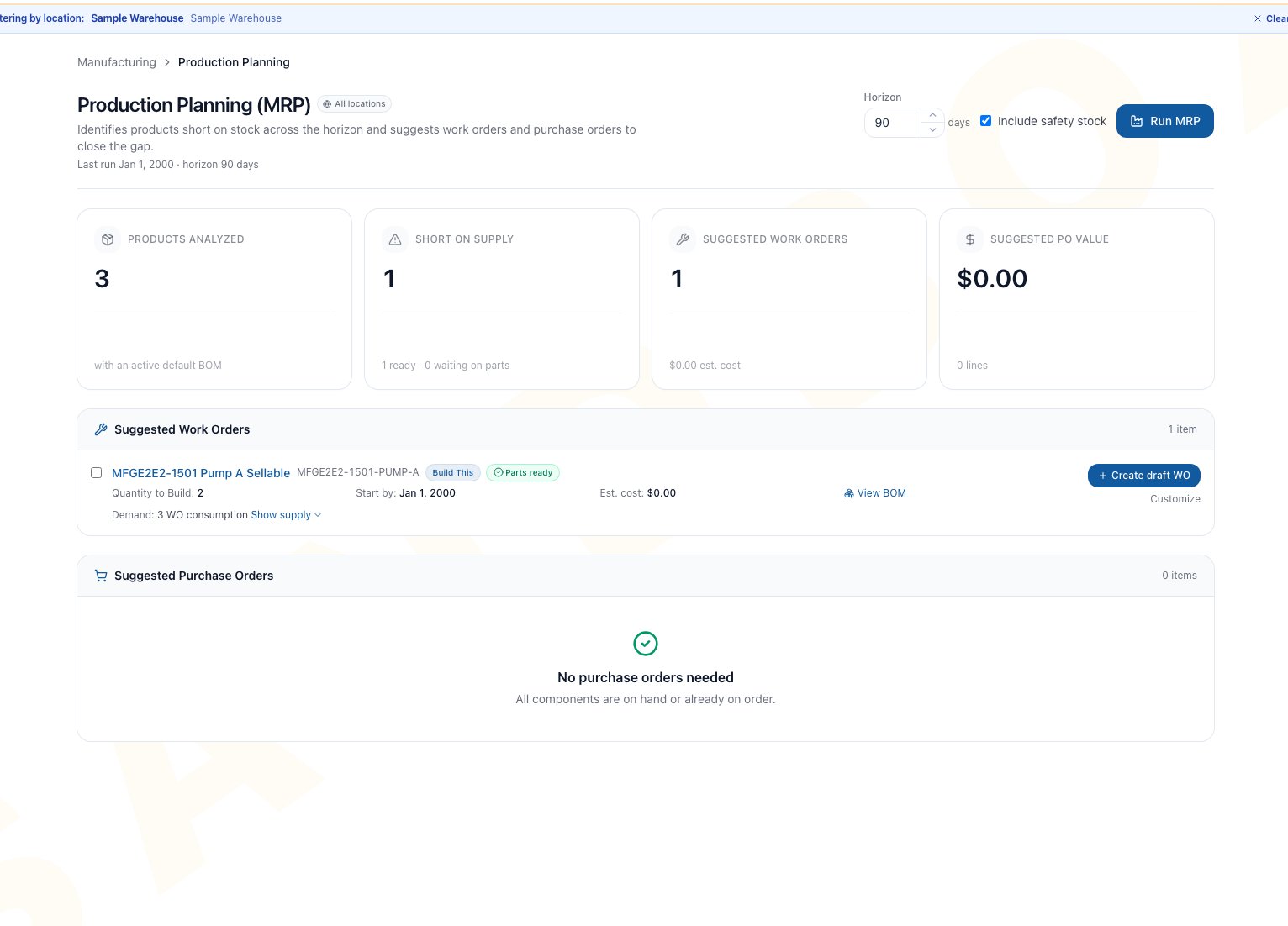
Example Production Planning result summarizing analyzed products, supply shortages, suggested work orders, and suggested purchase-order value for the selected horizon.
- Enter a Horizon from 1 to 365 days.
- Keep Include safety stock selected when the plan should preserve configured stock buffers.
- Click Run MRP.
- Verify the Last run time and horizon under the page title.
- Review the summary cards before selecting any records.
Understand What MRP Counts
MRP uses the Active default BOM to calculate per-run quantities and component demand. A Phantom BOM is expanded through to its components during planning. A non-phantom subassembly remains a separately stocked requirement and can receive its own suggestion when it is eligible.
Read The Summary Cards
- Products analyzed counts eligible products with an Active default BOM.
- Short on supply counts products whose calculated need exceeds counted supply. Its detail separates ready work from work waiting on parts.
- Suggested work orders counts recommended manufacturing jobs and shows their estimated cost.
- Suggested PO value totals the estimated value of purchase suggestions.
Review Suggested Work Orders
Each suggestion identifies the product, SKU, type-specific action, quantity, start-by date, estimated cost, recipe, demand, and parts readiness. Batch recipes can also show the calculated run count.- Open Show supply to compare demand, forecast, safety stock, on-hand stock, on-PO quantity, and open work-order supply.
- Review short components and the quantity required for each one.
- Open View BOM and confirm the recipe is still the correct default.
- Check the suggested quantity and date against floor capacity and the location that will perform the work.
- Choose an action only after the demand and supply explanation is credible.
Choose How To Create Work
The Release immediately checkbox on New Work Order is a per-order choice. The Manufacturing automatic-release setting applies separately and can release a newly created standalone work order even when you clear that checkbox. Always verify the resulting status.
Review Suggested Purchase Orders
Each purchase suggestion shows the product, vendor, quantity, unit cost, line value, order-by date, lead time, and the products whose suggested work created the need. Purchase suggestions are grouped by vendor during creation and become Draft purchase orders. They still require the normal purchasing review, approval, sending, receiving, billing, and close decisions. Arcus calculates the component shortage after available stock and counted on-PO quantity. It prefers an active default vendor, raises the suggestion to that vendor’s minimum order quantity when necessary, uses a positive vendor cost before the product cost, and uses vendor lead time before the inventory or product lead-time fallback. Verify every result against current vendor terms before creating the Draft PO.Create A Selected Plan
- Select only the work-order suggestions manufacturing is prepared to review or run.
- Select only the purchase suggestions purchasing is prepared to review.
- Check the WO and PO counts in the selection bar.
- Click Create N suggestion or Create N suggestions, where N is the number of selected rows.
- Read the created counts and any errors. The message reads “Created N WO + N PO”, with “(N errors)” added when some rows were refused.
- Open every created work order and purchase order.
- Correct failed suggestions, then rerun MRP before deciding whether to try them again.
- A purchase suggestion becomes a Draft purchase order and is counted as open purchase supply on the next plan, even though buyer review is still required.
- A work-order suggestion becomes Draft or Released according to the Manufacturing automatic-release setting and release gates.
- Running or creating the plan does not itself move inventory or post manufacturing cost.
- Each purchase order created from the plan, and each work order, is recorded in the audit trail, and other open screens refresh to show the new records.
- A created purchase order affects purchasing supply under its normal lifecycle. A work order becomes counted manufacturing supply after it reaches Released or In Progress.
Common Scenarios
Urgent build with parts ready
Use a short horizon and expand the supply explanation. Treat Parts ready as a planning signal, then verify physical stock at the intended location and the arrival timing of any counted PO supply. Use Customize when the location or date matters. Open the work order after creation and verify whether it is Draft or Released.Build blocked by a purchased component
Review the purchase suggestion, vendor, lead time, and order date. Create the purchase order only after buyer review. Keep manufacturing timing aligned with the credible receipt date.Teardown could supply the shortage
Do not treat recoverable output as on-hand supply. Review Buildability, create the appropriate Disassembly work, and use a Combined Run when the teardown and build need shared coordination.Long-range buying review
Increase the horizon, include safety stock, and inspect each demand and supply expansion. Create only the purchase suggestions the buyer is ready to validate.Troubleshooting And Refusals
- Could not run MRP: read the displayed reason and click Retry. A failed run does not create records.
- Failed to create suggestions: the batch request was refused as a whole, for example without manufacturing.create. Nothing was created.
- Could not create work order: Create draft WO was refused. The message shows the reason, for example “Cannot create work order from archived BOM” when the suggested recipe was archived after the plan ran. On success the message reads “Draft work order created” and the work order opens.
- No work orders needed (“All manufactured products have sufficient supply for the horizon.”): counted stock and open supply cover the calculated need, or no eligible product has an Active default BOM.
- No purchase orders needed (“All components are on hand or already on order.”): components are available or already counted on open purchase orders.
- A product is missing: verify it is active, inventory tracked, set to Manufactured or Both, and has an Active default BOM.
- Suggested quantity is too high: expand supply and demand, then review safety stock, open sales demand, forecast, dependent work, and stale orders.
- Suggested quantity is too low: review stock across locations, open purchase orders, and Released or In Progress output already counted as supply.
- Parts remain short: check BOM quantities, current balances, open purchases, open work, and jobs that should be completed or cancelled.
- Create reports some errors: keep the successful records, correct only the refused rows, rerun MRP, and reselect deliberately.
- A created work order is already Released: the Manufacturing automatic-release setting was applied. Review the record immediately before floor work begins.
FAQ
Does Run MRP create work orders or purchase orders?
No. It calculates suggestions. Use Create draft WO, Customize, or the dynamic Create N suggestion(s) action to create records.Does the horizon hide open sales orders outside the date range?
No. The horizon scales forecast and schedule dates. Current open sales demand and counted open supply are not filtered out by it.Does Draft work count as manufacturing supply?
No. Released and In Progress work-order output is counted. Review Draft jobs before relying on them.Can MRP plan a Combined Run automatically?
No. Create or review the individual suggestions, then plan related jobs with Plan Combined Run on Purchasing > Manufacturing > Work Orders.Why is there no product filter on this page?
Production Planning analyzes the full eligible product population for the company. Use the suggestion rows and their supply explanations to review a specific product.Related Guides
Bills of Materials
Set the Active default recipe, component quantities, phantom behavior, cost plan, and safety-stock context.
Buildability
Inspect current component limits and possible teardown recovery before acting on a shortage.
Work Orders
Review, release, run, complete, close, or cancel work created from a suggestion.
Combined Runs
Coordinate related teardown, conversion, and build jobs after planning them separately.
Manufacturing Settings
Understand when a newly created standalone work order can be released automatically.
Reorder Report
Review a separate product-level replenishment workflow.
Create And Manage Purchase Orders
Continue Draft purchase orders through the purchasing lifecycle.
Supply And Demand
Investigate inventory signals behind a replenishment decision.