

Reports use posted GL activity. Draft or pending entries do not affect report totals until
they are posted.
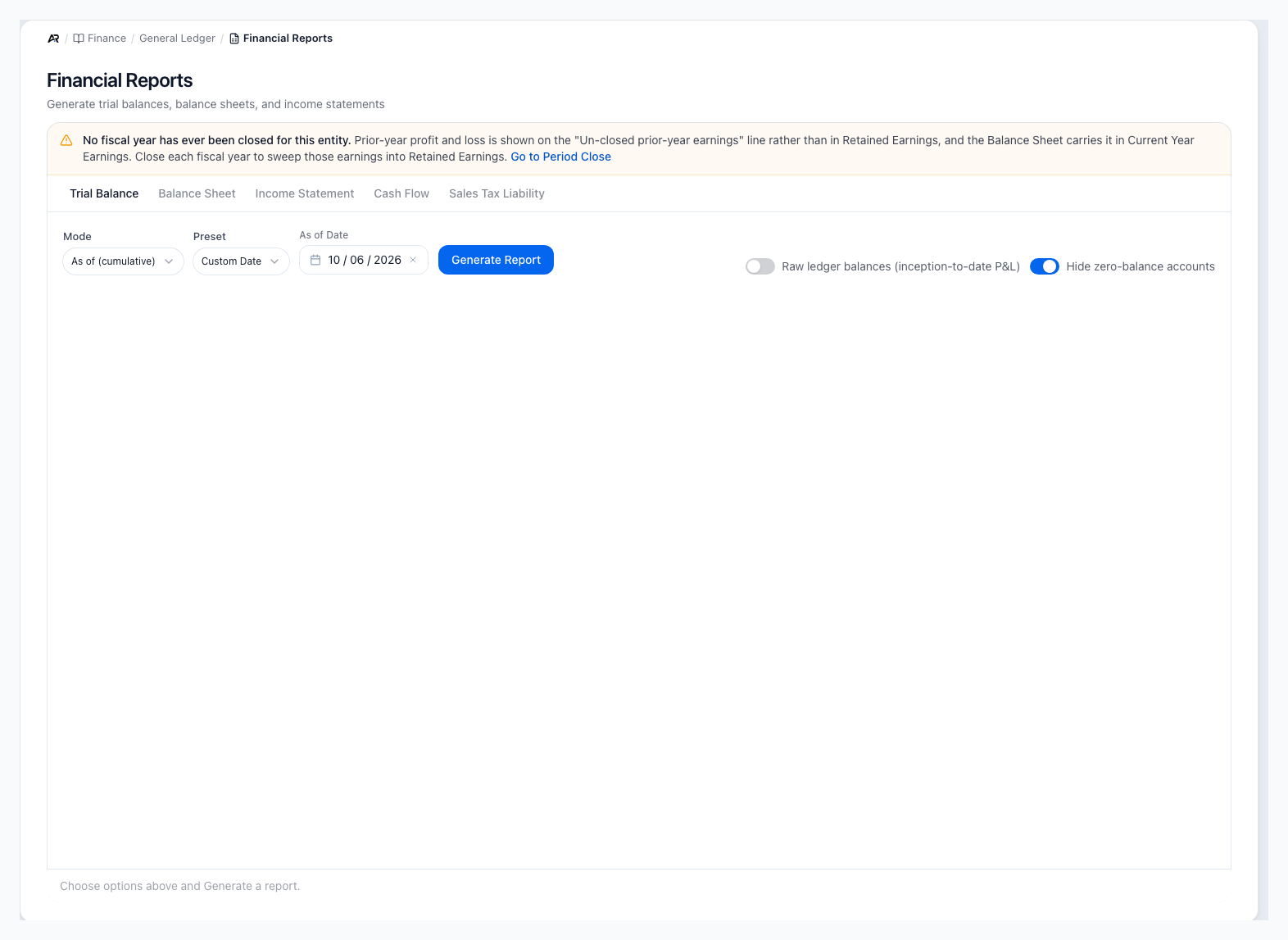
The report tabs, the Trial Balance controls and the fiscal-year banner before a report is generated.
Open Financial Reports
Open Finance > General Ledger > Financial Reports. You can also search for Financial Reports in the command palette, use the quick navigation on the Finance dashboard (its Working Capital card opens this page on Trial Balance), or follow a link from another screen, some of which open Balance Sheet, Income Statement or Cash Flow directly. The tab is kept in the page address, so a link you copy opens the same report tab. You need permission to view accounting. Choose a report tab (Trial Balance, Balance Sheet, Income Statement, Cash Flow or Sales Tax Liability), pick a preset (This Month, Last Month, This Quarter, Year to Date, Last Year) or a custom date (Custom Date on the as-of reports, Custom Range on the period reports), then click Generate Report. Generate Report stays disabled with a Choose a date first hint until an as-of date is set. After a report generates, use Print or the Export menu (CSV, Excel or PDF). If you set a From date after the To or As of date, a yellow banner says The period starts after it ends and names both dates, with Pick a From date on or before the other date to generate this report. If a report was already on screen, the banner adds that the report below is the one you last generated. A report is only as current as the last time you clicked Generate Report.Date Controls By Report
- Trial Balance: uses an as-of date. It includes posted activity through that date.
- Balance Sheet: uses an as-of date. It shows the financial position on that date.
- Income Statement: uses a from and to date range. It shows performance for that period.
- Cash Flow: uses a from and to date range. It explains cash movement for that period.
- Sales Tax Liability: uses a from and to date range. Shows per-jurisdiction sales tax owed for the period, suitable for state portal filing. Group rows by Jurisdiction, State or Filing Period (Month).
Generate after changing dates
Changing the date or preset does not make the report reliable until you click
Generate Report again and review the refreshed totals.
Trial Balance
The Trial Balance lists GL accounts with total debits, total credits, and ending balances as of the selected date. Use it to confirm the books are in balance and to spot accounts with unexpected balances.- Mode: As of (cumulative) shows balances through the date; Period (movements) shows the opening balance, the movements in the period and the closing balance.
- Raw ledger balances (inception-to-date profit and loss) shows income and expense accounts with their full history instead of rolling prior years into equity.
- Hide zero-balance accounts removes accounts with no balance (also on the Balance Sheet).
- Vendor bills count from the date they sit in the ledger (their posting date), not only the bill date. As-of reports and the close checks decide whether a bill exists at your date by that posting date, so a bill moved to another posting date ties to the ledger for that date.
- Run it before month-end or year-end review.
- Use it when an account balance looks wrong on another report.
- Compare total debit and total credit totals before deeper investigation.
- Use account rows as a starting point for Account Ledger or Journal Entries review. If the Trial Balance is out of balance, stop the close process and investigate before relying on the Balance Sheet, Income Statement, or Cash Flow report.
Income Statement
The Income Statement shows revenue, cost of goods sold, expenses, gross profit, and net income for a date range. It is also commonly called the Profit and Loss report.- Use it to review sales, margin, operating expenses, and net income for the selected period.
- Use the same range your leadership team, tax advisor, or lender expects before exporting.
- Investigate unusual expense or revenue balances from the account row back to Account Ledger.
- Marketplace orders imported with their own tax and not re-taxed in Arcus recognize the full imported tax amount, so the shipping-tax portion is no longer left in the wrong account.
- Shipping Performance compares shipping revenue with shipping cost for the period. View detail (or clicking the panel) opens the per-package shipping margin report for the same number of days as your range, up to a year. With no shipments, the panel says No shipping activity this period.
- A concentration check flags an account that carries an unusually large share of revenue when it is not your primary sales account, so you can check the account mapping on recent invoices.
Balance Sheet
The Balance Sheet shows the entity’s position as of a date: assets, liabilities, and equity. It should satisfy the accounting equation: assets equal liabilities plus equity. The report says Assets = Liabilities + Equity (balanced), or OUT OF BALANCE with both totals when it does not.- Assets: cash, receivables, inventory, fixed assets, and other resources.
- Liabilities: payables, tax payable, loans, credit cards, and accruals.
- Equity: owner equity, retained earnings, and current earnings. Use the Balance Sheet after cash, AR, AP, inventory, fixed assets, leases, and marketplace clearing have been reviewed. Unexpected retained earnings or equity changes usually trace back to posted income statement activity.
Cash Flow
The Cash Flow report summarizes operating, investing, and financing movement. Use it to understand why cash changed even when net income, receivables, payables, or inventory also changed.- Operating activities: starts with net income and adjusts for working-capital movement such as AR, inventory, AP, taxes, and customer deposits.
- Investing activities: highlights fixed asset and other long-term asset movement.
- Financing activities: highlights loans, owner equity, draws, and similar funding movement.
- Ending cash: should be reviewed against bank reconciliation and cash account balances.
Sales Tax Liability
The Sales Tax Liability tab uses a from and to date range and a Group by choice of Jurisdiction, State or Filing Period (Month). Total Liability Owed is what the report’s filing sources collected minus what was refunded in the window, which is a different question from the Balance Sheet’s Sales Tax Payable balance. Taxable sales show the unique base per order, so a sale that appears in several jurisdiction rows (city, county and state) is counted once in the total; tax owed adds across rows. When no AvaTax committed transactions exist in the range, the tab says so and falls back to your manual tax rates and the shipping-address state. See Sales Tax Liability for the full walkthrough.Drill Down When A Number Looks Wrong
- Confirm the report tab, date, and range.
- Run the Trial Balance for the same as-of date or period end.
- Open the related account in Account Ledger.
- Open the source journal entry or source transaction from the ledger when available.
- Correct the source workflow first when the issue came from AP, AR, inventory, banking, payout, or order activity.
- Use a manual journal entry only when accounting has approved a GL-only correction.
Month-End Review Sequence
- Post invoices, payments, vendor bills, deposits, payouts, and inventory accounting events.
- Approve, reject, or reverse manual journal entries waiting for review.
- Complete bank reconciliation for cash accounts that belong in the period.
- Review marketplace payouts, disputes, clearing balances, AP aging, and AR aging.
- Run Trial Balance and resolve any out-of-balance condition.
- Review Balance Sheet, Income Statement, and Cash Flow with the same period assumptions.
- Print or export final support after the reports have been reviewed.
- Close the accounting period.
Before You Share Reports
- Post approved journal entries for the period.
- Review failed or pending invoices, payments, vendor bills, inventory postings, and bank activity.
- Complete bank reconciliation when cash reports are being shared externally.
- Confirm the chart of accounts type and parent structure are correct.
- Run reports with the same dates your accountant, bank, or leadership team expects.
Exports and Printing
Use Print for a formatted report review and the Export menu (CSV, Excel or PDF) when the accountant needs spreadsheet detail. Always check the selected report tab and date range before sharing an export.Common Blocks
- Report is empty: confirm the date range includes posted activity.
- Totals look stale: refresh after posting entries or updating source transactions.
- Trial Balance is out of balance: stop and investigate. A balanced GL is required before relying on reports.
- Account appears in the wrong section: review account type and parent account in Chart of Accounts.
- Cash does not match the bank: complete bank reconciliation and review clearing accounts.
Related Articles
Dashboard and Calendar
Use the accounting dashboard and calendar to triage cash, AP, AR, close work, recurring items, leases, and fixed asset dates.
Chart of Accounts
Understand account structure, account types, and posting behavior.
Journal Entries
Create, review, and reverse journal entries.
Account Ledger
Review transaction history, source activity, debits, credits, and running balance for one GL account.
GL Reconciliation and Integrity
Compare control accounts to subledgers, review clearing account health, and audit GL integrity check logs.
Bank Reconciliation
Match bank transactions to payments, deposits, payouts, and checks.
Period Close
Close, approve, reopen, and audit accounting periods with pre-close checklist controls.
All Reports
Insights > Reports > All Reports: browse every report Arcus offers across accounting, sales, inventory, and operations.