

Use Operations > Inventory > Adjustments to correct what Arcus thinks is on hand when a real-world event proves the balance is wrong: damaged stock, a writeoff, stock you found, or a cost correction. You enter what you counted, pick a reason, and Arcus works out the difference, changes the balance and posts the matching journal entry to the account the reason names. For a controlled count with a reviewer and an approver, use Cycle Counts instead.
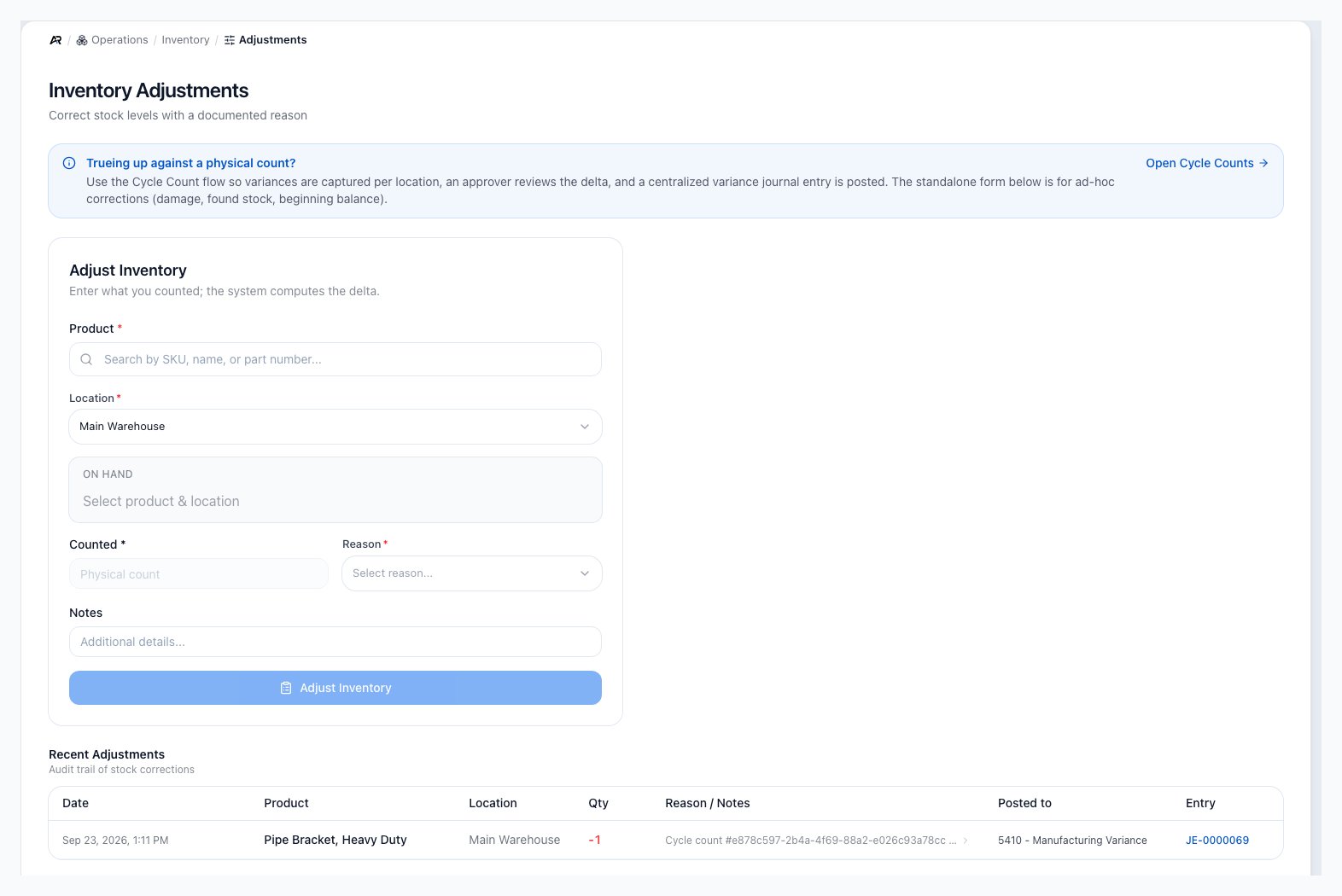
The page opens with the Cycle Counts reminder, the Adjust Inventory form, and the Recent Adjustments audit trail with the account each entry posted to.
Before You Start
- Permissions: you need Adjust Inventory to open the screen and submit an adjustment. Seeing the on-hand balance and the Recent Adjustments list needs View Inventory, and the server checks it even though the screen does not hide anything without it.
- Choosing the account: the account an adjustment posts to comes from the reason you pick. Changing it, or choosing one when the reason has none, needs Post Journal Entries. Without it, the account picker is disabled and says “Changing the account needs Post Journal Entries. Ask an accountant.”
- Counting down below zero: needs Allow Negative Inventory. Without it the submit button stays disabled while the warning shows.
- Adjustment reasons: the list of reasons, their accounts, whether a note is required and any approval limit are set at Settings > Shipping & Fulfillment > Warehouse, and changing them needs Edit Settings. Arcus starts every company with six reasons: Cycle Count Variance, Damage / Shrinkage, Write-off (Obsolete / Expired), Revaluation / Cost Correction, Found Stock and Other. Other has no account until someone chooses one.
- Stocked products only: the Product picker lists products that carry stock. Kit parents, services, boxes, variant parents and products with inventory tracking turned off cannot be adjusted; Arcus refuses them with a message naming the reason, for example “Service products do not track inventory.”
Enter What You Counted
The form uses a counted-quantity pattern. You enter the physical quantity you saw, and Arcus calculates the difference from the current on-hand balance.- Open Operations > Inventory > Adjustments.
- Search for the Product by SKU, name or part number.
- Choose the Location where you counted. Arcus fills in your default location.
- Read the On Hand box. It shows the balance, and the average unit cost when the product has one. Until a product and location are chosen it reads “Select product & location”.
- Enter the physical Counted quantity. The field stays disabled until the balance has loaded.
- Choose a Reason.
- Read Posts to (see below) and change the account only if you must.
- Add Notes. They are required when the reason says so.
- Select Adjust Inventory.

The form starts by asking for product, location, counted quantity, reason, and notes.
Read the Difference Preview
Once you enter a count, a Difference line shows the change and the before and after quantities.- Positive difference: counted stock is higher than on hand. Arcus will add stock.
- Negative difference: counted stock is lower than on hand. Arcus will remove stock.
- No change: the line reads “no change, nothing to submit” and the button reads No change.
See Where It Posts
Once you pick a reason, a Posts to box shows the account the adjustment will hit, before you submit. It is the same account the journal entry uses.- Before you enter a count, it shows both directions: “Counting up” and “Counting down”, each with its account, or “no account (one must be chosen)”.
- After you enter a count, it shows the one account for that direction.
- Under Change account you can pick a different account. The box then adds Changed from the reason’s account, and the activity log records the original and the new account.
- When the reason names no account for the direction, the box says “No account yet: choose the account below.” and the button stays disabled until someone with Post Journal Entries chooses one.
- When the reason has an approval limit, the box adds “An adjustment of this reason worth more than (the limit) must be posted by someone with Post Journal Entries.”
When Unit Cost Appears
A What this will cost the added units note appears as soon as a product and location are chosen. Counting stock up creates a new cost layer at the Unit Cost you enter, which defaults to the average unit cost at this location. Counting stock down takes its cost from the oldest cost layers, so there is nothing to choose. Unit Cost appears only when you count stock up.- If the product already has an average cost at this location, Arcus fills it in. Replace it when the stock you found has a known different cost, for example older units with a historical receipt cost.
- If the product has no cost basis yet, Unit Cost is required, and the form says “First positive adjustment for this product. Enter the actual unit cost (system has no prior cost basis); a $0 cost would corrupt FIFO + GL.”
- Do not enter zero just to get past the form.
What Happens After Posting
Arcus shows “Adjusted (product) by +5 (on hand: 15), posted to (account) (entry number)” and clears the form so you can enter the next count.- The balance changes at the selected product and location, and a transaction row is added to Inventory Transactions.
- Counting up creates a cost layer. Counting down consumes the oldest available cost layers first.
- A journal entry posts automatically for the value change, against the account in Posts to. If the accounting entry cannot post, the correction does not complete.
- A zero-value adjustment moves stock but posts no entry; its row in Recent Adjustments reads “No entry (no value)”.
- Connected marketplaces receive the new stock level.
- The adjustment is written to the activity log with the reason, the account and whether the account was changed, and anyone with the screen open sees the list refresh.
Messages You May See
Any other refusal appears in a red box above the form with the reason Arcus gives.
Negative Stock Controls
If a counted quantity would drive stock below zero, Arcus warns you before submission. People without Allow Negative Inventory are told that only an owner or someone with that permission can submit the adjustment, and to recount or contact an owner. The submit button stays disabled. People with the permission get an I confirm, submit with override button.- Check that you selected the right location.
- Check whether stock is committed to open fulfillment work.
- Review recent transactions for that product.
- Ask an inventory owner before forcing a negative correction.
Review Recent Adjustments
Recent Adjustments shows the ten latest stock corrections. Use it to confirm what changed and where the money went.- Date: when the adjustment posted.
- Product: the product and its part number.
- Location: where the correction happened.
- Qty: positive (green) for added stock, negative (red) for removed stock.
- Reason / Notes: the reason and your notes.
- Posted to: the account the entry hit, or “See entry” or “No entry (no value)”.
- Entry: the journal entry number, which opens the entry.
Common Blocks
- Counted is disabled: choose a product and a location first, and wait for the On Hand box to load.
- The button reads No change: the counted quantity matches on hand.
- The button is disabled with a line under it: read the line. It names the missing reason, note or account.
- Unit Cost is required: you are adding stock and Arcus has no cost basis for it.
- Product is missing from the picker: the product may not be stockable.
- Correction posted to the wrong location: use a documented follow-up adjustment or a transfer.
Related Articles
Cycle Counts
Operations > Warehouse > Cycle Counts: the controlled count with a reviewer and an approver.
Inventory Overview
Operations > Inventory > Overview: monitor stock health, location balances, low-stock alerts, and inventory value warnings.
Inventory Transactions
Operations > Inventory > Transactions: audit stock movement history, movement types, and cost layer detail.
Receive Inventory
Operations > Inventory > Receive: receive standalone stock and protect cost basis.
Manual Inventory Adjustment
Record a one-line correction with a reason code and read how it posts.
Product Setup
Create physical products, services, and product records.
Bin Locations
Use warehouse bins to organize stock by physical location.
Customer Returns
Create RMAs, receive returned items, inspect condition, choose disposition, and close customer returns.