

Before You Start
- You need the settings.view permission to open the page. The preset buttons (Add Preset, Edit, Delete and Set Default) need settings.edit and are disabled without it, and the server refuses a preset change from a role without it. Saving the parameters and the pack triggers is a change to your company settings, which also needs settings.edit.
- Products, boxes and shipping rules should already be set up. See Product Data Mighty Depends On.
Open Mighty Packing
- In the deck, open Settings.
- Under Shipping & Fulfillment, choose Mighty Packing.
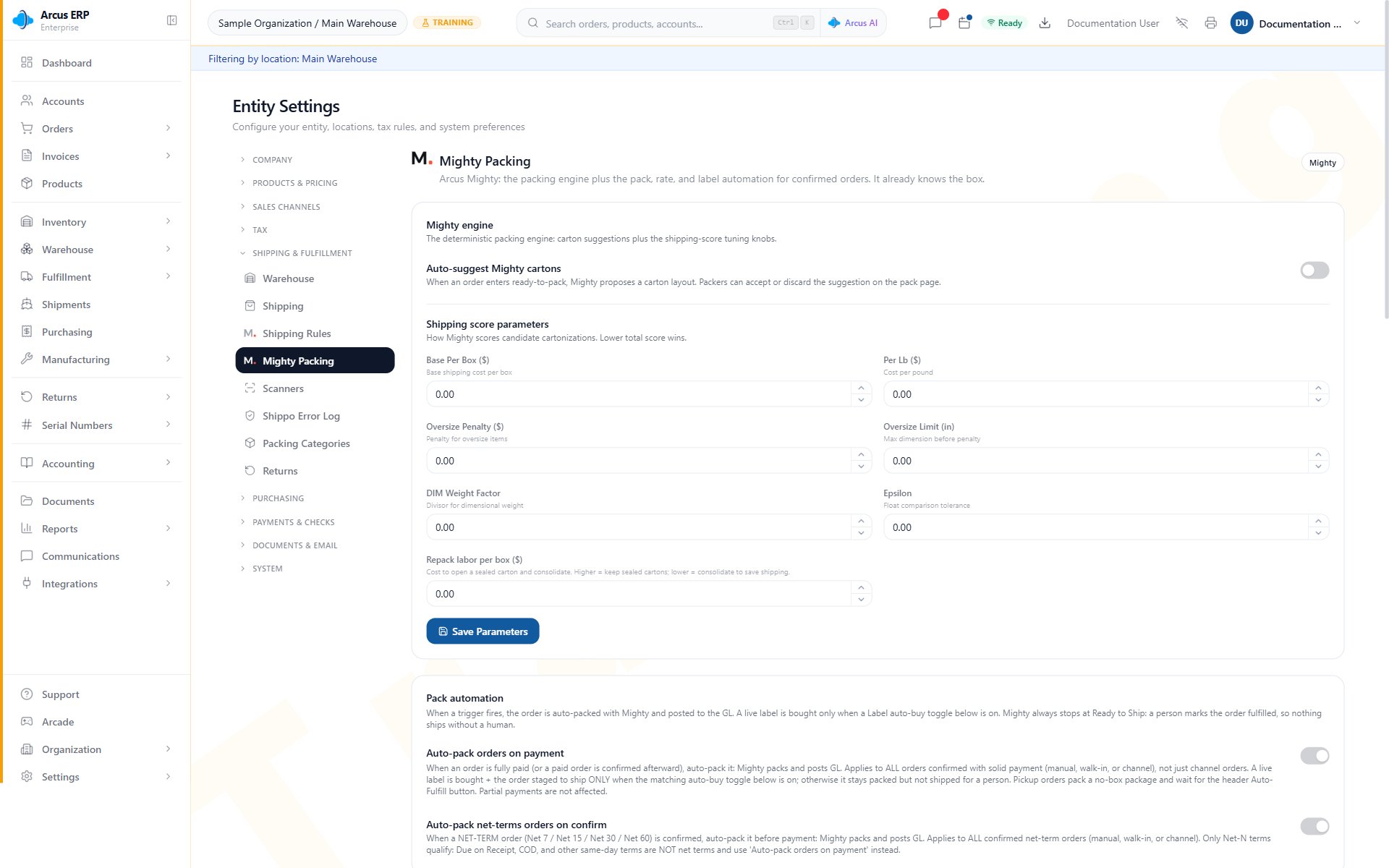
Mighty Packing shows carton suggestions, shipping-score parameters, and the first pack-automation controls.
Set The Mighty Engine
Auto-suggest Mighty cartons is a switch at the top of Mighty engine. When an order enters ready-to-pack, Mighty proposes a carton layout, and packers can accept or discard the suggestion on the pack page. It saves as soon as you change it. Below it, Shipping score parameters tell Mighty how to score candidate box layouts; the lowest total score wins. Use the seven parameters together to tune package suggestions. The built-in values are in brackets:- Base Per Box ($) [6]: adds a cost for each suggested box. A higher value generally favors fewer boxes.
- Per Lb ($) [0.45]: represents the cost associated with package weight.
- Oversize Penalty ($) [50]: adds a cost when a suggestion exceeds the oversize limit.
- Oversize Limit (in) [48]: sets the dimension at which the oversize penalty applies.
- DIM Weight Factor [225]: the divisor for dimensional weight. It accounts for the space a package occupies when comparing options.
- Epsilon [0.03]: allows a small fit tolerance for dimensions that are nearly equal.
- Repack labor per box ($) [3]: the cost to open a sealed carton and consolidate. A higher value keeps sealed cartons sealed; a lower value consolidates to save shipping.
Configure Pack Automation
When a trigger fires, the order is packed with Mighty and posted to the general ledger. A live label is bought only when a Label auto-buy switch below is on; otherwise the order stays packed but not shipped for a person.- Auto-pack orders on payment: starts packing when an order is fully paid, or when an already paid order is confirmed afterward. It applies to every order confirmed with solid payment, whether manual, walk-in or from a channel, not only channel orders. Pickup orders pack a no-box package and wait for the Auto-Fulfill button in the order header. Partial payments do not start it.
- Auto-pack net-terms orders on confirm: starts packing a net-terms order, such as Net 7, Net 15, Net 30 or Net 60, when it is confirmed, before payment. Due on Receipt, COD and other same-day terms are not net terms and use Auto-pack orders on payment instead.
Configure Rate Automation
Rate automation controls how Mighty fetches and selects carrier rates as packages are created and packed:- Auto-fetch rates when package is created: requests carrier rates from Shippo when a new package is created. On by default.
- Auto-select cheapest rate: selects the lowest-cost rate instead of showing every option. Off by default.
- Auto-fetch rates on pack: when Mighty finishes packing an order, fetches rates for each new package so operators see them without an extra click. Off by default.
-
When no rates are available: choose one of these responses:
- Show warning to user: stop and show the issue for a person to resolve.
- Use flat rate from shipping rules: use the applicable flat rate from Shipping Rules.
Configure Label Auto-Buy
Label auto-buy uses the intended service from an order-level override or a matching shipping rule. That service is never silently downgraded.- Auto-buy label on pack (manual and walk-in orders): buys a label when an eligible manual or walk-in order is packed, both from the Pack with Mighty button and from automatic packing. After rates are fetched, it buys the intended carrier service from your shipping rules. If the carrier does not return that service, no label is bought and the order waits for a person to pick a rate. Turning it on also turns on Auto-fetch rates on pack.
- Auto-buy label on channel orders: for orders from a connected channel such as Shopify, Amazon or eBay, validates the ship-to address, rate-shops and buys the label when the order auto-packs on payment. It is the only control that arms channel orders for auto-buy, it is off by default, and it requires Auto-pack orders on payment to be enabled.
- Auto-buy by default: for eligible manual and walk-in orders, allows a matching rule with one intended service to auto-buy a label even when that rule does not explicitly enable auto-buy. Channel orders use Auto-buy label on channel orders.
- Fallback services (when no shipping rule matches): defines the services Arcus is allowed to consider. The list is an allowlist, not a preference order. Mighty buys the cheapest eligible returned rate within the allowed set. Fallback applies only when there is no matching rule and no order-level override. An empty list buys no label.
- **Re-rate Charge Threshold (2.00 default.
Manage Packing Presets
Packing Presets let you save sets of the seven parameters for repeatable testing and operations. Each preset is a card that lists its numbers.- System Default is always present and labelled Canonical fallback (always available). It supports Test Pack only. You cannot edit it, delete it, or select it as a custom default.
- Custom presets support Add Preset, Edit, Delete, Test Pack, and Set Default. With none yet, the list reads “No custom presets yet. The System Default is always available. Create your own preset to save a different scoring parameter set.”
- Set Default makes that custom preset the active default: the card shows Active default (drives the engine), and its seven numbers are copied into the saved parameters in Mighty engine. You see “Applied” followed by the preset’s name and “The Mighty engine now uses its parameters.”
- Add Preset and Edit open Add Packing Preset or Edit Packing Preset. Enter a Preset Name (required), set the seven Shipping Score Parameters, then choose Create or Update. You see “Preset created” or “Preset updated”. The Active Default Preset switch in the dialog marks the preset default; use Set Default on its card to load its numbers into the engine.
- Delete asks you to confirm Delete Packing Preset; the warning reads that the action cannot be undone. You see “Preset deleted”.
Preview With Test Pack
Choose Test Pack on System Default or a custom preset. In the Test Pack Console, edit the sample Items and Boxes, including dimensions, weight, quantity, category, and box capacity as needed. Keep at least one item and one box, then choose Run Test Pack. Review the proposed packed boxes, item placement, and leftovers. If the preview is not practical, adjust the sample Items, sample Boxes, or preset and run it again. Test Pack writes nothing: it creates no packages or labels and does not change fulfillment, inventory, accounting, or saved settings.What Changes Elsewhere
- Packing and fulfillment: suggestions, pack triggers and the automatic stop at Ready to Ship change how orders move through Pack with Mighty.
- General ledger: when a trigger packs an order, Mighty packs it and posts to the general ledger.
- Carrier and labels: rate fetches go to Shippo, and an automatic label purchase spends real shipping money. Review label auto-buy settings before turning them on.
- Customer charges: the Re-rate Charge Threshold decides when a difference between label cost and the shipping charged prompts a recharge.
- Audit trail: saving the parameters, the pack triggers or the rate and label automation is recorded in the Audit Log. Adding, editing, deleting or setting a default preset is also recorded in the Audit Log (as create, update, delete and set default packing preset).
- Other open sessions: people with Settings open see changes refresh without reloading.
Messages You May See
Product Data Mighty Depends On
Review these fields before changing parameters to compensate for a data problem:- Product dimensions, weight, and measurement units.
- Packaging classification and packing category.
- Box products and prepackaged configurations.
- Serial tracking requirements.
- Freight and shipping information.
- Available inventory and bin assignments.
Common Blocks
- No suggestion appears: check the pack trigger, product dimensions, weight, inventory, bins, serial requirements, and freight handling.
- Too many boxes are suggested: verify item and box dimensions, then review Base Per Box ($) and packing categories.
- An oversized box is suggested: verify dimensions, then review Oversize Limit (in) and Oversize Penalty ($).
- No rate is available: check Shippo, ship-from and destination addresses, package data, allowed services, and the selected no-rates response.
- Auto-pack did not start for a paid order: check Auto-pack orders on payment, then the payment status, ACH hold and dispute freeze on Payments.
- A Save button is missing on the automation cards: Save automation settings appears only after you change one of the rate or label controls.
- No label is purchased: check the order override, matching shipping rule, fallback services, Shippo connection, and address validation.
- An order waits at Ready to Ship: review the packages, selected service, rate, and label, then complete fulfillment manually.
Related Articles
Pack with Mighty
Review suggestions, pack items, handle serial capture, and prepare an order for shipment.
Mighty Leftovers
Resolve items that remain unpacked after a Mighty packing attempt.
Payments and Checks Settings
See the payment intent gate, ACH hold and dispute freeze that decide whether an order can pack.
Shipping Rules
Supply preferred carrier services and optional label auto-buy behavior for matching orders.
Product Setup
Maintain the dimensions, weight, packaging, serial, and freight data used during packing.