

AR is connected to orders, invoices, payments, customer credits, refunds, statements,
and financial reports. Investigate the customer and source document before making
accounting corrections.
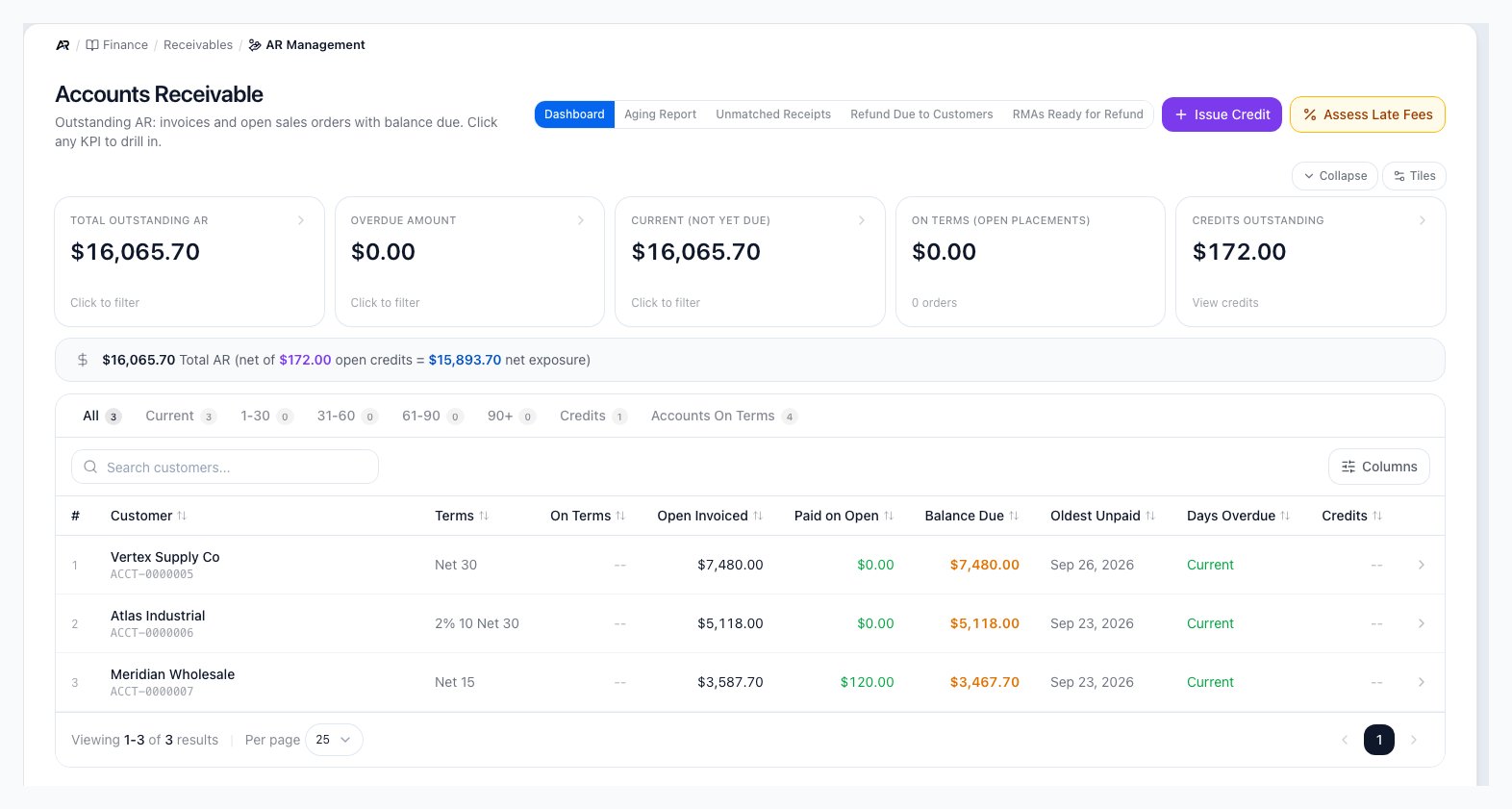
AR Management on the Dashboard view, with the view buttons, the receivables tiles and the customer list.
Before You Start
- You need the View Accounting permission to open AR Management. The customer lists it reads also need View Accounts, which roles that work receivables already have.
- Write Off and the Void action on a credit memo need Post Journal Entries.
- Apply Credit, Record Payment and Change applied invoices need Process Payments. Without it the controls are disabled and the tooltip says You need the ‘Process Payments’ permission to perform this action.
- Void receipt, Issue Credit, Put on hold and the confirm button of the credit Void dialog need Refund / Void Payments.
- Answer hold needs Process Returns.
- Assess Late Fees needs Manage Late Fees, and late fees must be turned on in Settings > Payments & Checks > Late Fees.
Open AR Management
Open Finance > Receivables > AR Management. You can also search for AR Management in the command palette, or follow a receivables link from the Finance dashboard, Period Close or a customer’s transactions tab. Links can also open a customer directly or a particular view, for example a refund shortcut on your Home screen opens Refund Due to Customers. The view buttons across the top are Dashboard, Aging Report, Unmatched Receipts, Refund Due to Customers and RMAs Ready for Refund.Use the Dashboard
- Total Outstanding AR: open balances across customers and source documents.
- Overdue Amount: balances past their due date.
- Current (Not Yet Due): balances that are not yet due.
- On Terms (open placements): open balances on customers who buy on terms.
- Credits Outstanding: customer credit balances that can affect collection work. Click it to open Credit Memos. When no credits are open, the panel says No open credits — gross AR equals net AR.
- Overcharged alert: customers who were billed more than they owe, for example sales tax on a tax-exempt account. Click a customer to view their orders and issue refunds.
Review the Aging Report
Click Aging Report to group balances into current, 1-30, 31-60, 61-90, and 90+ day buckets. Use this view for collection review, period-end reporting, and customer statement preparation. The segments are All, Current, 1-30, 31-60, 61-90, 90+, Credits and Accounts On Terms. Aging counts days from the invoice’s calendar date, so an invoice never enters a bucket a day early. Customers with an available credit appear even when they have no open invoice. Their credit is shown in its own Credits column, apart from the amounts you can collect. Click Aging Report scope details for what the report includes, and Export CSV to download it.Other Views
- Unmatched Receipts: customer payments (ACH, wire, check, cash) that are posted but not yet matched to a bank deposit. Use Match in Bank Rec to finish the match in Bank Reconciliation.
- Refund Due to Customers: orders where the customer paid more than the order total. Open an order to refund the difference or keep it as credit on file.
- RMAs Ready for Refund: received returns that still owe the customer a net refund. See the next section.
Work the RMAs Ready for Refund List
The list shows each return with its customer and order, Status, refund Method, Refund Due and an Action column. Search by RMA number, order number or customer name, and page through the results. Above the table, Total refund owed is the total for every matching return across all pages, not only the page on screen, with the count beside it. Returns with no refund due do not appear. A return that has already been partly paid shows how much under its amount.- Issue Refund opens the refund window for that return, already set to the refund method the return asked for; you can choose another there. Nothing is paid until you confirm in that window, and nothing on this list pays by itself. The button is disabled when the return has no original order (This RMA has no original order, so it cannot be refunded here) or is on hold.
- Put on hold (needs Refund / Void Payments) stops the refund and asks the office a question. In the window, write the question (at least 10 and at most 2,000 characters) and click Put on hold. The return then shows a Refund on hold badge, and a held refund cannot be issued from Issue Refund, the return page, a supplemental refund or the API until the office answers. The hold moves no money.
- Answer hold (needs Process Returns) opens the question with who asked it and when. Write the answer and click Answer and release. The answer is kept on the return and releases the hold; releasing does not pay anything.
- If the holds cannot be loaded, a notice says Refund holds could not be loaded, so a held RMA is not marked on this list. Issue Refund still refuses a held RMA. with a Retry button.
- The empty list says No RMAs are waiting for a refund., or No RMA owing money matches this search. when a search is active.
Open a Customer Detail
Click a customer row to open the customer’s receivables. The tiles show Outstanding, Unpaid Documents and Credit Balance. Use Back to AR to return to the list. The tabs are:- Open invoices: every invoice with a balance, oldest due first. This list and the Outstanding tile are the same money.
- All invoices: the same documents including paid, voided and draft invoices, newest first.
- Payments: every receipt on the account and the invoices it was applied to.
- Credits: credit memos on the account and what is left on each. Void reverses the unused part of a credit memo; any part already applied stays applied.
- Sales orders: what the customer ordered and what it was invoiced as. An order is never a balance until it is invoiced.
- Not yet invoiced: goods that shipped but are not billed, above orders that are open but not shipped. None of it is in Outstanding, Overdue or any aging bucket.
Credit statuses control what you can do with a credit
A credit memo is active or partially used while it can still be applied or voided. Once
it is fully used it becomes applied or fully applied, and once voided or past its expiry
date it is voided or expired. Applied, fully applied, voided and expired credits are
locked: Apply Credit and Void no longer work on them. See
Credit Memos for the full lifecycle and how expiry is set.
Change or Void a Receipt
On the Payments tab:- Change applied invoices moves an existing receipt to different invoices, for example the ones named on a remittance, without recording the cash again. Enter the reason, such as customer remittance advice, and set the amount for each invoice.
- Void receipt reverses a posted receipt. Its journal entry is reversed on its own date, every invoice it paid is open again, and any bank line it was matched to goes back to review. A reason is required and is recorded on the receipt, the reopened invoices and the reversing entry. Invoices that were already past due stay overdue after the void.
Record Customer Payment
- Open the customer row, then click Record Payment. This opens Receive Payment scoped to that customer, with every open invoice listed oldest due first.
- Select the payment method, date, and reference details. A check needs its check number, and ACH or wire needs the bank trace or confirmation number (or tick No reference available). Type the Amount received: it starts blank, and nothing is taken from the invoices.
- Choose which open invoices the payment pays down. The screen opens with no invoice selected. Click Apply oldest first to tick the oldest invoices up to the amount you typed, Pay everything open to tick every open invoice and set the amount to the total, or tick invoices yourself and edit each Apply Amount. To match a customer’s remittance, open Match a remittance, paste the check stub or list of invoice numbers, and Arcus ticks exactly those invoices and names any it could not find open on this account.
- A line under the amount says what will happen: nothing typed yet, Applies in full, more received than applied, or more applied than received. If you apply more than you received, Arcus says so before you submit: a message that names the amount applied, how much more it is than the amount received, and says Lower an invoice or untick one. If part of the payment does not match an open invoice, or the customer is paying ahead of an invoice, tick Hold as credit on account instead of leaving it unapplied. Arcus requires either an invoice application or a credit hold: Apply to at least one invoice, or enable ‘Hold as credit on account’.
- Click the review button and confirm in Confirm payment application.
- The screen then shows Payment recorded, with focus moved to that heading so a screen reader announces it, and the updated balance.
Issue and Apply Credits
Use credits for overpayments, returns, customer concessions, or other approved credit adjustments. Credits reduce what the customer owes when applied to open documents. They should include a reason and reference so the next person can understand why the credit exists.Customer Statements
Statements summarize open customer activity for a selected period. Use them when a customer needs a formal balance summary, when collections needs a clean view of open documents, or when accounting is reconciling customer payment disputes.- Statement on a customer opens Customer Statement. Choose Balance forward or Open item, preview it, then Download PDF or email it. A customer with no email on file shows Add email to customer. A customer who opted out of statement emails needs Send anyway, and the override is recorded in the audit log.
- Send Statements from the aging view opens Send Customer Statements for the customers you select (open balance, overdue, or all on terms). You can also skip customers who came from a data migration, since a first statement is not always the right welcome for them. Sends run in small batches; Arcus reports which were sent, skipped (for example no email on file), or failed, and View in Communications opens the email log for the full detail.
- Statement emails are controlled by Monthly AR statements in Settings > Documents & Email >
Email Configuration. When that notification is off, sends are skipped (recorded as
notification_disabled in the email log) but preview and PDF download still work. **Settings
Payments & Checks > Dunning Levels** is a related but separate setting: it schedules automatic overdue reminder emails, not the statements you send from this screen.
Late Fees
Click Assess Late Fees to open the Assess Late Fees dialog. Arcus first previews the fees it would assess, invoice by invoice, with each customer, days overdue, balance due, and the fee amount. Nothing is charged until you click Assess on the preview. What counts as eligible, and how the fee is calculated, comes from **Settings > Payments & ChecksLate Fees**:
- Finance charge enabled turns the whole feature on or off (off by default).
- Grace period (days) delays eligibility after the due date (default 30).
- **Min invoice amount (25).
- Set either a Flat fee amount ($) per cycle, or a Finance charge rate (%) applied to the balance; a flat amount takes priority over a rate when both are set.
- Maximum fee per cycle ($) caps the computed fee (0 means uncapped).
- Compounding mode (monthly, daily, or none) controls how repeat cycles accrue.
- Finance charge taxable calculates and adds tax on the fee.
- Notify customer on assess emails the customer when a fee posts (on by default).
What Posts
Every action on this screen keeps the general ledger, tax, and email in sync automatically, and records who did what:- Record Payment posts the cash or card receipt to the ledger and, for card payments, processes the charge or credit with your payment processor.
- Issue Credit, Apply Credit, and Void on a credit memo each post their own reversing or offsetting journal entry; issuing or voiding a credit created from an overpaid order also updates that order’s payment status.
- Write Off posts a journal entry that moves the balance out of Accounts Receivable.
- Void receipt reverses the original receipt’s journal entry on its own date and reopens the invoices it paid. Any bank line it was matched to goes back to review.
- Put on hold and Answer and release write the question and the answer to the return and its history. They do not move money.
- Assess Late Fees posts a journal entry per fee, calculates tax on the fee when taxable finance charges are on, and emails the customer when notifications are on.
- Send Statements (single or bulk) emails the customer through your connected email sender.
If a Customer Disputes a Charge
A customer who contests a card charge or an invoice amount shows up in Disputes, not on this screen. Use AR Management to confirm what was billed and collected, then work the dispute itself, including any evidence response, from the Disputes screen.Common Blocks
- Customer does not appear: search all tabs and confirm the account has open AR activity.
- Balance looks wrong: open the customer detail and compare invoices, payments, credits, and overcharge alerts.
- Payment will not record: check required payment fields, permissions, payment method setup, and period controls.
- Credit cannot apply: confirm the credit is available, unexpired, and belongs to the same customer. Apply Credit opens the Apply Credits window, which lists the customer’s credits and open invoices side by side; it needs Process Payments.
- Issue Refund is disabled on a return: the return is on hold or has no original order. Hover the button for the reason.
- A void is refused: the dialog says why (a card payment, an already-voided receipt, a refund or a placeholder row) and leaves the button disabled.
- Aging does not match dashboard: review the scope note and use aging for collections buckets.
- An ACH payment was returned: the return reverses the receipt, including a receipt applied across several invoices, dated to the bank transaction that returned it.
- An invoice moved from Overdue back to Posted: its due date or payment terms changed and the new due date is not past.
Related Articles
Account Management
Create customer and vendor accounts with terms, addresses, and preferences.
Invoice Management
Find, create, post, send, pay, correct, and void customer invoices.
Record an Order Payment
Record cash, card, ACH, check, wire, external, terms, or credit payments.
Payment Methods
Save cards and bank accounts for future customer payments.
Collections
Finance > Receivables > Collections: log calls and promises to pay, and assign owners.
Credit Memos
Issue, apply, refund, and void customer credits, and see the full credit lifecycle.
Disputes
Track and resolve card and invoice disputes raised against your customers.
Bank Reconciliation
Match deposits and receipts to your bank feed and complete the period.
Financial Reports
Run balance sheet, profit and loss, cash flow, and operational reports.