

Read The Type-Specific Number
Availability sums stock across the entity. A warehouse or location selection elsewhere in Arcus does not narrow this BOM card.
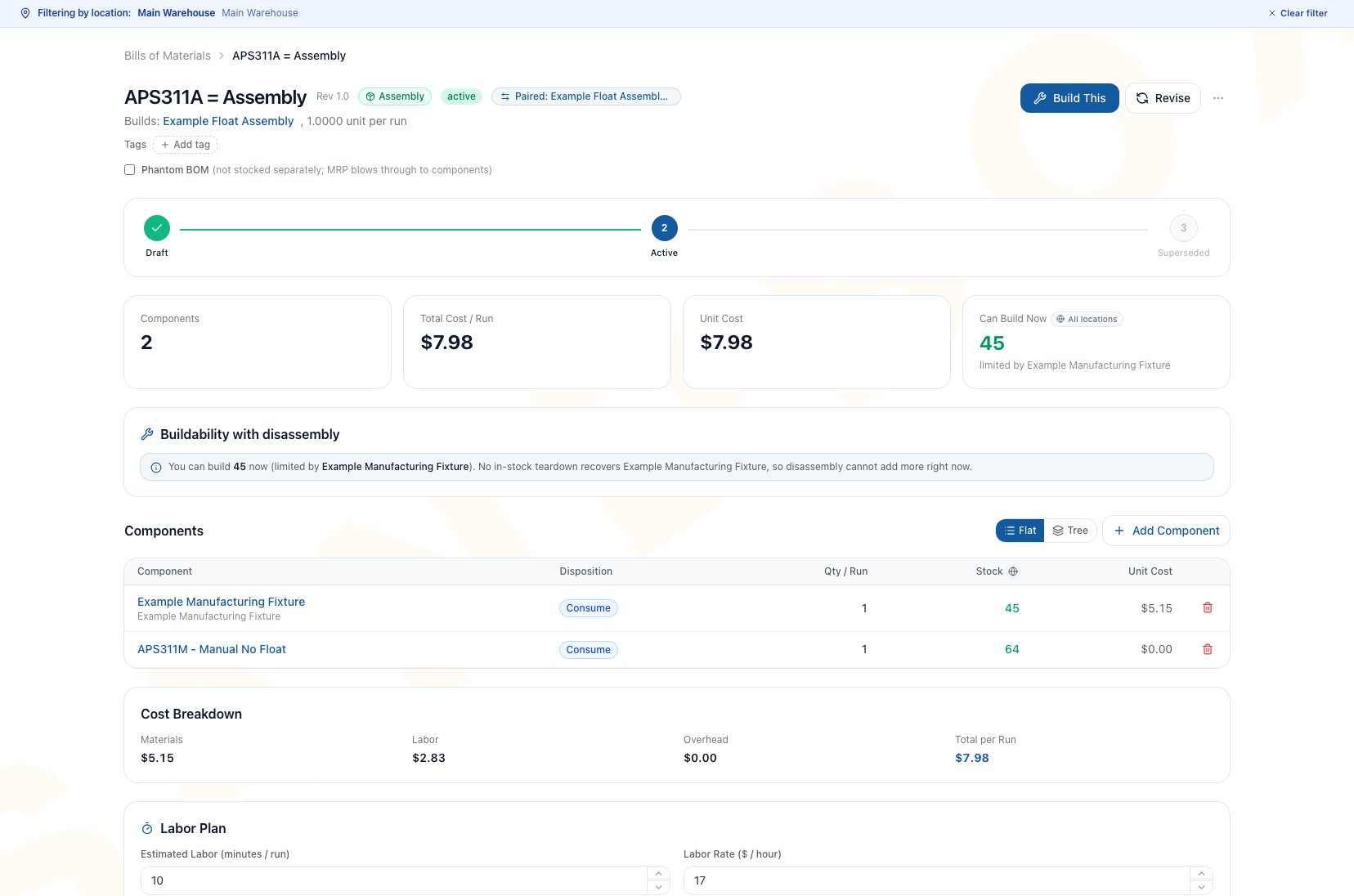
The BOM detail page shows an entity-wide build estimate and an honest no-lift state when available teardown recipes cannot improve the binding constraint.
Check Availability Before Starting Work
Prerequisites
- The BOM header and all material lines are complete.
- Quantities are correct per run.
- Current inventory balances are posted.
- For Conversion, all Consume and Add lines have been added.
- For a teardown-assisted plan, an Active Disassembly BOM can return at least one actual binding component and its source is in stock.
Workflow
- Open the exact BOM.
- Confirm type, status, output quantity, and component lines.
- Read Can Build Now, Can Disassemble Now, or Can Convert Now.
- For Assembly, inspect every component tied at the constraining quantity and each quantity per run.
- For Conversion, inspect both the source and every Consume or Add line. Do not assume the source is always the binding constraint.
- Compare the estimate with the intended work-order quantity.
- Open Build This, Disassemble, or Convert only when the recipe and quantity are appropriate.
- On New Work Order, verify location, quantity, serial when required, dates, and availability again before creation or release.
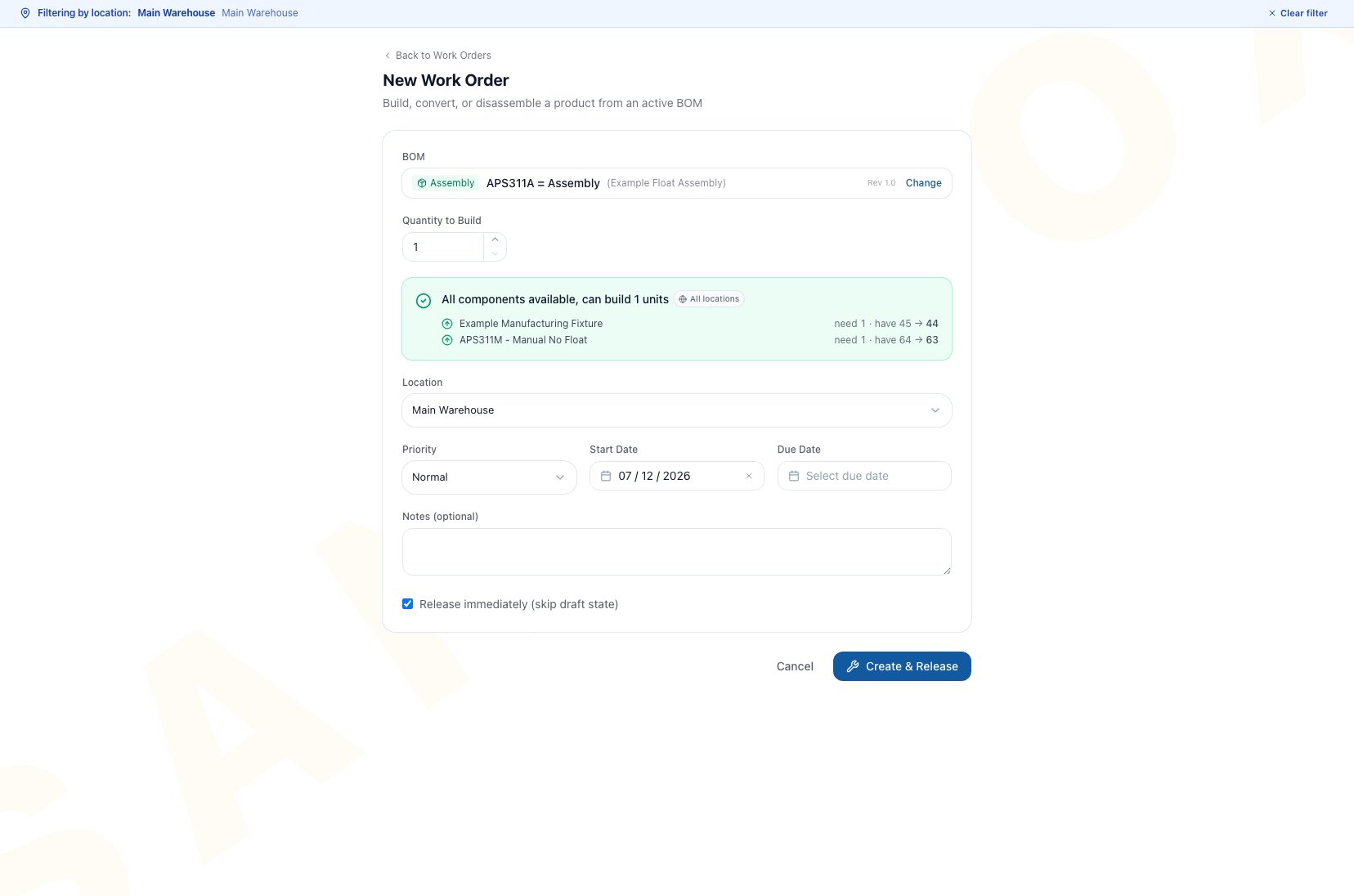
Starting from the exact Active BOM opens New Work Order with that recipe selected so quantity and current availability can be reviewed again.
Understand Output Quantity Per Run
Assembly capacity is calculated in whole supported runs and then expressed as finished output. A recipe that produces multiple units per run can therefore show a finished quantity larger than the number of supported runs. Review both values before changing a work-order quantity:- Quantity per Run on each material line is the amount needed for one full run.
- Output Quantity per Run is what that full run produces.
- The least-supported required line limits the whole recipe.
Use Buildability With Disassembly
The Buildability with disassembly card appears for Assembly BOMs. It asks whether tearing down an in-stock source could recover a component that currently binds the assembly. The calculation is deliberately narrow:- It examines every component tied at the current binding quantity.
- It uses Return to stock lines from Active Disassembly BOMs.
- It requires available stock of that disassembly source.
- It looks one teardown level deep.
- It rechecks the assembly after the proposed recovery, so another component can become the new constraint.
- Recovering a nonbinding component does not increase the result.
Review A Product’s Manufacturing View
Open Products, select the specific physical product or child variant, and choose Manufacturing. The tab is not shown for kits, services, boxes, or variant parents. Changing the supply method requires product edit access. Manufacturing viewing or work-order creation permission alone does not authorize that product change.
Total potential supply is on-hand stock plus the quantity recoverable from one-level teardown sources. It is not the number that can be built. Buildable now uses an Active Assembly recipe and prefers an Active default when one exists.
Distinguish BOM Availability From MRP
MRP also requires the product to be active, inventory tracked, and supplied as Manufactured or Both. An assembly marked Phantom BOM changes MRP explosion only: an active default phantom child is replaced by its leaf requirements instead of appearing as a separate planned subassembly. Phantom does not change this card, move stock, or create work.
See MRP Planning before treating a local availability result as a production plan.
The BOM detail Plan combined run action described above comes from a positive one-level teardown lift on that exact Assembly. It is separate from any recovery information shown during broader MRP review.
Common Scenario: Recover The Binding Part
An Assembly BOM is blocked by a housing. Another in-stock product has an Active Disassembly BOM that returns the same housing.- Confirm the housing is an actual binding component on the Assembly and check whether another component is tied with it.
- Review the teardown source quantity available entity-wide.
- Confirm the Disassembly returns the housing rather than scrapping it.
- Read the additional finished output after Arcus rechecks the full Assembly.
- Choose Plan combined run only if the lift is positive.
- Verify both exact recipes and the work sequence before release.
Troubleshooting And Refusals
- Can Build Now is zero: Inspect every tied binding Consume or Add requirement, quantity per run, and entity-wide balance.
- Can Disassemble Now is zero: The source product has no current available stock.
- Can Convert Now looks too high: Complete the material list. Both Consume and Add lines constrain conversion along with the source.
- The location cannot support the displayed number: The BOM card is entity-wide. Choose and verify the work-order location separately.
- No teardown lift appears: There may be no Active Disassembly that returns a tied binding component, no teardown source stock, or another tied component may still cap output at the same quantity.
- A teardown recovers a useful part but adds no buildability: The recovered part is not the current binding component.
- Plan combined run is absent: Arcus shows it only when a one-level teardown creates a positive lift and the user can create manufacturing work.
- The Product Manufacturing tab is missing: Open a specific physical product or child variant. Kits, services, boxes, and variant parents do not show it.
- Build This Product opened an unexpected recipe: Return to the product, open the intended Active BOM row, and use Build This from that exact recipe.
- Completion later reports insufficient source stock: Availability was not reserved. Recheck stock and use a supported completion quantity.
- MRP ignores an available recipe: Confirm the BOM is Active and Default and the product is active, inventory tracked, and supplied as Manufactured or Both.
FAQ
Why can Can Convert Now appear before Add lines exist?
Why can Can Convert Now appear before Add lines exist?
Arcus can show a source-based preview while the Draft is incomplete. Add every Consume and Add requirement before relying on the number. On the current BOM page, Activate remains unavailable while no material line exists.
Do Add and Consume constrain conversion differently?
Do Add and Consume constrain conversion differently?
No. Both currently require stock and enter the same material-cost path. Their different labels communicate floor intent.
Can teardown-assisted buildability chain through several BOMs?
Can teardown-assisted buildability chain through several BOMs?
No. It is Assembly-only, examines the current tied binding components, and looks one disassembly level deep.
Does availability reserve inventory?
Does availability reserve inventory?
No. Recheck quantity and location before release and again before completion.
Does Build This Product always use the default BOM?
Does Build This Product always use the default BOM?
No. The current shortcut selects an Active BOM but does not guarantee the default. Open the intended BOM and use Build This when recipe selection matters.
Related Guides
Bills Of Materials
Verify recipe type, status, quantity per run, and the exact product revision.
Disassembly And Conversion
Understand source stock, Add and Consume constraints, and Return to stock outcomes.
Create A BOM
Correct line and output-quantity setup before relying on availability.
MRP Planning
Turn qualifying active default recipes and broader supply-demand signals into suggestions.
Work Orders
Verify location and stock, then release and complete the planned work safely.