

A pickup order sits in
awaiting_pickup until the customer collects it. If the customer never arrives, Arcus nudges them with reminder emails, and a CS rep marks the order customer no-show by hand when it is genuinely abandoned. There is no automatic cancellation. Marking no-show reverses the GL fulfillment entry, voids tax, releases inventory, and emails the customer. It does NOT auto-refund.When This Workflow Runs
Pickup no-show applies to orders where:delivery_option = pick_upfulfillment_status = awaiting_pickup- The customer has not collected the order.
- Manual. A CS rep clicks Mark No-Show on the order detail page or the No-Show queue when the order is genuinely abandoned. The daily sweeper only sends reminder emails; it never cancels.
Configure Pickup Settings
The pickup workflow is driven by per-entity settings. An admin sets them in Settings > Order Workflow > Pickup Reminders:
Each reminder day is a positive integer. Multi-stage reminders are labeled early, mid, and last so the customer sees increasing (but non-threatening) nudges. The copy never threatens an automatic cancellation.
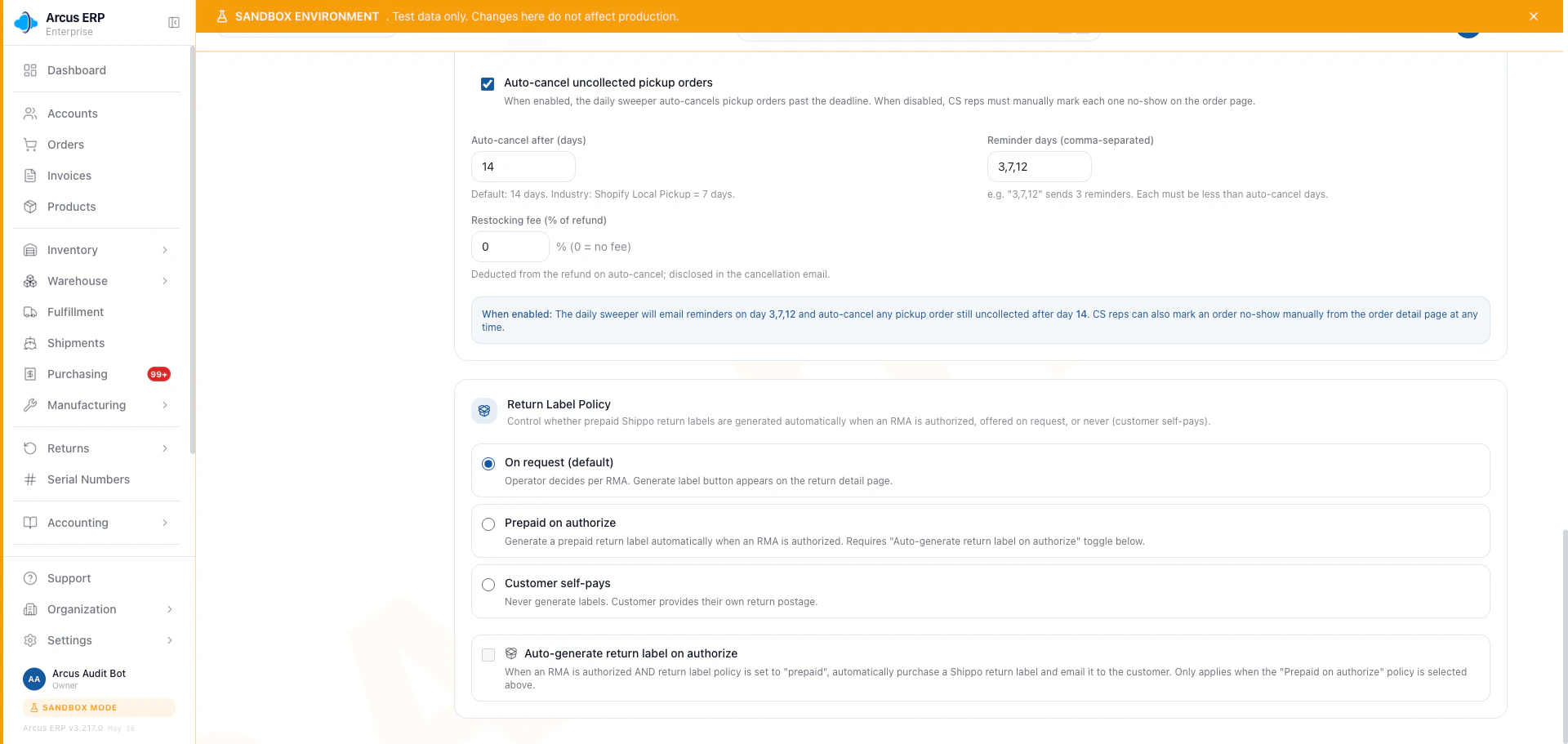
Pickup reminder settings live in the Order Workflow page so the admin can tune the reminder cadence per entity.
How Reminders Work
When a pickup order transitions intoawaiting_pickup, Arcus stamps pickup_ready_at. The daily reminder job walks every entity’s pickup_reminder_days schedule and sends a reminder email when:
- The order age passes a reminder threshold.
- That stage has not already been sent (each configured stage sends exactly once).
- A minimum 12-hour gap is honored between sends so a misconfigured timer cannot carpet-bomb the customer.
Manual No-Show
When a pickup order is genuinely abandoned (or the customer calls and confirms they will not collect), a CS rep finalizes it by hand:- Open the order detail page or the No-Show queue.
- Open the Order Actions menu.
- Select Mark No-Show.
- Review the server-enumerated confirmation (it shows exactly what will reverse and what payment is owed back) and confirm the reason in the modal.
- Apply.
What Mark No-Show Does
The no-show runs the canonicalvoidOrder cascade with suppress_refund set. In one transaction:
- Reverses fulfillment GL. Cost of Goods Sold and Inventory entries are reversed so the books match the unfulfilled state. The reversal is double-entry balanced.
- Voids sales tax. Sales Tax Collected is reversed. When AvaTax is connected, the AvaTax invoice is voided in their system.
- Reverses shipping income. Shipping Revenue and Shipping COGS are reversed if the order was billed for shipping.
- Releases inventory. On-hand goes back up and FIFO layers are restored. Serialized units transition from
soldback toavailable. - Never auto-refunds. If the customer pre-paid, the payment is NOT refunded automatically. The paid amount is parked as a customer credit (AR) and a refund-owed work item (
REFUND_MANUAL_REQUIRED) is surfaced for a human to issue via a sanctioned refund surface (Issue Refund or the Cancel wizard). Any restocking fee is applied by that human when they issue the refund. - Stamps
pickup_no_show_aton the order so reports can find no-show orders later. - Logs the activity on the order timeline with the
PICKUP_MANUAL_NO_SHOWaction. - Broadcasts
order.updatedso dashboards reflect the change immediately. - Sends the no-show email to the customer. It acknowledges any payment on file and says a human will be in touch about it. It never claims a refund was already issued.
cancelled and voided. The original fulfillment entries remain in the GL for audit; the reversing entries net them out.
Dashboard Surfaces
Pickup no-show appears in:- Order Lifecycle Status mix. No-show orders show in the cancelled bucket with a no-show sub-tag so reports can split them out from other cancellations.
- Pickup Aging Report. Open pickup orders sorted by
pickup_ready_atage. The oldest bucket (13+ days) flags orders that need staff attention: mark picked up if the customer collected, or mark no-show if abandoned. - Activity Log. The
PICKUP_MANUAL_NO_SHOWaction surfaces in the entity activity stream.
When Mark No-Show is Blocked
- Not a pickup order. The button is hidden if
delivery_optionis notpick_up. Use the regular cancel workflow instead. - Already collected. If the customer collected and the order is
fulfilled, no-show does not apply. Use a return instead. - Already cancelled. A previously cancelled or voided order shows the no-show button as disabled.
- Closed period. If the original fulfillment was in a now-closed period, the GL reversal cannot post. Reopen the period or post the reversal in the current period after a conversation with accounting.
Industry Notes
The 3-7-12 reminder cadence matches Shopify Local Pickup and Square Will-Call reminder defaults. Arcus deliberately does not auto-cancel: marking a pickup order no-show is a human decision, so a collected-but-unmarked order is never voided and refunded by a scheduler.Related Articles
Walk-In Pack
Counter-sale pack for orders the customer takes home today, not pickup orders that wait.
Cancel Order Decision Tree
Pick the right cancel path: void, cancel, no-show, or return.
Apply Account Credit
Apply the parked credit when a no-show payment stays as an AR balance rather than going back to the card.
Order Lifecycle
Review all order status transitions, including pickup states.