

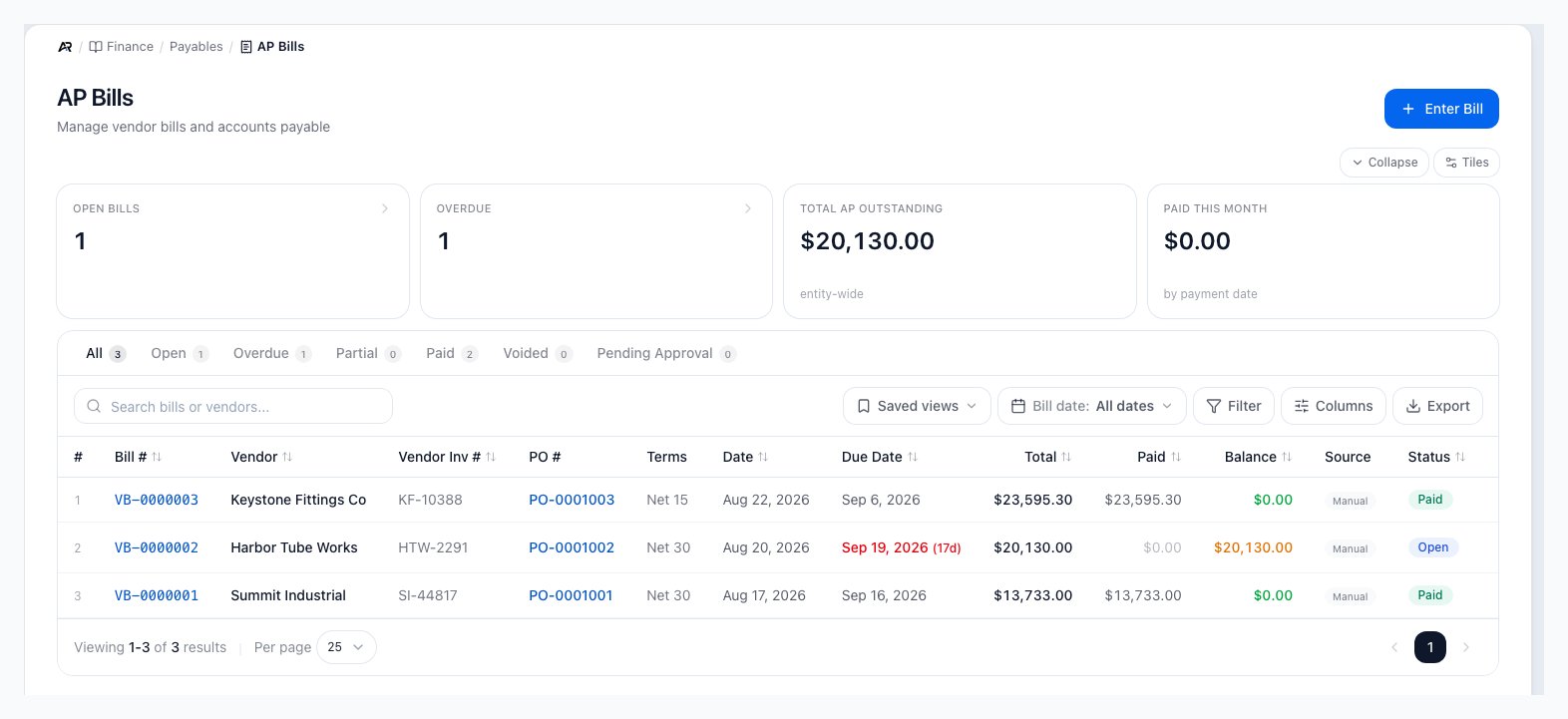
The bill list with its four tiles, status tabs, saved views, filters and columns.
How AP Fits Together
Most vendor payables begin with a purchase order, receiving, or a direct vendor bill. Once a bill is posted, it appears in payables until it is paid, credited, voided, or otherwise reversed through a supported correction workflow.Open AP Bills
Open Finance > Payables > AP Bills. You can also search for AP Bills in the command palette, follow View all on the dashboard’s bills-due list or View overdue on its banner (both open the list; use the Overdue tab to narrow it), or open a bill from a purchase order, the GRNI report, the Calendar, the Check Register, an account’s AP tab or Period Close. A link to one bill opens its detail page directly, and New AP Bill from the quick-create menu opens the entry form. A link from a purchase order carries the PO and vendor into the form. Viewing needs permission to view accounting. Entering, editing, paying bills, placing a payment hold, correcting landed cost and moving a bill’s effective date need permission to post accounting. Approving bills, rejecting bills, releasing a payment hold, posting a revaluation, and the Void Bill and Write Off Balance menu items are enabled for users who can approve bills; anyone else sees them disabled with the permission named. Reversing a payment needs permission to void or reverse payments. Posting a bill on a date beyond your company’s posting window needs permission to close periods. The void preview’s amounts are shown only to users who can also see margins.- Tiles: Open Bills, Overdue, Total AP Outstanding and Paid This Month. Paid This Month counts posted payments by the date the payment was made, not the bill date, so a bill dated last month and paid this month is included and a bill dated this month but not yet paid is not.
- Tabs: All, Open, Overdue, Partial, Paid, Voided and, for users who can approve bills, Pending Approval; the Filter panel’s Status options add Draft and Written Off. An Attention tab appears only when a draft or written-off bill exists outside those filters, so nothing is silently unreachable.
- Source filter: Manual entry, Auto (from receipt) or Migrated.
- Columns: Bill #, Vendor, Vendor Inv #, PO #, Terms, Date, Due Date, Total, Paid, Balance, Source and Status, with saved views, a bill date range, Filter, Columns and Export. A bill’s list row refreshes when anyone changes it.
- 3-way match warning: a small amber badge next to a bill number means the bill has open warnings, such as a price or quantity variance against the receipt. Open the bill to review them.
- Approvals: bills waiting for approval show Review now, and each can be approved or rejected from the list.
- Row actions include Edit bill and Void bill. Edit bill is hidden for a voided or written-off bill, a rejected bill, and a paid bill unless its effective date can still move. Approving from the list asks the same posting-date and duplicate-charge questions as approving from the bill (see Approve below).
Enter a Bill
- Click Enter Bill.
- Choose the vendor, enter the vendor invoice number, Bill Date, Terms or Due Date, and the lines. Effective Date is the date the bill posts to the general ledger; leave it blank to use the bill date. A bill can carry landed-cost lines such as Freight In, Duty, Brokerage, Insurance and Handling (your company can add its own categories).
- Click Save Bill, or Save & New to start another. Arcus confirms Bill (number) created.
Landed cost lines
On a landed line, choose how the charge spreads: By value (cost), By quantity, By weight, By volume, Split equally, or Split by hand, which takes an amount per receipt (for example the duty a customs entry states per line). Split by hand is offered only when Arcus knows the receipts the line lands on: a bill linked to its purchase order, or a standalone landed bill with receipts selected. Otherwise it is disabled and says why. The picker lists received purchase orders for the vendor, searchable by PO, receipt, vendor, product or SKU; tick Show receipts from all vendors when a carrier bills for another vendor’s goods. Each receipt shows what landed cost is already on it (No landed cost on them yet, or the bills and amount). Several landed bills may share a receipt. When a bill joins others, Arcus warns (bill) joins (n) landed bills already on the same receipts and names the first three; it never blocks on that alone.Posting date
When the effective date is outside your company’s posting window (set under Settings > System > Fiscal Year), a banner under the dates names how many days ahead or back it is. A user who can close periods enters a Reason for the future-period date (or prior-period date) of at least four characters, and the bill posts to the ledger on that date if an open monthly accounting period covers it. Anyone else sees that the date is beyond the window and needs permission to close periods. If the server refuses the date, a dialog titled for the cause explains it (the date is past the forward or backdate window, a closed period, a locked tax year, or no period covers it) and, for a closed period that an open period follows, offers Use (the next open date). Day counts use the server’s day. For how the bill date, effective date and due date fit together, which reports follow the posting date and how to move a posted bill’s date, see Bill Dates and GL Posting. Arcus stops you before a mistake:- Duplicate vendor invoice number: another bill from this vendor already uses the number (the form also warns Possible duplicate of (bill) for this vendor as you type). Correct it, or choose Override and save with an Override reason when it is genuinely a different invoice.
- This looks like a landed charge already entered: a landed bill of the same kind and nearly the same amount already sits on these receipts. The dialog lists it (vendor, category, date, On file amount and This line amount). Give the reason it is a separate charge, then Override and save; the reason is recorded on the bill’s activity.
- This purchase order came from your previous system: a purchase order migrated from another system has its earlier bills loaded without a link to it, so Arcus cannot see what was already billed. Confirm the goods are genuinely unbilled, give a reason, and Override and save; the override is audited. When there is no goods accrual to relieve, the dialog is titled These goods have no accrual to relieve and also asks you to pick the Goods account the goods belong to (never a payable, receivable, accrual, landed-cost clearing or bank account). If you save several bills and accept one answer, the page keeps the accepted answers and does not ask again.
- This bill would over-bill the purchase order: the bill exceeds what was received on the PO. Correct the lines, or Override and save with a reason, which is recorded for audit.
- If the vendor has an unapplied prepayment, a banner suggests applying it after you save.
Work a Bill
Open a bill to see its progress (Draft, Posted, Partially Paid, Paid), lines, payment history and banners. From the header:- Pay Bill records a payment from the bill. Payment Recorded then offers Email Remittance, Print Remittance and Print Check.
- Approve and Reject for bills waiting on approval. A bill over your entity’s high-value threshold shows Approve (Controller Required) instead: a regular approver sees the button disabled, with the reason on hover, and only a controller-tier approval can clear it.
- Edit Bill to change lines, invoice number, due date, terms and notes. Editing beyond the received quantity asks for an override (Edit exceeds received quantity). Saving re-posts the general ledger to match the new lines. A bill with a payment applied has its lines locked: issue a vendor credit memo to change the amount. A bill imported from the previous system has its lines locked too (invoice number, due date, terms and notes can still change), and the page says why. The Effective Date field moves where the bill posts in the ledger. Changing it opens Move (bill) from (date) to (date), which shows the lines of the posted entry and posts two linked correcting entries; the original entry stays as it is, nothing is reversed or deleted, and your reason (at least four characters) is recorded on the bill’s activity with both entry numbers. A due date that came from the payment terms follows the new date; one set by hand is kept. The date cannot move past the bill’s first payment or credit, and a bill linked to a purchase order or carrying a revaluation or landed-cost entry cannot be re-dated (void it and re-enter it). On a paid bill only the effective date can move. If you change both lines and the date, save the lines first; if only part saves, a Partly saved banner says which fields were not. A successful move says (bill) now posts on (date).
- Adjust bill on the Pending vendor return banner follows the same rule as Edit Bill: it is enabled for users who can post accounting, disabled with the permission named for others, and absent when the bill cannot be edited.
- Correct Landed Cost (on a paid or partly paid bill with a landed line) lowers a freight or duty line to the corrected amount. Arcus reverses the original landed allocation, re-allocates at the corrected amount, and issues a vendor credit for the overcharge. To increase landed cost, enter a new freight bill instead. The dialog shows the Original capitalized freight, the Corrected freight and the Vendor credit to issue, and a Reason. Receipts and a split-by-hand grid work as on the entry form. Arcus checks the correction before posting: an invalid receipt selection, a PO-linked line on a bill with no PO, lines from two POs, or a goods line unrelated to the bill’s PO are refused in the dialog with The correction was not saved, and nothing was posted. and the reason, so you can fix the bill and press again. The duplicate-charge question appears here too. The confirmation reads Landed cost corrected; vendor credit (number) issued for (amount)., and names any landed bills already on the same receipts. Landed reversals follow stock that has since been sold, transferred or returned: the charge comes out of the inventory or cost of goods sold position it is in now, not its original allocation alone.
- Place Payment Hold… keeps a bill out of Quick Pay, the pay run, printed checks, ACH, and auto-pay until the hold is released. Choose a reason such as a suspected duplicate bill or an unrelieved vendor prepayment; the reason shows as a pill next to the bill everywhere it appears. A hold for a suspected duplicate also blocks applying a vendor credit or prepayment to the bill, since relief is exactly what a true duplicate must not get; a prepayment-type hold does not, since applying the prepayment is the fix. Release the hold from the banner on the bill (needs permission to approve bills) with Release hold.
- Reverse Payment… voids a posted payment on this bill: it reverses the disbursement GL entry, restores any vendor credits the payment used, voids the check if one was printed, and reopens every bill the payment covered, not only this one. Needs permission to void or reverse payments.
- Write Off Balance writes off what is left on the bill as other income; it is not a cash refund. It posts on the bill’s own posting date, so it is refused when that date is in the future, in a closed period or in a locked tax year, and the dialog says which.
- Void Bill voids the bill and posts a reversing journal entry. A voided bill stays at a zero balance, even if the bill is recalculated later. The dialog warns Voiding cannot be undone. A bill with payments must have them reversed first (Reverse Payment…). For a bill that carries landed cost, the dialog previews the effect before you confirm: Landed cost this void takes back, how much comes Out of inventory, for units still on hand and Out of cost of goods sold, for units already sold, the receipt layers and locations affected, and the accounts with debits and credits. If stock moved while you were reviewing, Arcus asks for a fresh preview before Void becomes available again. When units are in transit, sent to another company, or held in quarantine or staged for a vendor return, the dialog says This bill cannot be voided yet, and nothing was posted. and lists each one to resolve first. An optional Reason is added to the bill’s notes (as “VOIDED: reason”) once the void succeeds; if the note cannot be saved Arcus says the void is done and the reason can be added from Edit Bill. The success message names the inventory and cost of goods sold amounts.
- Enable auto-pay on due date schedules a check or ACH payment for the due date.
- Apply prepayment to this bill uses a vendor prepayment you already made.
- Post Revaluation JE appears when the billed cost differs from the received cost, so inventory value can follow the bill.
- A Pending vendor return banner warns when a return for this PO is still open; Adjust bill takes you to the edit.
Use the Right Payables Path
- PO-linked inventory bill: start from GRNI or the purchase order so Arcus can match received items to the vendor bill.
- Regular vendor expense: create or review the vendor bill directly in AP Bills.
- Recurring expense: use Recurring Bills when the same vendor bill should be generated on a schedule.
- One-off check without a bill first: use Write a Check when the expense can be coded and paid in one flow.
- Credit from a vendor: issue or apply a Vendor Credit before paying the remaining cash portion.
- Tax reporting vendor: keep the vendor’s 1099 flags and W-9 state current before year-end reporting.
Review Received Not Billed
GRNI means goods received not invoiced. It shows inventory that has been received from a purchase order but has not been matched to a vendor bill yet. Review GRNI before creating PO-linked bills so the bill amount, quantity, and receipt history line up.Pay Open Bills
Pay Bills groups open and partial bills by vendor. Choose the payment method, bank account when required, payment date, selected bills, and any vendor credits before you confirm the payment.Payment Method Rules
- Check: records the payment and creates a printable check.
- ACH: records an ACH transfer you start in your bank’s portal.
- ACH File (NACHA): creates a bank-upload file; money is not sent until your team uploads it to the bank portal.
- Wire: records a wire after it is handled through the bank.
- External: records a payment already made by other means, such as a card.
- Cash: records a cash payment and does not require a bank account.
Vendor credits reduce the cash portion
Vendor credits are applied inside the vendor group. They are not selected as a payment
method, and they cannot be applied to a different vendor’s bills.
Print and Reconcile Checks
Check payments create check records that can be printed, batch printed, cleared, voided, and reviewed from the Check Register. The Check Register is also where AP teams confirm which bills were paid by a specific check.Common Blocks
- Bill is missing from Pay Bills: confirm it is posted, open or partially paid, and not filtered out by vendor or date.
- Payment is blocked: check required bank account, payment date, permissions, and accounting-period status.
- The date was refused: read the dialog title (past the window, closed period, locked tax year, no period covers it, or the date cannot move past the first payment); each states the fix, such as reopening the period from Period Close or generating the month’s period.
- Void or edit says a cost entry is in a closed period: reopen that period from Period Close first, or record the change as a vendor credit.
- Check cannot print: review check configuration, check numbering, popup blockers, and printer access.
- NACHA cannot generate: confirm funding-bank routing data and vendor ACH details.
- Vendor credit is not selectable: make sure it belongs to the same vendor and is open, unexpired, and not already fully applied.
- PO bill does not match receiving: return to GRNI or the purchase order and confirm received quantity, cost, and bill lines.
- 1099 totals look wrong: review vendor flags, payment dates, form type, W-9 state, and tax-year lock status. 1099 Vendors says which dates decide the year.
Related Articles
GRNI and PO-Linked Vendor Bills
Create vendor bills from received purchase orders and clear received-not-billed balances.
Pay Bills and Print Checks
Pay open vendor bills by check, ACH, ACH file, wire, or cash.
Check Register and AP Checks
Print, batch print, clear, void, and audit vendor checks.
Vendor Credits
Issue, review, expire, and apply supplier credits during bill payment.
Recurring Bills
Create scheduled vendor bill templates, pause runs, allocate GL splits, and review history.
1099 Vendors
Review flagged vendors, W-9 status, tax-year totals, downloads, and locks.