

Entity Settings
Business, products, channels, tax, shipping, purchasing, payment, document, email, and system preferences.
Organization
Manage organization-wide access, entity membership, and shared administration.
Organization Users
Invite users, assign entity access, restrict locations, resend invites, send a password reset code, mark an email verified, remove access, and reset MFA.
Roles and Permissions
Review locked system roles, duplicate a role, and create custom access profiles for your team.
Profile and Security
Update your profile, avatar, phone number, PIN, MFA factors, security keys, and recovery options.
Access depends on your role
Some settings are visible only to users with settings, user, role, audit, or accounting
access. If a setting or an Organization page is missing from the deck, ask an owner or admin to check your
role, entity membership, and custom permission overrides.
Organization Overview
Where: Organization > Overview Organization in the deck holds the pages that span every entity: Overview, Entities, Users, and Audit Log. Open Overview to see the account around your entities. The page is titled Organization with “Manage your plan, entities, and users”, and needs the View Settings permission.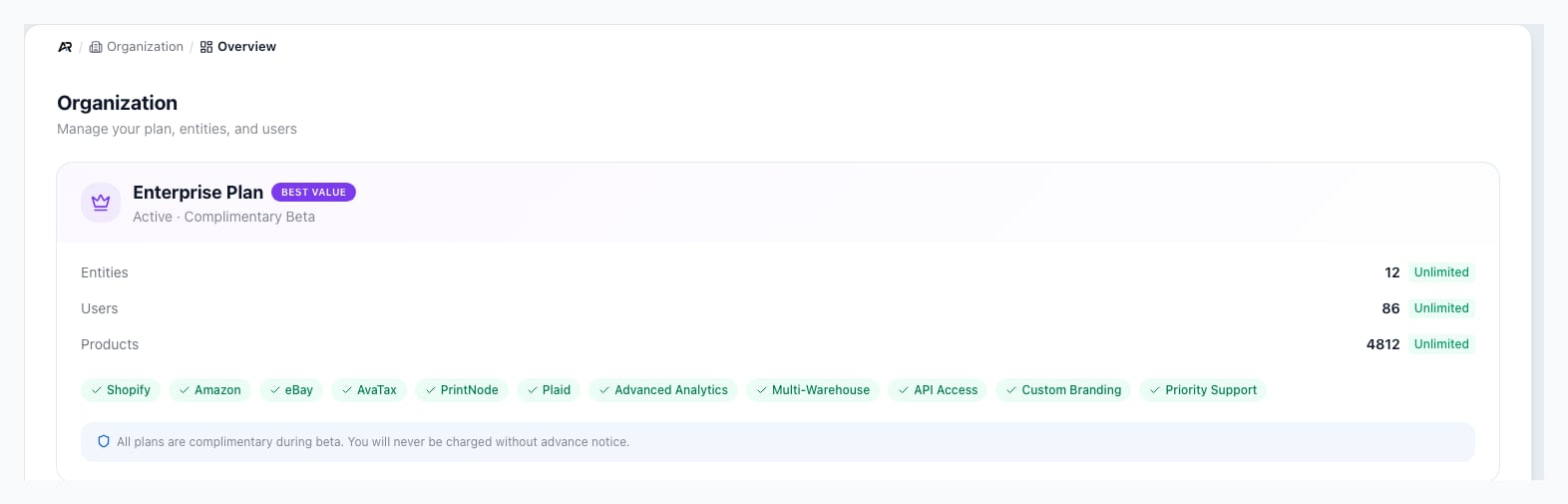
The Overview screen in Organization, with the plan card, the usage for entities, users and products, and the feature badges.
- Plan card: the plan name, its subscription status (Active, plus Complimentary Beta on a beta plan), and Upgrade Plan, which opens Choose Your Plan. Only the organization owner can change plans. A successful change shows “Plan upgraded to” the plan name.
- Usage bars: Entities, Users, and Products, each reading “used / limit” with how many are left, and At limit when none are left. When Arcus blocks a new entity, user, or product, check these bars first.
- Feature badges: the optional capabilities your plan includes, such as API Access, AvaTax, PrintNode, Shopify, Amazon, eBay, Plaid, Advanced Analytics, Multi-Warehouse, Custom Branding, and Priority Support.
- Danger Zone: shown only to the primary owner. Transfer primary ownership hands the single delete authority to another active Owner, and Close this organization permanently deletes the account after a typed confirmation and a second-factor check. A brand-new organization closes immediately, and an established one has a 7-day grace window with Cancel Closure.
How Entity Settings Are Organized
Entity Settings is the largest settings area. It currently contains 34 sections grouped into 9 areas. Use the group list at the start of Entity Settings to jump between groups.
Company settings are the foundation for business identity, document output, shipping addresses, tax behavior, and operational defaults.
Before You Change Settings
Settings changes often affect more than the screen you are on. A good admin rhythm is to change one area at a time, run the workflow that depends on it, and confirm the result before changing the next setting.
High-impact settings often gate work in another module, so test the affected workflow after changing them.
- Use sandbox first when a change affects money, shipping, tax, documents, or integrations.
- Record what changed, who changed it, and what workflow should be tested afterward.
- Test the first order, label, email, payment, or bill after the change before rolling it out.
- Avoid changing numbering, accounting, tax, or payment settings during a busy operating window.
Settings That Commonly Surprise Teams
- Locations affect order defaults, receiving, ship-from addresses, inventory visibility, and label buying.
- Payment settings control the Payment Intent Gate and whether ACH or disputed orders must wait.
- Shipping settings and shipping rules work together. Connector setup, account addresses, package data, and rule priority all affect the final label workflow.
- Packing Configuration controls Mighty parameters, packing triggers, rate automation, label auto-buy, and Packing Presets. Automation stops at Ready to Ship for a person to review and complete fulfillment.
- Document numbering changes the next number Arcus assigns. Increase counters carefully and do not reuse numbers already issued.
- Email configuration controls customer-facing messages like confirmations, invoices, receipts, statements, and reminders.
- Approval workflows can pause a record until a user with the right approval access acts on it.
- System settings such as Printing, Modules, Tags, and Developers are admin-level controls. Review access before changing them.
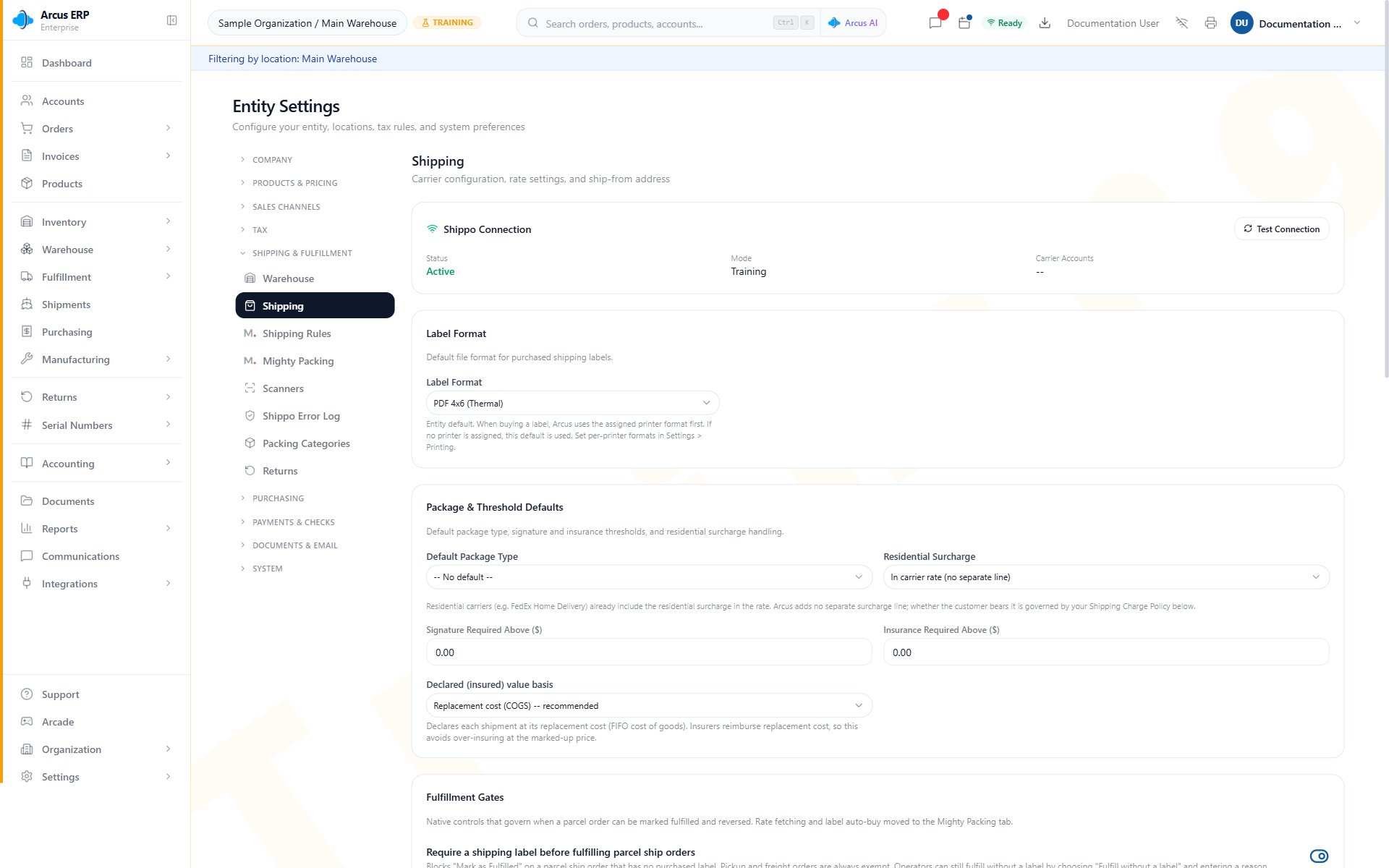
Shipping is a good example of a settings area that affects orders, addresses, package data, labels, rates, and fulfillment timing.
Common Settings Blocks
- A setting is missing: confirm your role, active entity, module visibility, organization membership, and whether the setting is owner or admin only.
- Save is disabled: complete required fields, fix invalid values, wait for connection checks, or confirm the page is not read-only in the current environment.
- A workflow did not change after saving: refresh the page, reopen the affected record, confirm no more specific default overrides the setting, and test with a new record.
- A customer-facing page still uses old branding: review Company Branding, Customer Portal branding, document templates, cached PDFs, and already-sent public links.
- A connector setting will not stay connected: check credentials, test mode versus production mode, account permissions, webhook status, and whether the connector belongs to another entity.
- A public link still opens after a portal change: public links are tokenized and separate from login-based portal access, so review link expiration and revocation policy.
Related Articles
Set Up Your Entity Walkthrough
Start here if you are a new admin. The right order to configure company, locations, team, tax, email, and integrations.
Organization, Entities, and API Access
Organization > Overview and Entities: plan limits, creating and deleting entities, ownership transfer, and closing the organization.
Audit Log and Compliance
Organization > Audit Log: review activity, run compliance reports, and verify integrity.
User Management
Invite users, manage entity access, roles, permissions, location restrictions, PINs, and MFA reset workflows.
Profile and Security
Manage profile details, PIN lock, MFA, security keys, and recovery options.
Entity Configuration
Manage business information, numbering, taxes, and defaults.
Integrations
Connect Stripe, marketplaces, shipping, email, and other services.
System Operations Settings
Understand printing, module visibility, and tag behavior at a high level.
Document Numbering
Control future document prefixes, padding, and next-number previews.
Email Configuration
Configure customer-facing sender identity, notifications, custom domains, and test emails.
Printing Settings
Configure PrintNode connection checks, defaults, printer filters, failed jobs, and safe reprints.
Packing Configuration
Configure Mighty parameters, packing triggers, rate and label automation, and Packing Presets.
Developers Settings
Manage entity API keys, webhooks, request logs, usage analytics, REST client collections, docs links, and SDK entry points.