

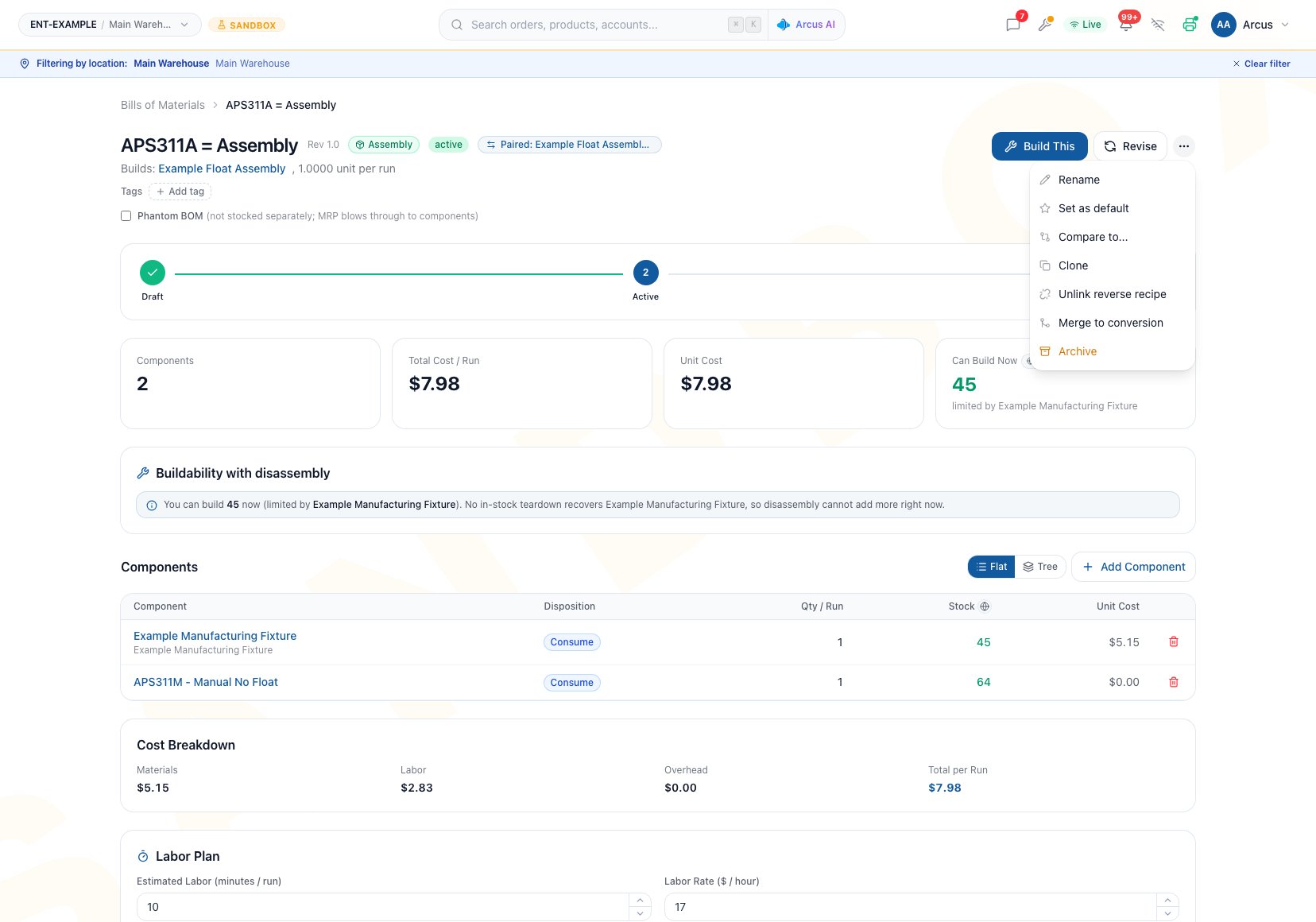
Unlink reverse recipe and Merge to conversion appear with other recipe decisions on this paired Active assembly.
Know What Will Be Inverted
Excluded or assumed lines appear in the preview so they can be reviewed before creation. The generator does not prove that a physically possible inverse process exists.
Generate A Reverse Recipe
Prerequisites
- The source BOM is not Archived.
- It is not already paired to another reverse recipe.
- Its product and any required source product still resolve.
- The operator understands which parts are truly recoverable.
Workflow
- Open the action menu and choose Generate reverse recipe.
- Review the target recipe type, source, output, and inverted lines.
- Read every non-invertible warning.
- For an Assembly source, mark an assumed-returnable line as Scrap on teardown when it will not be recovered.
- Edit the suggested name if needed.
- Click Create reverse recipe.
- Review the new Draft’s header, every line, quantities, dispositions, labor, cost, documents, and availability.
- Add the correct labor plan.
- Activate only after the inverse process is independently approved.
Review The Generated Draft
Use this gate before activation:- Source and output represent the real inverse process.
- Every recovered line is physically recoverable.
- Scrap lines are intentionally omitted or marked.
- Quantities are correct per run.
- Every Conversion line generated from a forward Add or Consume input is truly recoverable; change or remove a used-up Consume input.
- Labor has been entered independently.
- Zero overhead is appropriate, or the generated Draft remains unused.
- The Draft has at least one valid material line so the current BOM page enables Activate.
- Cost and entity-wide availability make sense for the reverse direction.
- Operators have current instructions and documents.
Unlink A Pair
Use unlink when the relationship is wrong but both recipes should remain.- Open either paired recipe.
- Choose Unlink reverse recipe.
- Confirm the action.
- Recheck both recipe headers.
Merge A Paired Assembly And Disassembly
Merge to conversion is available only for a paired Assembly and Disassembly. It creates a separate conversion Draft by netting assembly consumption against disassembly recovery.Workflow
- Open either recipe in the paired Assembly and Disassembly.
- Choose Merge to conversion.
- Review Merge into a conversion recipe.
- Confirm that the two source recipes use compatible per-run quantity bases.
- Confirm the proposed source, output, fixed one-unit output quantity, and every net component change.
- Enter a clear New conversion recipe name.
- Create the conversion Draft.
- Review the resulting source, output, net lines, exclusions, quantity, labor, overhead, cost, and availability.
- Activate only after the conversion stands on its own as an approved physical process.
Common Scenario: Build And Service The Same Unit
A company assembles a serviceable unit and can later tear it down for reusable modules.- Start from the verified Assembly BOM.
- Generate a Disassembly reverse Draft.
- In the preview, mark consumables and damaged-on-removal parts as Scrap.
- Review recovered quantities and assign recovery cost on the new Disassembly.
- Enter teardown labor independently.
- Keep the Draft unactivated if zero overhead is not correct.
- Activate only after a real teardown review confirms the recovered parts.
Troubleshooting And Refusals
- Generate reverse recipe is missing: The BOM may be Archived, already paired, or missing a required source or output identity.
- Arcus says a reverse already exists: Open the paired recipe. Unlink only when the relationship is genuinely obsolete.
- The preview excludes a line: Its disposition cannot be inverted safely. Decide whether the generated process is still complete before creating it.
- The generated Draft has no labor or overhead: This is expected. Enter labor; do not activate when nonzero overhead is required because overhead is not editable there.
- Activate is unavailable: The current BOM page needs at least one material line and edit permission before it enables the action.
- Merge to conversion is missing: It requires a currently paired Assembly and Disassembly.
- A merged net line looks wrong: Compare assembly consumption with disassembly Return to stock quantity. Scrap does not enter the net.
- The paired recipes use different run bases: Do not merge them. Create a normal Conversion BOM with the correct source, output quantity, and per-run lines.
- A restored BOM is no longer paired: Restore does not recreate reverse links. Review both recipes and their current lifecycle state; do not assume the former relationship still exists.
FAQ
Does Generate reverse recipe copy labor and overhead?
Does Generate reverse recipe copy labor and overhead?
No. Neither is copied. Labor can be entered on the new Draft. Overhead remains zero and cannot currently be edited on the detail page.
Does unlink delete either recipe?
Does unlink delete either recipe?
No. It only clears the relationship from both BOMs.
What happens to the pair when I revise a BOM?
What happens to the pair when I revise a BOM?
A current reverse relationship moves to the new revision. The previous revision no longer remains paired.
Does a merged conversion replace its assembly and disassembly?
Does a merged conversion replace its assembly and disassembly?
No. It is a separate Draft. The original recipes and their relationship remain until someone changes them deliberately.
Related Guides
Disassembly And Conversion
Verify dispositions, recovery cost, and inventory outcomes.
BOM Lifecycle
Understand how revision, archive, delete, and restore affect pairing.
Create A BOM
Create a correct Draft when a generated source, output, quantity, or overhead is unsuitable.
Buildability
Check current source and component constraints in either direction.
Manufacturing Settings
Review the configured labor and overhead defaults before creating a replacement recipe.