

The Three Dates
A payment has its own date too, picked when you pay. It is not one of the bill’s three dates (see
What Is Not A Posting Date).
Most of the time the dates agree: you enter the invoice date, leave Effective Date blank, and the
bill posts on it. Set an effective date when the books should show a bill in a different month from its
invoice. For example, a freight statement dated October 3 that covers September can carry an effective
date of September 30, and it posts in September as long as September is open and the date is inside
your posting window.
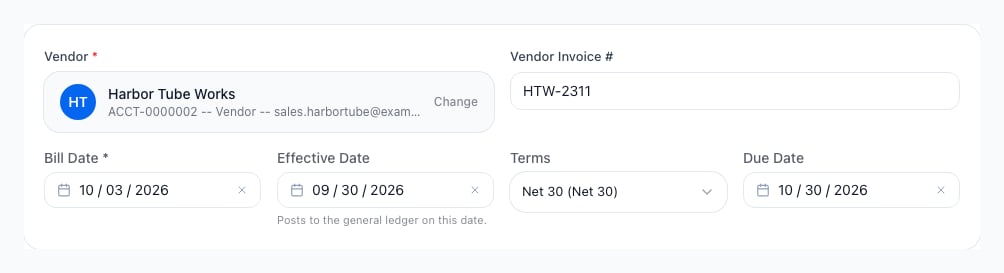
Enter Vendor Bill: the bill date is the invoice date, the effective date is the day the bill posts to the general ledger, and the due date follows the effective date.
Where You Choose The Dates
What happens when a date is not allowed depends on who chose it:
- You pick the date (the first three rows): Arcus refuses a date the posting window or a closed period does not allow, and a dialog or a banner says why. The steps are in AP Bills, GRNI and PO-Linked Vendor Bills and Write a Check.
- The date comes from the work (receiving and a bank line): a refused date creates no bill and Arcus says why. A receipt still stands without its bill. See Receive Items and Bank Transactions.
- Nobody is there to answer (a recurring template and a lease payment): the bill posts on its date when the date is allowed. Otherwise it posts on today’s date, and the bill’s activity history records the date that was asked for and why it moved. See Which Date the Bill Posts On and How Lease Payments Post.
The Posting Window
Two company settings limit how far from today a date you choose may be. Both are under Settings > System > Fiscal Year, and Fiscal Year shows where to change them.- Days a journal entry may be backdated (the Journal entry backdating card) is 180 days unless you change it. A posting date further back than that is refused.
- Days ahead a posting date may be set (the Future posting dates card) is 0 days unless you change it. A posting date after today is refused until you raise it.
The forward window starts at 0
Until someone raises it, a bill dated after today is refused unless it is posted with a reason. Raise
it under Fiscal Year if your team books bills ahead of their invoice date.
Closed Months And Locked Tax Years
The window is not the only check. A posting date also has to land in a month that is still open and in a tax year that is not locked.- A closed month. A date in a closed or year-end closed accounting period is refused whatever the window says, and a reason cannot override it. The dialog’s title ends the posting date is in a closed period, and it reads: “The posting date falls in the closed period (period name), so nothing can post there.” When an open period follows, it goes on: “The next open period starts (date). Pick a date there, or reopen the period from Period Close.” and Use (date) puts that date in the form. When none follows, it says “Pick a date in an open period, or reopen the period from Period Close.” and has no Use button. A month whose close is only requested, and so still Pending approval, still takes postings.
- No period for the date. A date beyond the window needs an open accounting period that covers it. When none does, the title ends no accounting period covers that date and the dialog says to generate the period from Period Close first, or pick another date.
- A locked tax year. A date in a tax year you locked is refused with a title that ends the tax year is locked. Ask someone who can unlock the year (see 1099 Vendors), or pick a date in an unlocked year.
Move A Posted Bill’s Date
To change when a posted bill hits the books, open the bill, choose Edit Bill, change Effective Date and give a reason. Work a Bill walks through the dialog. You need permission to post accounting. A date beyond the posting window also needs permission to close periods and a reason, the same as when you enter a bill. Arcus never reverses or re-posts the bill to move it. Instead it:- Posts two linked Correction entries in one step. The first takes the bill’s lines out of the date they were posted on, so that month nets to zero on every account. The second records the same lines on the new date. The original entry is left as it is. On the first move both corrections name the original entry. On a later move both name the second entry of the move before.
- Moves the effective date. The due date follows when it was worked out from the payment terms; a due date you set by hand is kept.
- Leaves payments, their entries and the balance due alone.
- Writes one entry in the bill’s activity history and in the Audit Log. It names the old and new dates, both correction entry numbers and your reason (4 to 500 characters).
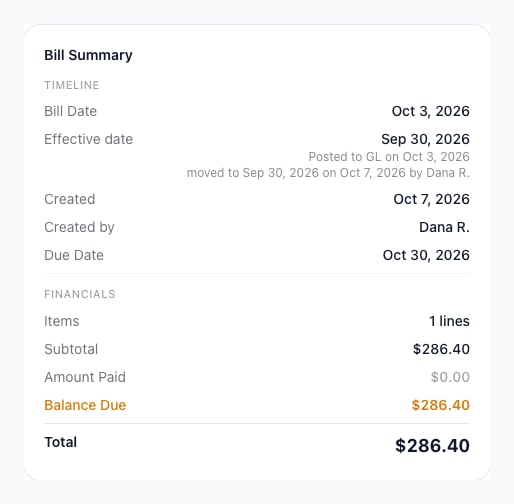
The bill summary after the effective date moved: the new Effective date, the date the bill first posted, and when and by whom it moved.
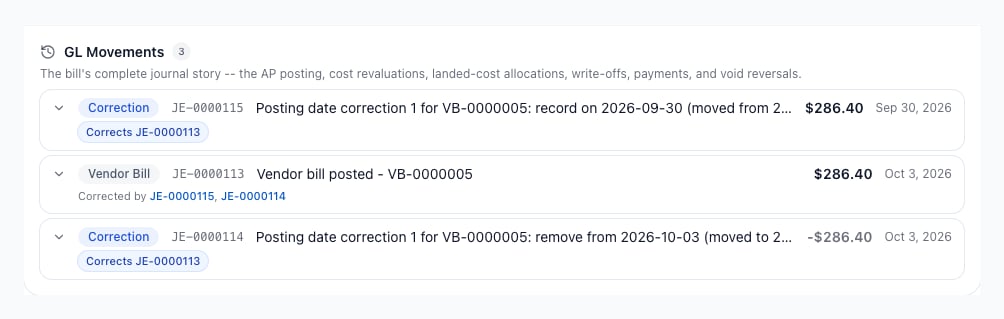
GL Movements after a move: the original entry stays, one correction takes the bill out of October and one puts it in September.
- It was imported from your previous system. Its dates are part of the migrated history.
- It is voided or written off.
- It is linked to a purchase order, or it carries a revaluation or landed-cost entry. Moving it would also have to move inventory and goods received, not invoiced entries, which Arcus does not support yet. Void it and enter it again instead.
- The new date is after the bill’s first payment or credit. The date can move to that day or earlier, never after it, or the vendor’s balance would run negative in between.
- The date it is leaving, or the date it is moving to, is in a closed period or a locked tax year.
Purchase Orders And Receiving
A purchase order posts nothing to the ledger. The ledger moves when goods arrive and when the bill posts, and each uses its own date:- Receiving posts on the day you receive the goods: inventory goes up and goods received, not invoiced (GRNI) goes up. A later bill never changes that date.
- The bill posts on its effective date. That is when the bill relieves GRNI and records the payable, so the bill’s posting date decides which period the relief, and any expense or inventory cost the bill adds, land in. A purchase order received in September and billed with an October effective date shows the goods in September and the bill in October.
Reports That Follow The Posting Date
Anything that asks which bills existed on a date counts a bill from its posting date, so the payables detail and the ledger agree about the same bill:- AP aging as of an earlier date counts a bill from the day it posts. A past-due bill’s age still counts from its due date.
- The payables comparison (the vendor bill detail against the payables control account) counts a bill from its posting date wherever it is read as of a date: the Subledger Drift events on the Calendar and the check at a period close.
- Period Close counts the open vendor bills in a period, and its payables comparison at the period’s end, by posting date. See Which Vendor Bills Count Toward a Period.
- The GRNI Report’s As of date counts a bill from its posting date and a receipt from the day it was received (see Purchase Orders And Receiving).
What Is Not A Posting Date
- A payment’s date. A payment posts on the date you choose when you pay. Moving a bill’s posting date never moves its payments, and the posting date cannot move past the bill’s first payment.
- The bill date on the AP Bills list. The list’s Date column, its date range and its export show the bill date. A bill dated September 28 that posts on October 1 appears in a September list and in October’s books. Open the bill to see its Effective date.
- The 1099 year. A vendor’s 1099 total adds up posted AP payments by each payment’s own date inside the tax year, so moving a bill’s posting date does not move what you paid into another year. A balance written off with Write Off Balance counts as a payment dated on the bill’s effective date, so moving the effective date of a bill you later write off moves that amount’s year. See 1099 Vendors.
- The early-payment discount deadline. It counts from the bill date, because a vendor’s discount terms run from the invoice date.
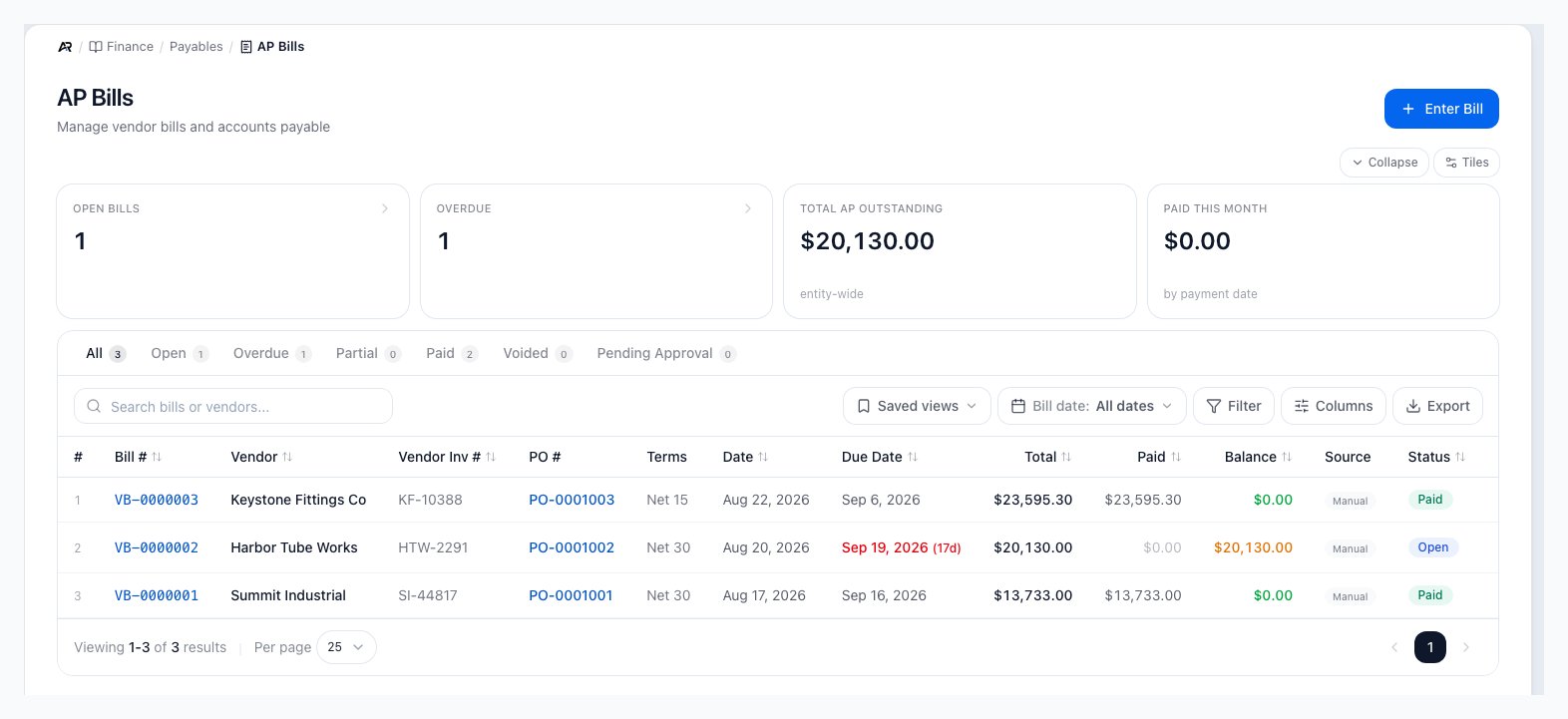
The AP Bills list. The date control above the table is labeled Bill date, and the Date and Due Date columns show each bill's bill date and due date. A bill's effective date is on the bill itself.
Common Problems
- A bill I entered this month is in last month’s reports. Its effective date is in last month. Open the bill and read Effective date in the summary. If the books should show another month, move it with Edit Bill, or void and re-enter it when it is linked to a purchase order.
- The bill’s summary shows Posted to GL on a date that differs from the effective date. Read the line under it. On the bill date, before bills posted on their effective date means the bill posted before October 6, 2026, when the ledger used the bill date. Held to the day it was entered means the entry sits on the day the bill was created: a recurring or lease bill whose date was not allowed, or a bill posted before October 6, 2026 whose bill date was that day or still ahead. The entry stays on that date until you move it with Edit Bill.
- Arcus refuses a bill dated after today. The forward window is 0 days until someone raises it under Settings > System > Fiscal Year. Someone who can close periods can post the bill with a reason.
- The dialog says the posting date is in a closed period. Choose Use (date) for the next open date when the dialog offers it, or reopen the month from Period Close.
- Edit Bill will not move the date. When Effective Date is greyed out, the sentence beside it names the cause, such as a bill linked to a purchase order. When a dialog opens as you save, its title says what is wrong, for example the period it is posted in is closed.
- The AP Bills list and my reports show different months. The list shows the bill date and the reports use the posting date.
Related Articles
AP & Bill Pay
Enter, approve, edit, pay and void vendor bills, and see the effective date on each bill.
GRNI and PO-Linked Vendor Bills
Bill received purchase orders in bulk and choose their bill and effective dates.
Recurring Bills
Set the bill and effective date offsets a generated bill uses.
Fiscal Year
Set the backdate and future posting windows.
Period Close
Close, reopen and review the months a posting date has to land in.
Journal Entries
See how a vendor bill’s entry is dated and find its correcting entries.
Write a Check
Pick the check date a quick check posts on.
1099 Vendors
See which date decides a vendor’s tax-year total and how a tax year is locked.