

Use this guide as the high-level customer sale path. Each step links to a deeper operational guide for the team that owns the work.
Workflow Overview
Sales order to cash is the path from customer demand to collected and reconciled money.
The Orders list is the daily control center for new sales, unpaid work, ready-to-pack orders, quotes, and exception queues.
- Create or confirm the customer account.
- Create a quote or sales order.
- Add line items, pricing, tax, shipping, and terms.
- Confirm the order.
- Collect payment or assign approved terms.
- Pick, pack, ship, or mark fulfilled.
- Create or post the invoice when your workflow requires it.
- Send customer documents.
- Deposit and reconcile money.
- Handle exceptions with refund, credit, return, void, or archive workflows.
1. Account And Quote
Start with the right customer account. Confirm contacts, billing address, shipping address, payment terms, pricing level, tax exemption, and portal access before sending quotes or creating orders. Use a quote when the customer needs to approve pricing, freight, terms, or availability before the order becomes active.2. Order Entry
Create the sales order and add lines. Review product availability, kit components, serial requirements, shipping method, freight flags, tax warnings, approval banners, and customer holds before confirmation.
Order detail combines customer, addresses, actions, documents, progress, line items, and warnings in one place.
3. Payment Or Terms
Collect payment from the order, invoice, customer portal, public payment link, or account workflow. If the customer is on approved terms, review credit limit and AR signals before releasing fulfillment. Payment state affects fulfillment. ACH processing, disputes, failed payments, or overcharges can block or redirect the workflow.4. Fulfillment
Fulfillment turns order lines into packages, labels, tracking, pickup, local delivery, freight, or completed service work.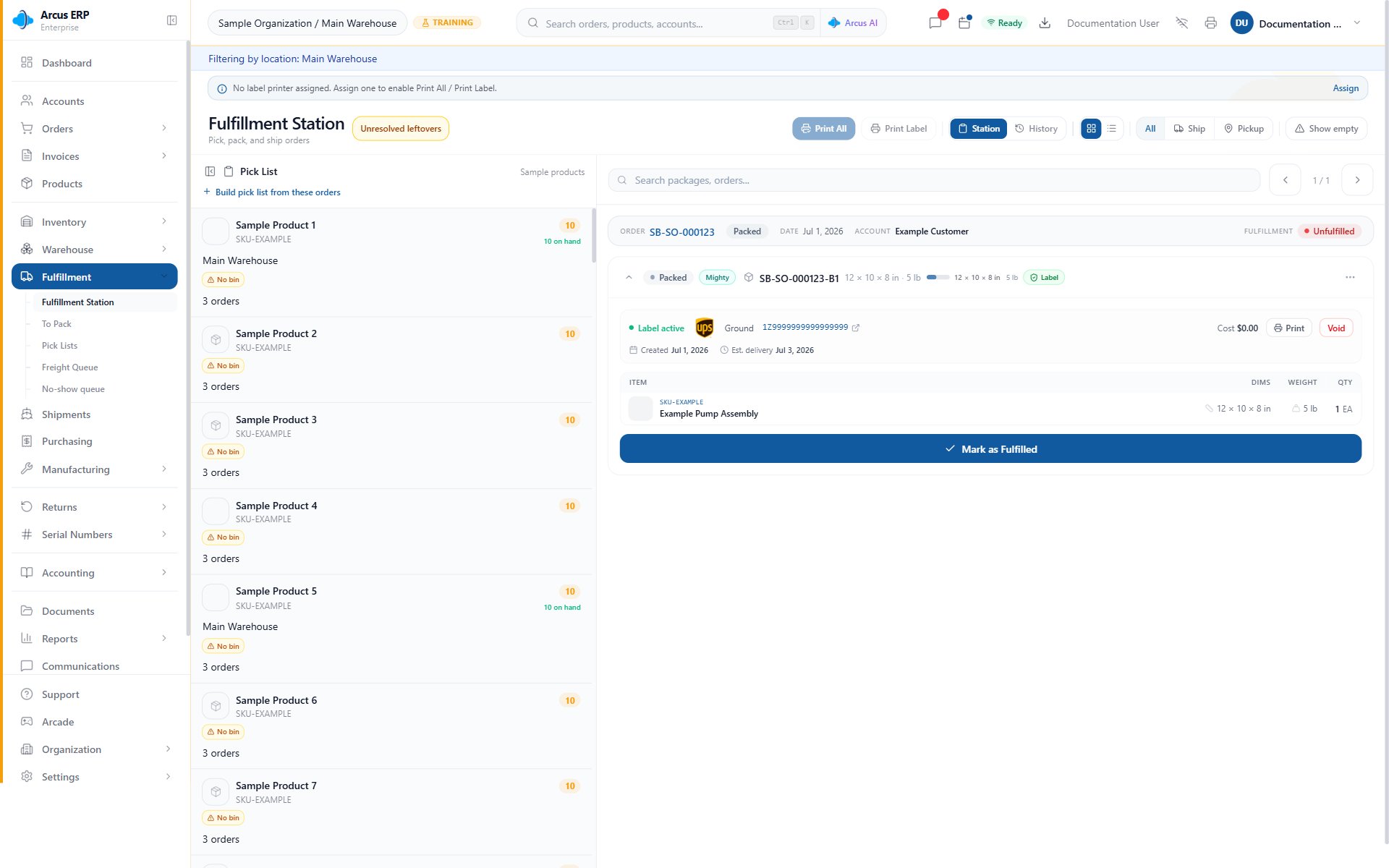
Fulfillment Station gives warehouse users pick, print, package search, and package review controls.
- Payment or terms are allowed.
- Shipping address is valid.
- Package dimensions and weight are correct.
- Customs data exists when needed.
- Serial numbers are captured when required.
- Freight orders follow the freight workflow.
- Labels print to the right workstation.
5. Invoice, Email, And Portal
Invoices and customer documents should reflect the final customer-facing record. Posted invoices can be sent, paid, corrected, voided, and shown in the portal when eligible. Use the email log to verify sent, delivered, skipped, bounced, or failed customer messages.6. Deposit And Reconcile
After payment is collected, follow the right accounting path:- Card and ACH payments can flow through Stripe and payout review.
- Cash and checks may need deposit slips or cash drawer review.
- Wires and external payments need bank reconciliation.
- Credits and refunds need AR review.
Exceptions
Common Order-To-Cash Blocks
- Order cannot be confirmed: review required customer, address, product, pricing, approval, tax, and sales channel fields.
- Payment is blocked: confirm the balance due, payment method, Stripe or ACH status, customer terms, and whether the order or invoice is voided or already paid.
- Fulfillment is blocked: check payment release rules, inventory allocation, serial requirements, package data, shipping address, and approval state.
- Invoice cannot be posted or sent: confirm invoice state, document numbering, email settings, recipient address, and accounting period.
- Customer-facing link does not work: resend the document from Arcus and confirm token expiration, recipient, account, and customer-safe visibility.
- Deposit does not reconcile: match the payment source, payout batch, deposit slip, bank feed date, refund activity, and clearing account.
Related Articles
Creating Orders
Create sales orders and quotes, add customers, set addresses, and add products.
Record Customer Payments
Record cash, card, ACH, check, wire, external, terms, or credit payments.
Order Fulfillment
Move an order from confirmed to picked, packed, shipped, and invoiced.
Invoice Management
Find, create, post, send, pay, correct, and void customer invoices.