

This guide assumes your entity already exists and your user has the permissions needed for
setup, orders, fulfillment, and accounting. If a page or action is missing, ask an admin to
review your role and location access.
1. Confirm Company Setup
Before live orders, confirm the business profile, addresses, locations, branding, document settings, tax settings, payment settings, shipping settings, and user access. These settings affect invoices, packing slips, emails, labels, tax, payments, purchasing, and accounting.
Company settings control what appears on documents, emails, labels, and customer-facing records.
2. Add Products
Products are required before order lines, inventory receiving, pricing rules, kits, serials, and fulfillment can work correctly. Start with the core product record, then add shipping, inventory, pricing, kit, serial, and bin details as needed.
The Products list is where users search, filter, create, and open product records.
- Set the product name, SKU or part number, and product type.
- Add price and cost details before selling or purchasing.
- Add dimensions and weight before shipping or 3D packing.
- Use kit setup for bundles that consume component inventory.
- Use serial and bin controls only when the product needs that level of tracking.
3. Add Accounts
Orders and bills need accounts. Create customer, vendor, or combined accounts with the correct addresses, contacts, payment terms, tax status, pricing level, and payment methods.
Accounts carry the customer and vendor details that orders, invoices, purchasing, payments, and communications rely on.
4. Create an Order
Open Orders, click Create Order, choose the account, set fulfillment details, and add line items. Review pricing, tax, freight, inventory warnings, kit availability, serial requirements, and payment holds before confirming.
Order creation starts with the customer, location, delivery method, addresses, and channel context.
5. Fulfill and Ship
Fulfillment turns open order lines into picked, packed, labeled, and shipped work. Use the Fulfillment Station for warehouse flow, package review, packing slips, carrier labels, serial capture, and shipment completion.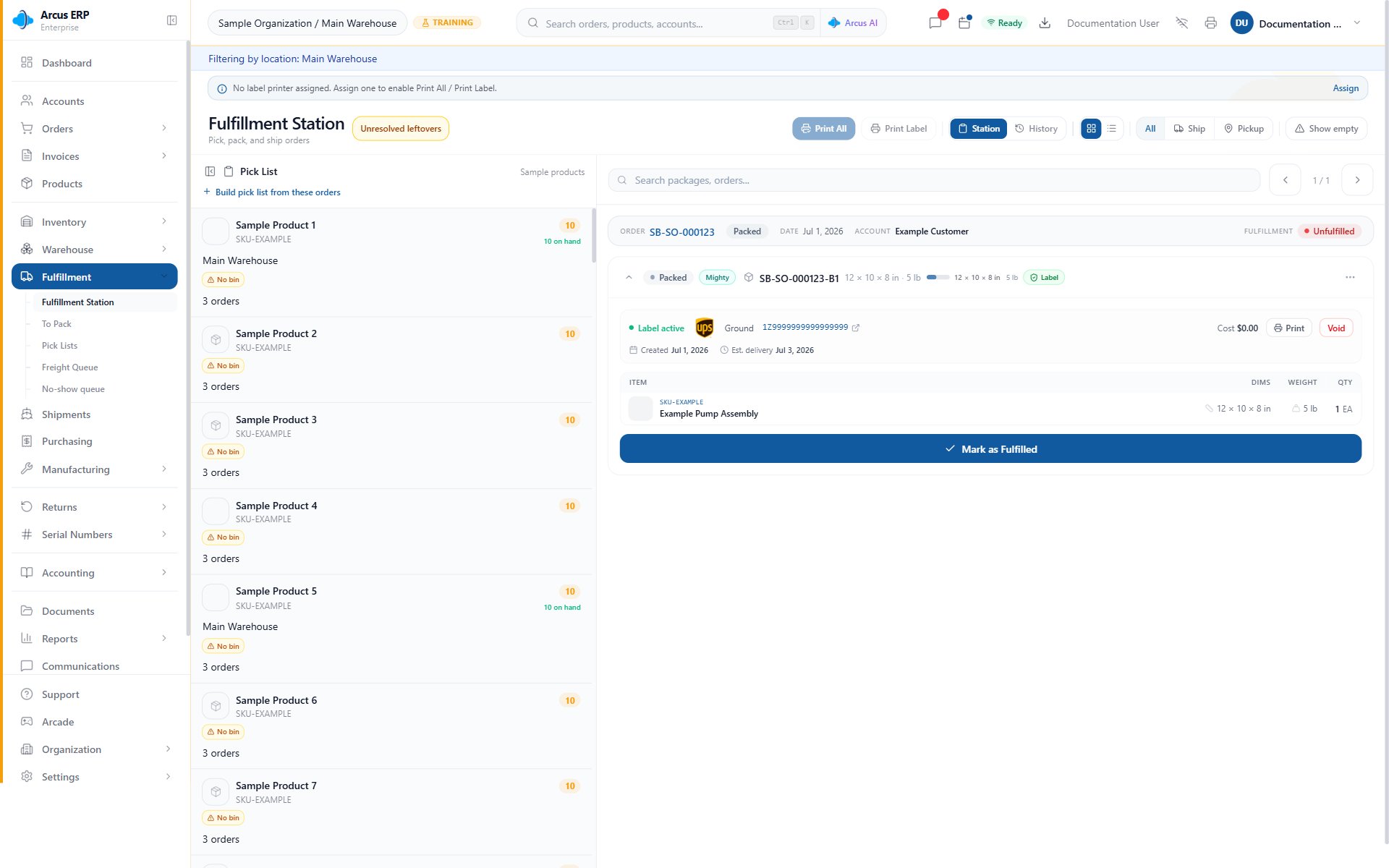
Fulfillment Station brings pick, print, package search, and fulfillment controls into one workspace.
6. Invoice and Collect Payment
After the order is ready, post or manage the invoice according to your workflow, then record payment from the order, invoice, AR, or account workflow. Payment method setup determines whether the entry posts to cash, clearing, check, ACH, credit card, or another configured account.
Recording payment updates the customer balance and posts accounting based on the payment method.
What to Configure Next
- Users and roles: invite the team and grant only the access they need.
- Integrations: connect Stripe, Shippo, AvaTax, PrintNode, Shopify, Plaid, or other required systems.
- Tax and payment settings: confirm defaults before production orders.
- Purchasing and inventory: set reorder points, vendors, receiving workflow, and approval thresholds.
- Accounting setup: verify chart of accounts, system mappings, AP, AR, bank accounts, and reports.
Common Setup Blocks
- A setup page is missing: confirm your active entity, role, location restrictions, and whether the module is enabled for the entity.
- Products cannot be ordered: confirm the product is active, sellable, priced, stocked or service-type, and available at the order location.
- An order cannot move forward: review payment terms, approval state, inventory availability, address validation, tax setup, and fulfillment readiness.
- A label cannot be purchased: check the ship-from location, customer address, product dimensions, package weight, Shippo connection, and carrier rule.
- Payment cannot be recorded: review the payment method, customer account, open balance, Stripe or ACH status, cash register, and accounting period.
- Reports look empty: confirm the entity, date range, posted transaction state, sandbox versus production environment, and your report permissions.
Related Articles
Welcome to Arcus ERP
A quick orientation to the Arcus workspace.
Navigation Overview
Find modules, records, settings, and support tools quickly.
First Day in Arcus
Confirm environment, learn navigation, find records, and practice safely.
Sales Order to Cash
Follow the full customer sale workflow from order to payment, fulfillment, invoice, deposit, and reconciliation.
Purchase to Pay Walkthrough
Follow the vendor buying workflow from purchase order to payment and bank reconciliation.
Inventory Day in the Life
Review stock health, receiving, movements, counts, shortages, and warehouse closeout.
Company Setup
Configure business profile, environment, branding, locations, and the workflow impact of company defaults.
Product Setup
Create physical products, services, and product records.
Creating Orders
Build a sales order, add customers, set addresses, and add products.