

What is Arcus ERP?
Arcus ERP is a cloud-native business management system that replaces fragmented tools with a single, connected platform. It handles the complete order-to-cash cycle. From taking an order through shipping, invoicing, payment collection, and accounting. Arcus is designed for teams that need real-time inventory visibility, multi-location support, and tight integration between sales, fulfillment, and finance.
The dashboard is the first stop for daily work: open orders, unpaid invoices, fulfillment performance, inventory alerts, and recent activity.
Key Features
Here’s what Arcus ERP covers:Order Management
Create, edit, and fulfill orders from a single workspace. Supports walk-ins, online, and phone orders.
Product Catalog
Maintain your full product library with pricing tiers, variants, serial tracking, and bin locations.
Account Management
Track customers, contacts, addresses, credit limits, and payment terms in one place.
Fulfillment Station
Pack orders, print labels through PrintNode, generate packing slips, and track shipments.
Accounting
Use double-entry accounting for GL, AP, AR, journal entries, bank reconciliation, and financial reports.
Analytics
Review dashboard trends for revenue, fulfillment rate, and inventory health.
How to Navigate Arcus
Arcus uses a collapsible left sidebar for primary navigation. Each section of the app has its own icon and label. You can collapse the sidebar to gain more screen space by clicking the ** panel toggle** button at the top right of the sidebar.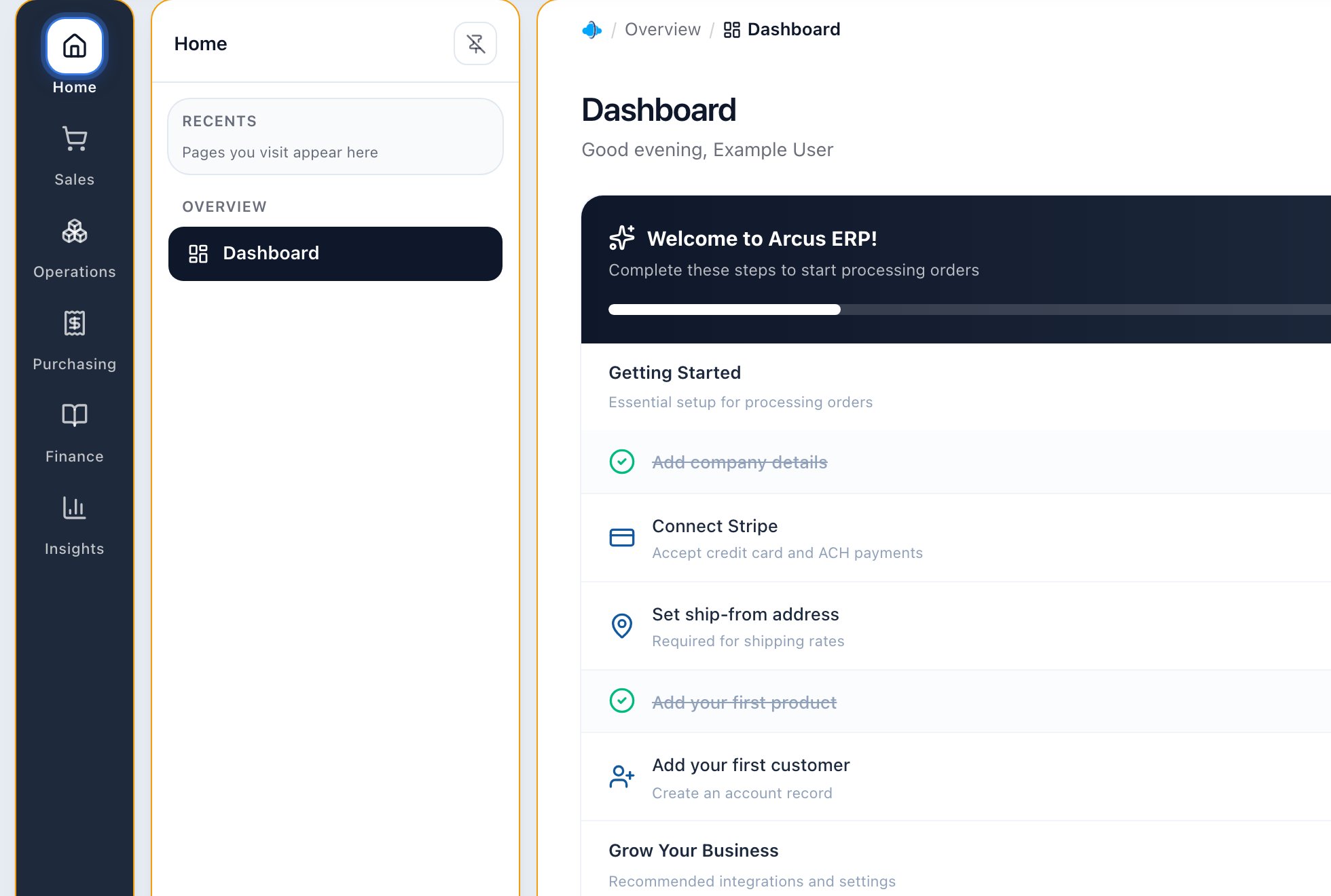
The left sidebar is the main map through Arcus. Your permissions determine which sections appear.
Main sections
- Dashboard: Overview of today’s orders, revenue, and alerts
- Orders: Create and manage sales orders
- Invoices: View and manage posted invoices
- Accounts: Customer accounts and contacts
- Products: Product catalog and pricing
- Inventory: Stock levels and adjustments
- Warehouse: Bin management and putaway
- Fulfillment: Pack and ship orders
- Accounting: Full GL, AP, AR, and reports
- Settings: Entity configuration, users, and integrations
Permissions
Your access to specific sections depends on your user role. If you don’t see a section in the sidebar,
contact your administrator to check your permissions.
Getting Help
If you can’t find what you need in this Help Center, here are your options:- Browse the Help Center by topic using the sidebar on the left
- Use the search bar on the Help Center home to find specific articles
- Contact your Arcus system administrator for entity-specific configuration questions
Common First Steps
- You cannot see a module: ask an owner or admin to review your role, entity membership, location access, and enabled modules.
- You are not sure if you are in sandbox: check the entity and environment indicator before creating, posting, paying, shipping, or closing work.
- You know the order, product, or account name: use global search before digging through module lists.
- You are learning a workflow: read the workflow guide first, then practice in sandbox before touching production records.
- You see a warning banner: stop and read it. Warnings usually explain the setup, payment, inventory, fulfillment, tax, or accounting issue blocking the next step.
Related Articles
Set Up Your Entity Walkthrough
For new admins. The right order to configure company, locations, team, tax, email, and integrations.
First Day in Arcus
Confirm environment, learn navigation, find records, and practice safely.
Quick Start Guide
Set up the basics and complete your first operational loop.
Navigation Overview
Learn the sidebar, top bar, search, list pages, detail pages, and permission-aware navigation.
Common Error Messages and What To Do
Understand blocked actions, disabled buttons, missing setup, connector errors, and escalation paths.