> ## Documentation Index
> Fetch the complete documentation index at: https://docs.arcuserp.com/llms.txt
> Use this file to discover all available pages before exploring further.
# Quarantine
> Inspect damaged units held from purchase order receipts and resolve each one: restock it, return it to the vendor, or write it off.
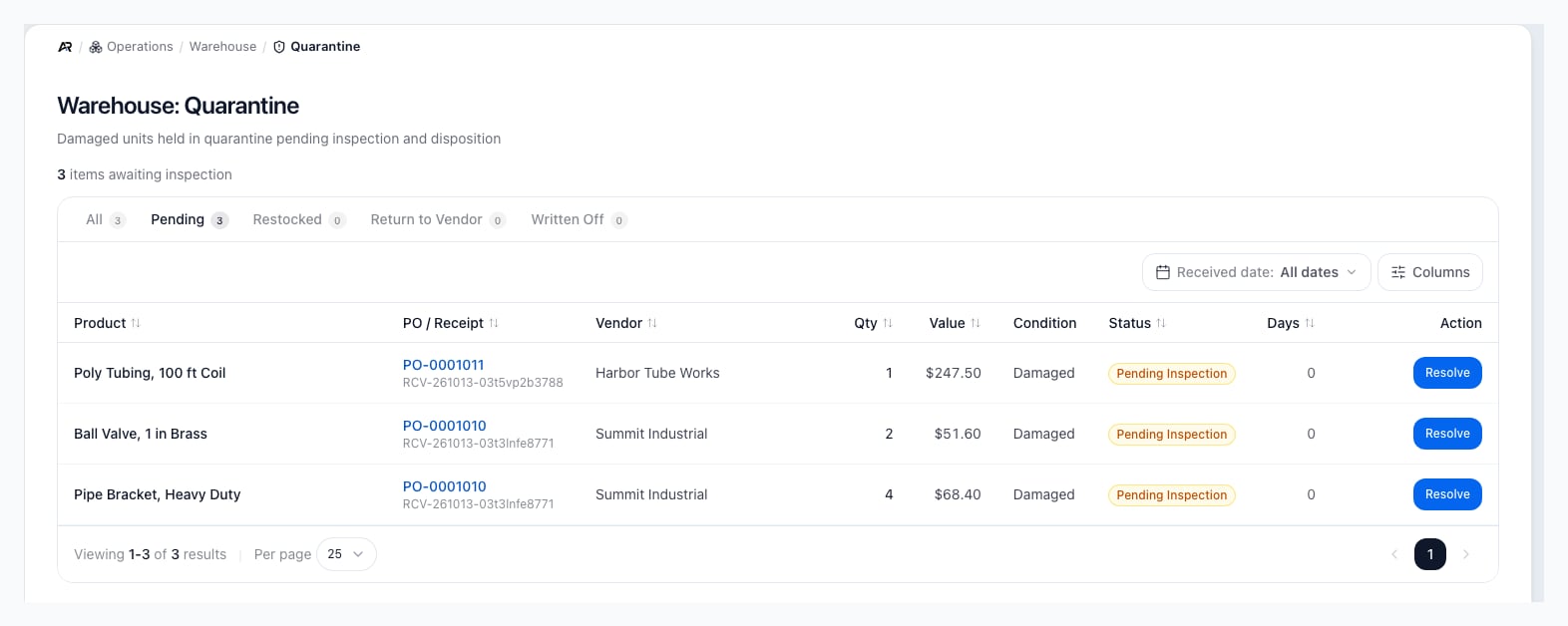
Quarantine is the inspection queue for damaged units that arrived on a purchase order. When a receiver records damaged units and routes them to quarantine or to a vendor return, Arcus holds those units out of sellable stock and lists them here until someone decides what happens to them. Open it at **Operations > Warehouse > Quarantine**.
 ## Before You Start
* **Permissions**: opening the screen needs **View Inventory**, and reading the list also needs **View Purchasing**. Resolving an item needs **Receive Inventory**. The **Resolve** button shows for everyone who can see the list, so a user without **Receive Inventory** sees it and the server refuses the resolution. The **Quarantine** entry under **Operations > Warehouse** and its command palette entry appear only to users who also hold **Receive Inventory**, although the screen itself opens with **View Inventory**.
* **How units get here**: in the purchase order receive dialog, when a line has damaged units, the receiver picks a **Damaged unit disposition**. **Quarantine (hold for inspection; may auto-draft a vendor return)** and **Return to vendor (drafts a vendor return)** both put the damaged units in this queue. **Write off** does not; those units are expensed at receipt and never appear here.
* **Header location**: when you pick a location in the header, the queue shows only items received at that location.
Other ways in:
* Search for **Quarantine** in the command palette.
* The **Binned Products** tile on **Operations > Warehouse > Bins** counts products with units held in quarantine, and a location's quarantine bin card counts its units. Review those units here.
## Read the Queue
The line above the table says how many items are awaiting inspection, or "No items currently awaiting inspection."
The tabs filter by status, and each shows its count:
| Tab | Shows |
| - | - |
| **All** | Every quarantined receipt line, resolved or not. |
| **Pending** | Lines still waiting for a decision. The queue opens on this tab. |
| **Restocked** | Lines released back into stock. |
| **Return to Vendor** | Lines resolved as a return to the vendor. |
| **Written Off** | Lines written off as a loss. |
Each row shows:
* **Product**: the product name and its part number.
* **PO / Receipt**: the purchase order number, which opens the order's receiving tab under **Purchasing > Purchase Orders**, and the receipt number below it.
* **Vendor**, **Qty** (the damaged units), and **Value** (the units times the receipt's unit cost).
* **Condition**: the condition the receiver recorded.
* **Status**: **Pending Inspection**, **Restocked**, **Return to Vendor**, or **Written Off**.
* **Days**: how long the line has been in quarantine.
* **Action**: **Resolve** on a pending line. A resolved line shows **Resolved**; hover it to see when and by whom.
Pending lines sort first, then the newest. Select a column header to sort by **Product**, **PO / Receipt**, **Vendor**, **Qty**, **Value**, **Status**, or **Days**. Use the date control to narrow the list by the date the units were received, in your company's time zone, and the **Columns** menu to hide columns.
The tab, the page, the page size, the sort, and the date range are kept in the page address. Back from a purchase order, a refresh, or a copied link brings the queue back as you left it.
## Resolve a Quarantined Item
1. Open **Operations > Warehouse > Quarantine** and stay on **Pending**.
2. Select **Resolve** on the row. The **Resolve quarantined item** dialog opens with the product, the units, and the receipt number.
3. Review the summary: **PO**, **Vendor**, **Qty / Value**, and the **Damage notes** the receiver wrote.
4. Under **Disposition**, choose one:
* **Approve restock**: release the units back into stock.
* **Return to vendor**: confirm the units go back to the vendor.
* **Write off**: record the units as a loss.
5. Optionally add notes, such as inspector findings, a vendor claim number, or why you wrote the units off.
6. Select **Resolve**. It stays disabled until you choose a disposition.
Arcus shows "Quarantine item resolved." The row moves to the tab of its new status. A line can be resolved only once.
## What Each Disposition Does
Every disposition first takes the units out of quarantine. Then:
| Disposition | Stock | Accounting | Serial numbers |
| - | - | - | - |
| **Approve restock** | The units are added back to on-hand stock at the receiving location, in its default bin when it has one. | No journal entry: the units were already valued in inventory when they were received. | Serial numbers captured for the units at the dock become available. |
| **Return to vendor** | The units stay out of sellable stock. | No journal entry from this screen. | Serial numbers captured for the units are retired. |
| **Write off** | The units stay out of stock for good. | A journal entry dated today debits your inventory shrink account and credits Inventory for the units times their unit cost. A line with no cost posts no entry. | Serial numbers captured for the units are marked damaged. |
**Return to vendor** records your decision only. A vendor return may already have been drafted when the goods were received. Open **Operations > Returns > Vendor Returns** to continue it, or create one there if none exists.
Other effects of every resolution:
* **Activity log**: the resolution and the units are recorded with your name. Your notes are saved with the resolved line, not in the activity log.
* **Marketplace stock**: a restock changes available stock, so connected sales channels receive the new quantity.
* **Warehouse tiles**: the counts on **Operations > Warehouse > Bins** update.
## Common Scenarios
### The vendor agreed to credit the damaged units
Choose **Return to vendor**, add the vendor's claim or authorization number in the notes, then continue the vendor return under **Operations > Returns > Vendor Returns**.
### Inspection shows the units are fine
Choose **Approve restock**. The units go back into sellable stock at the location where they were received.
### The units cannot be sold or returned
Choose **Write off** and say why in the notes. The loss posts to the general ledger.
## Messages You May See
| Message | What it means | What to do |
| - | - | - |
| "No items currently in quarantine. Damaged units from PO receipts will appear here." | Nothing is pending at this location. | Nothing. Use **All** to review resolved lines. |
| "No quarantine items" and "No items match this filter." | No line matches the tab or the date range. | Change the tab or clear the date range. |
| "Failed to load quarantine queue. Try refreshing." | The list could not be read. Without **View Purchasing** it never loads. | Refresh, or ask an administrator for **View Purchasing**. |
| "Pick a disposition first" | **Resolve** is disabled because no disposition is chosen. | Choose **Approve restock**, **Return to vendor**, or **Write off**. |
| "Quarantine item is already in state" followed by the status, then "Cannot resolve twice." | Someone resolved the line before you. | Refresh the queue; the line is on its new status tab. |
| A message that the receipt line has no damaged units to resolve | The line holds no damaged units. | Refresh the queue and check the purchase order's receipt. |
| A message naming a missing inventory shrink account | A write off needs an inventory shrink account mapped in your chart of accounts. Nothing was changed. | Ask an accountant to map it at **Finance > General Ledger > Chart of Accounts**, then resolve again. |
## Related Articles
Operations > Warehouse > Receiving: receive purchase orders and record damaged units.
Record damaged units and choose their disposition at receipt.
Operations > Returns > Vendor Returns: send damaged goods back to the vendor.
Operations > Warehouse > Bins: the quarantine bin and the warehouse tiles.
Move received, returned, and quarantined stock to the right place.
Operations > Inventory > Transactions: the stock movements a resolution records.
This documentation is built and hosted on [Mintlify](https://mintlify.com), a developer documentation platform.
## Before You Start
* **Permissions**: opening the screen needs **View Inventory**, and reading the list also needs **View Purchasing**. Resolving an item needs **Receive Inventory**. The **Resolve** button shows for everyone who can see the list, so a user without **Receive Inventory** sees it and the server refuses the resolution. The **Quarantine** entry under **Operations > Warehouse** and its command palette entry appear only to users who also hold **Receive Inventory**, although the screen itself opens with **View Inventory**.
* **How units get here**: in the purchase order receive dialog, when a line has damaged units, the receiver picks a **Damaged unit disposition**. **Quarantine (hold for inspection; may auto-draft a vendor return)** and **Return to vendor (drafts a vendor return)** both put the damaged units in this queue. **Write off** does not; those units are expensed at receipt and never appear here.
* **Header location**: when you pick a location in the header, the queue shows only items received at that location.
Other ways in:
* Search for **Quarantine** in the command palette.
* The **Binned Products** tile on **Operations > Warehouse > Bins** counts products with units held in quarantine, and a location's quarantine bin card counts its units. Review those units here.
## Read the Queue
The line above the table says how many items are awaiting inspection, or "No items currently awaiting inspection."
The tabs filter by status, and each shows its count:
| Tab | Shows |
| - | - |
| **All** | Every quarantined receipt line, resolved or not. |
| **Pending** | Lines still waiting for a decision. The queue opens on this tab. |
| **Restocked** | Lines released back into stock. |
| **Return to Vendor** | Lines resolved as a return to the vendor. |
| **Written Off** | Lines written off as a loss. |
Each row shows:
* **Product**: the product name and its part number.
* **PO / Receipt**: the purchase order number, which opens the order's receiving tab under **Purchasing > Purchase Orders**, and the receipt number below it.
* **Vendor**, **Qty** (the damaged units), and **Value** (the units times the receipt's unit cost).
* **Condition**: the condition the receiver recorded.
* **Status**: **Pending Inspection**, **Restocked**, **Return to Vendor**, or **Written Off**.
* **Days**: how long the line has been in quarantine.
* **Action**: **Resolve** on a pending line. A resolved line shows **Resolved**; hover it to see when and by whom.
Pending lines sort first, then the newest. Select a column header to sort by **Product**, **PO / Receipt**, **Vendor**, **Qty**, **Value**, **Status**, or **Days**. Use the date control to narrow the list by the date the units were received, in your company's time zone, and the **Columns** menu to hide columns.
The tab, the page, the page size, the sort, and the date range are kept in the page address. Back from a purchase order, a refresh, or a copied link brings the queue back as you left it.
## Resolve a Quarantined Item
1. Open **Operations > Warehouse > Quarantine** and stay on **Pending**.
2. Select **Resolve** on the row. The **Resolve quarantined item** dialog opens with the product, the units, and the receipt number.
3. Review the summary: **PO**, **Vendor**, **Qty / Value**, and the **Damage notes** the receiver wrote.
4. Under **Disposition**, choose one:
* **Approve restock**: release the units back into stock.
* **Return to vendor**: confirm the units go back to the vendor.
* **Write off**: record the units as a loss.
5. Optionally add notes, such as inspector findings, a vendor claim number, or why you wrote the units off.
6. Select **Resolve**. It stays disabled until you choose a disposition.
Arcus shows "Quarantine item resolved." The row moves to the tab of its new status. A line can be resolved only once.
## What Each Disposition Does
Every disposition first takes the units out of quarantine. Then:
| Disposition | Stock | Accounting | Serial numbers |
| - | - | - | - |
| **Approve restock** | The units are added back to on-hand stock at the receiving location, in its default bin when it has one. | No journal entry: the units were already valued in inventory when they were received. | Serial numbers captured for the units at the dock become available. |
| **Return to vendor** | The units stay out of sellable stock. | No journal entry from this screen. | Serial numbers captured for the units are retired. |
| **Write off** | The units stay out of stock for good. | A journal entry dated today debits your inventory shrink account and credits Inventory for the units times their unit cost. A line with no cost posts no entry. | Serial numbers captured for the units are marked damaged. |
**Return to vendor** records your decision only. A vendor return may already have been drafted when the goods were received. Open **Operations > Returns > Vendor Returns** to continue it, or create one there if none exists.
Other effects of every resolution:
* **Activity log**: the resolution and the units are recorded with your name. Your notes are saved with the resolved line, not in the activity log.
* **Marketplace stock**: a restock changes available stock, so connected sales channels receive the new quantity.
* **Warehouse tiles**: the counts on **Operations > Warehouse > Bins** update.
## Common Scenarios
### The vendor agreed to credit the damaged units
Choose **Return to vendor**, add the vendor's claim or authorization number in the notes, then continue the vendor return under **Operations > Returns > Vendor Returns**.
### Inspection shows the units are fine
Choose **Approve restock**. The units go back into sellable stock at the location where they were received.
### The units cannot be sold or returned
Choose **Write off** and say why in the notes. The loss posts to the general ledger.
## Messages You May See
| Message | What it means | What to do |
| - | - | - |
| "No items currently in quarantine. Damaged units from PO receipts will appear here." | Nothing is pending at this location. | Nothing. Use **All** to review resolved lines. |
| "No quarantine items" and "No items match this filter." | No line matches the tab or the date range. | Change the tab or clear the date range. |
| "Failed to load quarantine queue. Try refreshing." | The list could not be read. Without **View Purchasing** it never loads. | Refresh, or ask an administrator for **View Purchasing**. |
| "Pick a disposition first" | **Resolve** is disabled because no disposition is chosen. | Choose **Approve restock**, **Return to vendor**, or **Write off**. |
| "Quarantine item is already in state" followed by the status, then "Cannot resolve twice." | Someone resolved the line before you. | Refresh the queue; the line is on its new status tab. |
| A message that the receipt line has no damaged units to resolve | The line holds no damaged units. | Refresh the queue and check the purchase order's receipt. |
| A message naming a missing inventory shrink account | A write off needs an inventory shrink account mapped in your chart of accounts. Nothing was changed. | Ask an accountant to map it at **Finance > General Ledger > Chart of Accounts**, then resolve again. |
## Related Articles
Operations > Warehouse > Receiving: receive purchase orders and record damaged units.
Record damaged units and choose their disposition at receipt.
Operations > Returns > Vendor Returns: send damaged goods back to the vendor.
Operations > Warehouse > Bins: the quarantine bin and the warehouse tiles.
Move received, returned, and quarantined stock to the right place.
Operations > Inventory > Transactions: the stock movements a resolution records.
This documentation is built and hosted on [Mintlify](https://mintlify.com), a developer documentation platform.