> ## Documentation Index
> Fetch the complete documentation index at: https://docs.arcuserp.com/llms.txt
> Use this file to discover all available pages before exploring further.
# Reverse Recipes And Conversion Merges
> Generate, review, pair, unlink, and merge inverse BOM recipes without assuming the generated Draft is production ready.
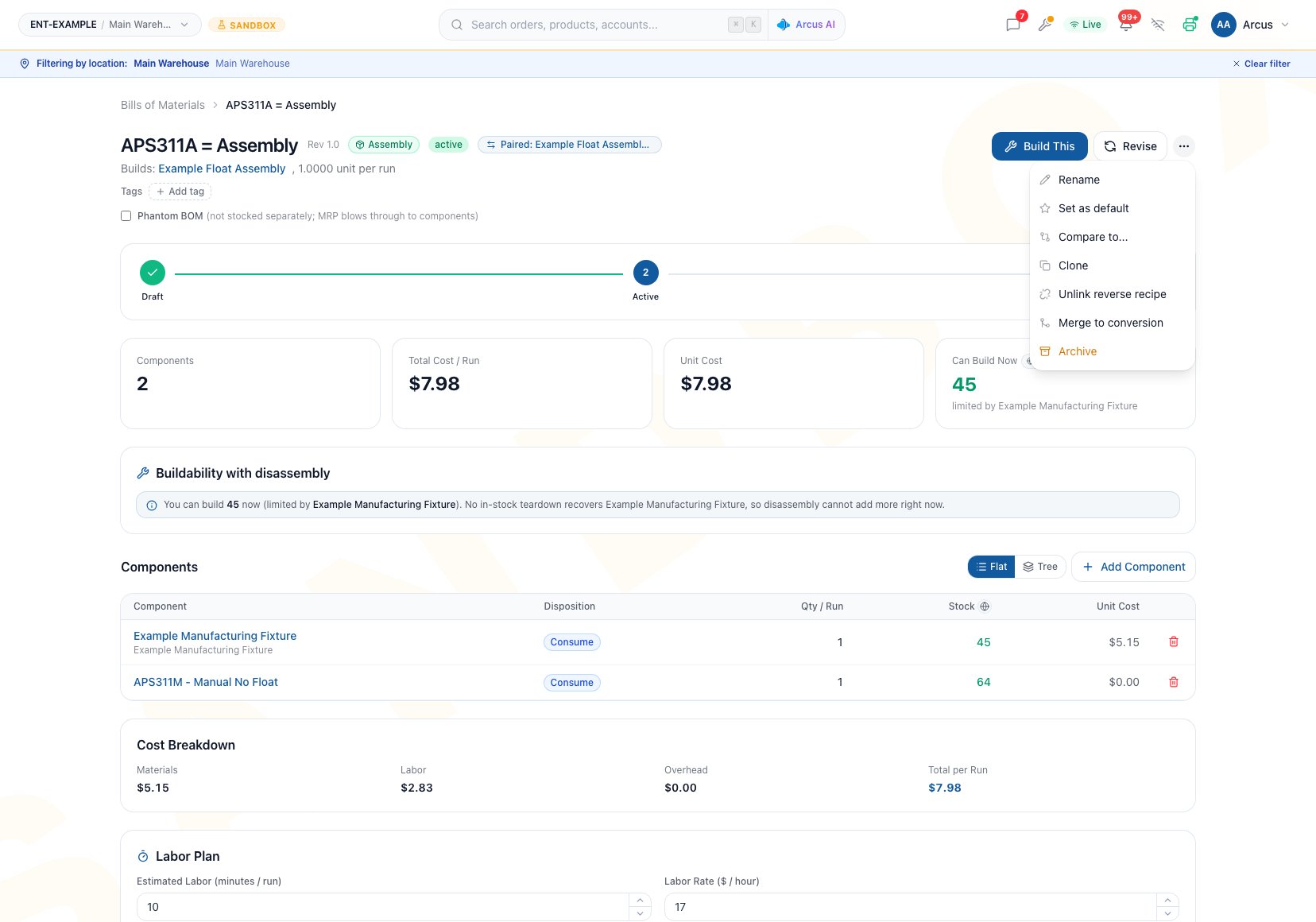
A reverse recipe turns an existing BOM into a paired inverse Draft. It is useful when a product can be both made and taken apart, or when a conversion can run in the opposite direction. A merge combines a paired assembly and disassembly into a new conversion Draft.
Open **Manufacturing > Bills of Materials**, then open the source recipe. You need **manufacturing.view** to review it, **manufacturing.create** to generate a reverse recipe or merged conversion, and **manufacturing.edit** to change and activate the generated Draft.
 ## Know What Will Be Inverted
| Source BOM | Generated Draft | Line mapping |
| ----------- | ----------------------------------------- | ----------------------------------------------------------------------------------------------------------------------------------------- |
| Assembly | Disassembly | Each consumed component becomes **Return to stock**; previewed lines can be changed to **Scrap on teardown** |
| Disassembly | Assembly | **Return to stock** becomes **Consume**; Scrap lines are excluded |
| Conversion | Conversion with source and output swapped | **Return to stock** becomes **Consume**; **Consume** and **Add** become **Return to stock**; **Retain** remains Retain; Scrap is excluded |
When reversing a Conversion BOM, Arcus maps both forward **Consume** and **Add** lines to **Return to stock**. Those forward dispositions have the same inventory and cost treatment, but they can represent different physical intent. A Consume input may be used up and not recoverable. Inspect every generated Return to stock line, then change or remove any nonrecoverable input on the Draft before activation.
Excluded or assumed lines appear in the preview so they can be reviewed before creation. The generator does not prove that a physically possible inverse process exists.
## Generate A Reverse Recipe
### Prerequisites
* The source BOM is not Archived.
* It is not already paired to another reverse recipe.
* Its product and any required source product still resolve.
* The operator understands which parts are truly recoverable.
### Workflow
1. Open the action menu and choose **Generate reverse recipe**.
2. Review the target recipe type, source, output, and inverted lines.
3. Read every non-invertible warning.
4. For an Assembly source, mark an assumed-returnable line as **Scrap on teardown** when it will not be recovered.
5. Edit the suggested name if needed.
6. Click **Create reverse recipe**.
7. Review the new Draft's header, every line, quantities, dispositions, labor, cost, documents, and availability.
8. Add the correct labor plan.
9. Activate only after the inverse process is independently approved.
**Outcome:** Arcus creates a Draft and links the two recipes symmetrically. The source remains in its existing status. Creating the pair does not create a work order, move inventory, or post an accounting entry.
Reverse generation does not copy labor or overhead. Labor can be entered on the generated Draft. Its overhead remains zero, and the current detail page has no overhead editor. If the inverse needs nonzero overhead, do not activate the generated Draft. Create a correct BOM under the intended configured default or ask the setup owner to resolve the overhead requirement first.
## Review The Generated Draft
Use this gate before activation:
* Source and output represent the real inverse process.
* Every recovered line is physically recoverable.
* Scrap lines are intentionally omitted or marked.
* Quantities are correct per run.
* Every Conversion line generated from a forward Add or Consume input is truly recoverable; change or remove a used-up Consume input.
* Labor has been entered independently.
* Zero overhead is appropriate, or the generated Draft remains unused.
* The Draft has at least one valid material line so the current BOM page enables **Activate**.
* Cost and entity-wide availability make sense for the reverse direction.
* Operators have current instructions and documents.
Generated output is a starting point, not a production approval.
## Unlink A Pair
Use unlink when the relationship is wrong but both recipes should remain.
1. Open either paired recipe.
2. Choose **Unlink reverse recipe**.
3. Confirm the action.
4. Recheck both recipe headers.
**Outcome:** Arcus clears the relationship from both recipes. It does not delete, archive, revise, change status, move inventory, or post an accounting entry.
If a pair is still current, revising one recipe moves the relationship to the new revision. Archiving or deleting a recipe clears the relationship. Restoring an archived recipe does not restore its former reverse link.
## Merge A Paired Assembly And Disassembly
**Merge to conversion** is available only for a paired Assembly and Disassembly. It creates a separate conversion Draft by netting assembly consumption against disassembly recovery.
Merge subtracts the two recipes' raw per-run line quantities without normalizing different batch sizes, and the merged Draft receives an output quantity of 1. Use it only when both recipes have compatible per-run bases for a one-unit conversion. For a non-1:1 process or mismatched run quantities, create a normal Conversion BOM instead.
| Net result for a component | Conversion line |
| ------------------------------------------------ | -------------------------------------- |
| Assembly consumes more than disassembly recovers | **Add** for the difference |
| Disassembly recovers more than assembly consumes | **Return to stock** for the difference |
| Consumption and recovery are equal | **Retain** |
| Disassembly marks the part Scrap | Excluded and flagged as non-invertible |
### Workflow
1. Open either recipe in the paired Assembly and Disassembly.
2. Choose **Merge to conversion**.
3. Review **Merge into a conversion recipe**.
4. Confirm that the two source recipes use compatible per-run quantity bases.
5. Confirm the proposed source, output, fixed one-unit output quantity, and every net component change.
6. Enter a clear **New conversion recipe** name.
7. Create the conversion Draft.
8. Review the resulting source, output, net lines, exclusions, quantity, labor, overhead, cost, and availability.
9. Activate only after the conversion stands on its own as an approved physical process.
**Outcome:** Arcus creates a new unpaired Conversion Draft. The original Assembly, Disassembly, and their pairing remain available. No inventory or accounting entry posts until work-order actions use an approved recipe.
Merge does not copy labor or overhead. The generated conversion has zero overhead and the current detail page cannot edit it. If nonzero overhead is required, leave the merged recipe in Draft and create a correct conversion through the normal setup path.
## Common Scenario: Build And Service The Same Unit
A company assembles a serviceable unit and can later tear it down for reusable modules.
1. Start from the verified Assembly BOM.
2. Generate a Disassembly reverse Draft.
3. In the preview, mark consumables and damaged-on-removal parts as Scrap.
4. Review recovered quantities and assign recovery cost on the new Disassembly.
5. Enter teardown labor independently.
6. Keep the Draft unactivated if zero overhead is not correct.
7. Activate only after a real teardown review confirms the recovered parts.
The paired link helps navigation and revision continuity. It does not guarantee that the same yield is achieved in both directions.
## Troubleshooting And Refusals
* **Generate reverse recipe is missing**: The BOM may be Archived, already paired, or missing a required source or output identity.
* **Arcus says a reverse already exists**: Open the paired recipe. Unlink only when the relationship is genuinely obsolete.
* **The preview excludes a line**: Its disposition cannot be inverted safely. Decide whether the generated process is still complete before creating it.
* **The generated Draft has no labor or overhead**: This is expected. Enter labor; do not activate when nonzero overhead is required because overhead is not editable there.
* **Activate is unavailable**: The current BOM page needs at least one material line and edit permission before it enables the action.
* **Merge to conversion is missing**: It requires a currently paired Assembly and Disassembly.
* **A merged net line looks wrong**: Compare assembly consumption with disassembly Return to stock quantity. Scrap does not enter the net.
* **The paired recipes use different run bases**: Do not merge them. Create a normal Conversion BOM with the correct source, output quantity, and per-run lines.
* **A restored BOM is no longer paired**: Restore does not recreate reverse links. Review both recipes and their current lifecycle state; do not assume the former relationship still exists.
## FAQ
No. Neither is copied. Labor can be entered on the new Draft. Overhead remains zero and cannot currently be edited on the detail page.
No. It only clears the relationship from both BOMs.
A current reverse relationship moves to the new revision. The previous revision no longer remains paired.
No. It is a separate Draft. The original recipes and their relationship remain until someone changes them deliberately.
## Related Guides
Verify dispositions, recovery cost, and inventory outcomes.
Understand how revision, archive, delete, and restore affect pairing.
Create a correct Draft when a generated source, output, quantity, or overhead is unsuitable.
Check current source and component constraints in either direction.
Review the configured labor and overhead defaults before creating a replacement recipe.
## Know What Will Be Inverted
| Source BOM | Generated Draft | Line mapping |
| ----------- | ----------------------------------------- | ----------------------------------------------------------------------------------------------------------------------------------------- |
| Assembly | Disassembly | Each consumed component becomes **Return to stock**; previewed lines can be changed to **Scrap on teardown** |
| Disassembly | Assembly | **Return to stock** becomes **Consume**; Scrap lines are excluded |
| Conversion | Conversion with source and output swapped | **Return to stock** becomes **Consume**; **Consume** and **Add** become **Return to stock**; **Retain** remains Retain; Scrap is excluded |
When reversing a Conversion BOM, Arcus maps both forward **Consume** and **Add** lines to **Return to stock**. Those forward dispositions have the same inventory and cost treatment, but they can represent different physical intent. A Consume input may be used up and not recoverable. Inspect every generated Return to stock line, then change or remove any nonrecoverable input on the Draft before activation.
Excluded or assumed lines appear in the preview so they can be reviewed before creation. The generator does not prove that a physically possible inverse process exists.
## Generate A Reverse Recipe
### Prerequisites
* The source BOM is not Archived.
* It is not already paired to another reverse recipe.
* Its product and any required source product still resolve.
* The operator understands which parts are truly recoverable.
### Workflow
1. Open the action menu and choose **Generate reverse recipe**.
2. Review the target recipe type, source, output, and inverted lines.
3. Read every non-invertible warning.
4. For an Assembly source, mark an assumed-returnable line as **Scrap on teardown** when it will not be recovered.
5. Edit the suggested name if needed.
6. Click **Create reverse recipe**.
7. Review the new Draft's header, every line, quantities, dispositions, labor, cost, documents, and availability.
8. Add the correct labor plan.
9. Activate only after the inverse process is independently approved.
**Outcome:** Arcus creates a Draft and links the two recipes symmetrically. The source remains in its existing status. Creating the pair does not create a work order, move inventory, or post an accounting entry.
Reverse generation does not copy labor or overhead. Labor can be entered on the generated Draft. Its overhead remains zero, and the current detail page has no overhead editor. If the inverse needs nonzero overhead, do not activate the generated Draft. Create a correct BOM under the intended configured default or ask the setup owner to resolve the overhead requirement first.
## Review The Generated Draft
Use this gate before activation:
* Source and output represent the real inverse process.
* Every recovered line is physically recoverable.
* Scrap lines are intentionally omitted or marked.
* Quantities are correct per run.
* Every Conversion line generated from a forward Add or Consume input is truly recoverable; change or remove a used-up Consume input.
* Labor has been entered independently.
* Zero overhead is appropriate, or the generated Draft remains unused.
* The Draft has at least one valid material line so the current BOM page enables **Activate**.
* Cost and entity-wide availability make sense for the reverse direction.
* Operators have current instructions and documents.
Generated output is a starting point, not a production approval.
## Unlink A Pair
Use unlink when the relationship is wrong but both recipes should remain.
1. Open either paired recipe.
2. Choose **Unlink reverse recipe**.
3. Confirm the action.
4. Recheck both recipe headers.
**Outcome:** Arcus clears the relationship from both recipes. It does not delete, archive, revise, change status, move inventory, or post an accounting entry.
If a pair is still current, revising one recipe moves the relationship to the new revision. Archiving or deleting a recipe clears the relationship. Restoring an archived recipe does not restore its former reverse link.
## Merge A Paired Assembly And Disassembly
**Merge to conversion** is available only for a paired Assembly and Disassembly. It creates a separate conversion Draft by netting assembly consumption against disassembly recovery.
Merge subtracts the two recipes' raw per-run line quantities without normalizing different batch sizes, and the merged Draft receives an output quantity of 1. Use it only when both recipes have compatible per-run bases for a one-unit conversion. For a non-1:1 process or mismatched run quantities, create a normal Conversion BOM instead.
| Net result for a component | Conversion line |
| ------------------------------------------------ | -------------------------------------- |
| Assembly consumes more than disassembly recovers | **Add** for the difference |
| Disassembly recovers more than assembly consumes | **Return to stock** for the difference |
| Consumption and recovery are equal | **Retain** |
| Disassembly marks the part Scrap | Excluded and flagged as non-invertible |
### Workflow
1. Open either recipe in the paired Assembly and Disassembly.
2. Choose **Merge to conversion**.
3. Review **Merge into a conversion recipe**.
4. Confirm that the two source recipes use compatible per-run quantity bases.
5. Confirm the proposed source, output, fixed one-unit output quantity, and every net component change.
6. Enter a clear **New conversion recipe** name.
7. Create the conversion Draft.
8. Review the resulting source, output, net lines, exclusions, quantity, labor, overhead, cost, and availability.
9. Activate only after the conversion stands on its own as an approved physical process.
**Outcome:** Arcus creates a new unpaired Conversion Draft. The original Assembly, Disassembly, and their pairing remain available. No inventory or accounting entry posts until work-order actions use an approved recipe.
Merge does not copy labor or overhead. The generated conversion has zero overhead and the current detail page cannot edit it. If nonzero overhead is required, leave the merged recipe in Draft and create a correct conversion through the normal setup path.
## Common Scenario: Build And Service The Same Unit
A company assembles a serviceable unit and can later tear it down for reusable modules.
1. Start from the verified Assembly BOM.
2. Generate a Disassembly reverse Draft.
3. In the preview, mark consumables and damaged-on-removal parts as Scrap.
4. Review recovered quantities and assign recovery cost on the new Disassembly.
5. Enter teardown labor independently.
6. Keep the Draft unactivated if zero overhead is not correct.
7. Activate only after a real teardown review confirms the recovered parts.
The paired link helps navigation and revision continuity. It does not guarantee that the same yield is achieved in both directions.
## Troubleshooting And Refusals
* **Generate reverse recipe is missing**: The BOM may be Archived, already paired, or missing a required source or output identity.
* **Arcus says a reverse already exists**: Open the paired recipe. Unlink only when the relationship is genuinely obsolete.
* **The preview excludes a line**: Its disposition cannot be inverted safely. Decide whether the generated process is still complete before creating it.
* **The generated Draft has no labor or overhead**: This is expected. Enter labor; do not activate when nonzero overhead is required because overhead is not editable there.
* **Activate is unavailable**: The current BOM page needs at least one material line and edit permission before it enables the action.
* **Merge to conversion is missing**: It requires a currently paired Assembly and Disassembly.
* **A merged net line looks wrong**: Compare assembly consumption with disassembly Return to stock quantity. Scrap does not enter the net.
* **The paired recipes use different run bases**: Do not merge them. Create a normal Conversion BOM with the correct source, output quantity, and per-run lines.
* **A restored BOM is no longer paired**: Restore does not recreate reverse links. Review both recipes and their current lifecycle state; do not assume the former relationship still exists.
## FAQ
No. Neither is copied. Labor can be entered on the new Draft. Overhead remains zero and cannot currently be edited on the detail page.
No. It only clears the relationship from both BOMs.
A current reverse relationship moves to the new revision. The previous revision no longer remains paired.
No. It is a separate Draft. The original recipes and their relationship remain until someone changes them deliberately.
## Related Guides
Verify dispositions, recovery cost, and inventory outcomes.
Understand how revision, archive, delete, and restore affect pairing.
Create a correct Draft when a generated source, output, quantity, or overhead is unsuitable.
Check current source and component constraints in either direction.
Review the configured labor and overhead defaults before creating a replacement recipe.