> ## Documentation Index
> Fetch the complete documentation index at: https://docs.arcuserp.com/llms.txt
> Use this file to discover all available pages before exploring further.
# Pickup Customer No-Show
> Handle pickup orders the customer never collects. Configure reminder cadence and auto-cancel days, or mark a single order no-show by hand. Cancel reverses fulfillment GL, releases inventory, and refunds the payment when applicable.
A pickup order sits in `awaiting_pickup` until the customer collects it. If the customer never arrives, the order needs a closeout: reminder emails, then an auto-cancel at a configured day count, or a one-click manual no-show by a CS rep. Both paths reverse the GL fulfillment entry, void tax, release inventory, refund the payment, and email the customer.
## When This Workflow Runs
Pickup no-show applies to orders where:
* `delivery_option = pick_up`
* `fulfillment_status = awaiting_pickup`
* The customer has not collected the order within the entity's configured `pickup_no_show_days` window (default 14 days).
Two paths produce the same outcome:
* **Automatic.** The daily stale-pickup sweeper sees the order age past the threshold and runs the cancel cascade.
* **Manual.** A CS rep clicks **Mark No-Show** on the order detail page when the customer confirms they will not collect.
## Configure Pickup Settings
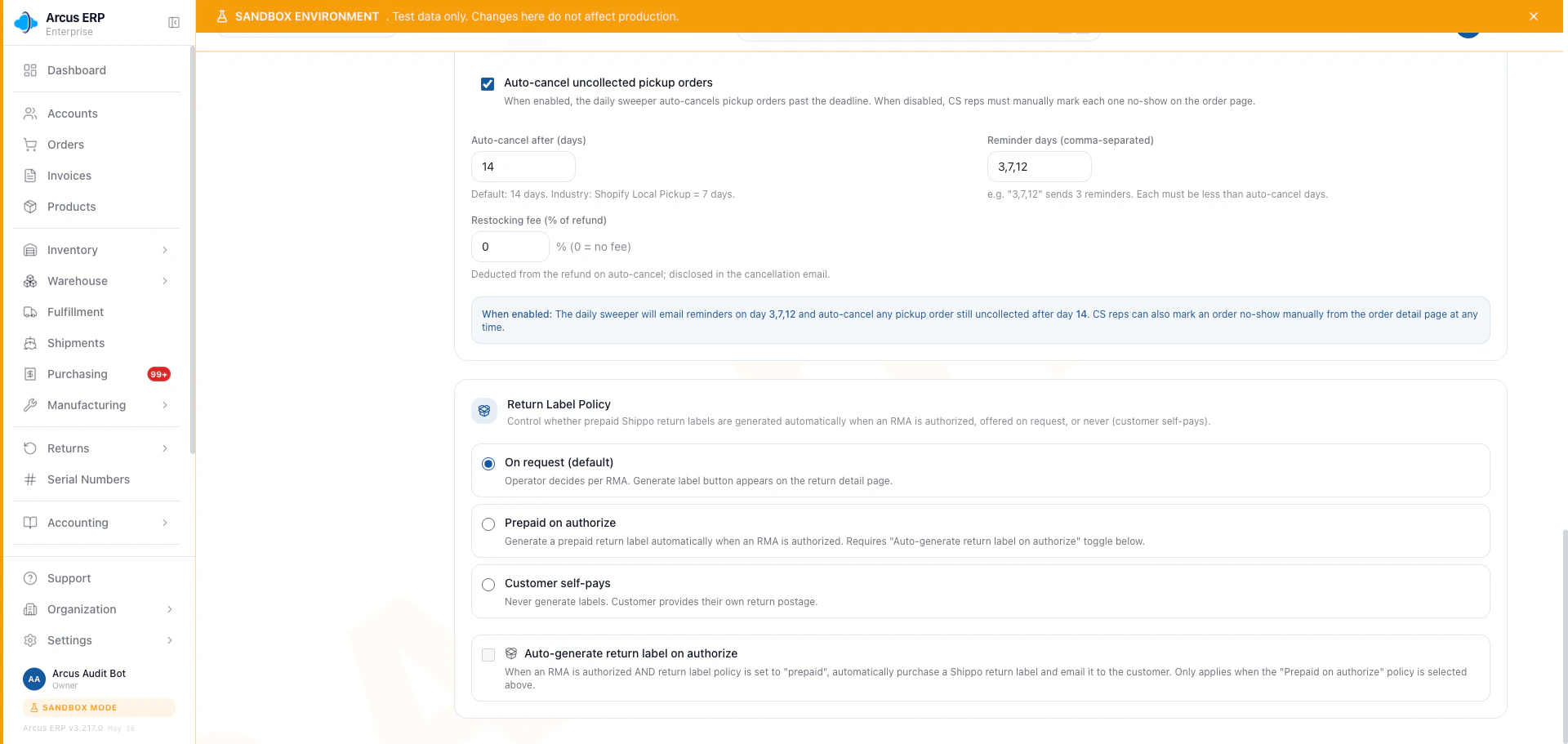
The pickup workflow is driven by per-entity settings. An admin sets them in Settings > Order Workflow > Pickup Orders:
| Setting | Default | Behavior |
| ---------------------------- | -------- | ---------------------------------------------------------------------- |
| `pickup_no_show_days` | 14 | The age in days after `pickup_ready_at` when the sweeper auto-cancels. |
| `pickup_reminder_days` | 3, 7, 12 | The days after `pickup_ready_at` when reminder emails go out. |
| `pickup_auto_cancel_enabled` | true | When false, reminders still send but the auto-cancel never fires. |
| `pickup_restocking_fee_pct` | 0 | Optional restocking fee added to the refund as a negative adjustment. |
Reminder days must all be smaller than the no-show day. Multi-stage reminders are labeled early, mid, and last so the customer sees increasing urgency.
 ## How Reminders Work
When a pickup order transitions into `awaiting_pickup`, Arcus stamps `pickup_ready_at`. The daily reminder job walks every entity's `pickup_reminder_days` schedule and sends a reminder email when:
* The order age passes a reminder threshold.
* The same stage has not already been sent today.
* A minimum 12-hour gap is honored between sends so a misconfigured timer cannot carpet-bomb the customer.
The reminder email lists the order number, the pickup location, the order items, and a link to the customer portal where the customer can confirm or reschedule.
## Manual No-Show
When the customer calls and confirms they will not collect, the CS rep can finalize immediately rather than wait for the auto-cancel:
1. Open the order detail page.
2. Open the **Order Actions** menu.
3. Select **Mark No-Show**.
4. Confirm the reason in the modal.
5. Apply.
The modal explains the cascade before submission so the operator knows the cancel is not a soft hold.
## What the Cancel Does
Whether automatic or manual, the no-show cancel runs the canonical `voidOrder` cascade. In one transaction:
1. **Reverses fulfillment GL.** Cost of Goods Sold and Inventory entries are reversed so the books match the unfulfilled state. The reversal is double-entry balanced.
2. **Voids sales tax.** Sales Tax Collected is reversed. When AvaTax is connected, the AvaTax invoice is voided in their system.
3. **Reverses shipping income.** Shipping Revenue and Shipping COGS are reversed if the order was billed for shipping.
4. **Releases inventory.** On-hand goes back up and FIFO layers are restored. Serialized units transition from `sold` back to `available`.
5. **Refunds the payment.** If the customer pre-paid, the refund is issued through the original payment method (Stripe, ACH, check, or AR credit) per your entity's refund policy.
6. **Applies the restocking fee** when `pickup_restocking_fee_pct` is non-zero. The fee is added as a negative adjustment so the customer sees the deducted amount on the refund.
7. **Stamps `pickup_no_show_at`** on the order so reports can find no-show orders later.
8. **Logs the activity** on the order timeline. The action is `PICKUP_AUTO_CANCELLED` for the sweeper and `PICKUP_MANUAL_NO_SHOW` for the CS rep.
9. **Broadcasts `order.updated`** so dashboards reflect the change immediately.
10. **Sends the cancellation email** to the customer with the refund amount and the restocking fee detail.
The order moves to `cancelled` and `voided`. The original fulfillment entries remain in the GL for audit; the reversing entries net them out.
## Dashboard Surfaces
Pickup no-show appears in:
* **Order Lifecycle Status mix.** No-show orders show in the cancelled bucket with a no-show sub-tag so reports can split them out from other cancellations.
* **Pickup Aging Report.** Open pickup orders sorted by `pickup_ready_at` age so a CS rep can see what is about to auto-cancel.
* **Activity Log.** Both `PICKUP_AUTO_CANCELLED` and `PICKUP_MANUAL_NO_SHOW` actions surface in the entity activity stream.
## When Mark No-Show is Blocked
* **Not a pickup order.** The button is hidden if `delivery_option` is not `pick_up`. Use the regular cancel workflow instead.
* **Already collected.** If the customer collected and the order is `fulfilled`, no-show does not apply. Use a return instead.
* **Already cancelled.** A previously cancelled or voided order shows the no-show button as disabled.
* **Closed period.** If the original fulfillment was in a now-closed period, the GL reversal cannot post. Reopen the period or post the reversal in the current period after a conversation with accounting.
## Industry Notes
The 14-day default and 3-7-12 reminder cadence match Shopify Local Pickup and Square Will-Call defaults. Acumatica's Will-Call workflow uses a similar aging report plus an auto-cancel option. These defaults were confirmed during the NEW-GAP-PICKUP-NOT-COLLECTED-WORKFLOW review on 2026-05-16.
## Related Articles
Counter-sale pack for orders the customer takes home today, not pickup orders that wait.
Pick the right cancel path: void, cancel, no-show, or return.
Apply credit when a no-show refund stays as AR balance rather than going back to the card.
Review all order status transitions, including pickup states.
## How Reminders Work
When a pickup order transitions into `awaiting_pickup`, Arcus stamps `pickup_ready_at`. The daily reminder job walks every entity's `pickup_reminder_days` schedule and sends a reminder email when:
* The order age passes a reminder threshold.
* The same stage has not already been sent today.
* A minimum 12-hour gap is honored between sends so a misconfigured timer cannot carpet-bomb the customer.
The reminder email lists the order number, the pickup location, the order items, and a link to the customer portal where the customer can confirm or reschedule.
## Manual No-Show
When the customer calls and confirms they will not collect, the CS rep can finalize immediately rather than wait for the auto-cancel:
1. Open the order detail page.
2. Open the **Order Actions** menu.
3. Select **Mark No-Show**.
4. Confirm the reason in the modal.
5. Apply.
The modal explains the cascade before submission so the operator knows the cancel is not a soft hold.
## What the Cancel Does
Whether automatic or manual, the no-show cancel runs the canonical `voidOrder` cascade. In one transaction:
1. **Reverses fulfillment GL.** Cost of Goods Sold and Inventory entries are reversed so the books match the unfulfilled state. The reversal is double-entry balanced.
2. **Voids sales tax.** Sales Tax Collected is reversed. When AvaTax is connected, the AvaTax invoice is voided in their system.
3. **Reverses shipping income.** Shipping Revenue and Shipping COGS are reversed if the order was billed for shipping.
4. **Releases inventory.** On-hand goes back up and FIFO layers are restored. Serialized units transition from `sold` back to `available`.
5. **Refunds the payment.** If the customer pre-paid, the refund is issued through the original payment method (Stripe, ACH, check, or AR credit) per your entity's refund policy.
6. **Applies the restocking fee** when `pickup_restocking_fee_pct` is non-zero. The fee is added as a negative adjustment so the customer sees the deducted amount on the refund.
7. **Stamps `pickup_no_show_at`** on the order so reports can find no-show orders later.
8. **Logs the activity** on the order timeline. The action is `PICKUP_AUTO_CANCELLED` for the sweeper and `PICKUP_MANUAL_NO_SHOW` for the CS rep.
9. **Broadcasts `order.updated`** so dashboards reflect the change immediately.
10. **Sends the cancellation email** to the customer with the refund amount and the restocking fee detail.
The order moves to `cancelled` and `voided`. The original fulfillment entries remain in the GL for audit; the reversing entries net them out.
## Dashboard Surfaces
Pickup no-show appears in:
* **Order Lifecycle Status mix.** No-show orders show in the cancelled bucket with a no-show sub-tag so reports can split them out from other cancellations.
* **Pickup Aging Report.** Open pickup orders sorted by `pickup_ready_at` age so a CS rep can see what is about to auto-cancel.
* **Activity Log.** Both `PICKUP_AUTO_CANCELLED` and `PICKUP_MANUAL_NO_SHOW` actions surface in the entity activity stream.
## When Mark No-Show is Blocked
* **Not a pickup order.** The button is hidden if `delivery_option` is not `pick_up`. Use the regular cancel workflow instead.
* **Already collected.** If the customer collected and the order is `fulfilled`, no-show does not apply. Use a return instead.
* **Already cancelled.** A previously cancelled or voided order shows the no-show button as disabled.
* **Closed period.** If the original fulfillment was in a now-closed period, the GL reversal cannot post. Reopen the period or post the reversal in the current period after a conversation with accounting.
## Industry Notes
The 14-day default and 3-7-12 reminder cadence match Shopify Local Pickup and Square Will-Call defaults. Acumatica's Will-Call workflow uses a similar aging report plus an auto-cancel option. These defaults were confirmed during the NEW-GAP-PICKUP-NOT-COLLECTED-WORKFLOW review on 2026-05-16.
## Related Articles
Counter-sale pack for orders the customer takes home today, not pickup orders that wait.
Pick the right cancel path: void, cancel, no-show, or return.
Apply credit when a no-show refund stays as AR balance rather than going back to the card.
Review all order status transitions, including pickup states.